
In the digital landscape of 2026, simply having a WordPress website is not enough. With WordPress powering over 43% of the entire internet, the competition is fierce.
The key to standing out, driving traffic, and achieving your business goals lies in mastering WordPress SEO.
This isn’t just a marketing tactic; it’s the fundamental science of making your website visible to the millions of potential customers searching on Google every second.
The impact of a strong SEO strategy is transformative. Organic search is the largest driver of website traffic for most industries, outperforming social media by over 300%.

Furthermore, leads from search engines have a 14.6% close rate, compared to just 1.7% for outbound leads like print ads.
A well-optimized WordPress site doesn’t just attract visitors; it attracts the right visitors at the exact moment they need your solution, making it a powerful engine for leads and revenue.
This comprehensive guide will walk you through every stage of WordPress SEO, from beginner foundations to advanced techniques.
We’ll cover everything from the initial technical setup and plugin configuration to sophisticated content optimization and link-building strategies, providing you with a complete roadmap to dominate the search results in 2026.
Key Takeaways
- The Power of the Right Foundation: Discover why your choice of hosting, theme, and basic WordPress settings can have a massive impact on your SEO success before you ever write a single post.
- Plugins as Your SEO Superpower: Learn the key differences between the top SEO plugins like Yoast SEO and Rank Math, and how to configure them for maximum impact, from sitemaps to schema.
- Content is King, but E-E-A-T is the Crown: Go beyond keywords to understand how to create content that demonstrates Experience, Expertise, Authoritativeness, and Trust (E-E-A-T), a critical factor for ranking in 2026.
- Mastering Technical SEO: Get a clear, actionable guide to improving your site speed, achieving excellent Core Web Vitals, and fixing common technical errors that can hold your site back.
- The Future of Search: Understand how the rise of AI Overviews and voice search is changing the SEO landscape and learn practical strategies to optimize your WordPress site for the future.
1. Introduction to WordPress SEO
Here we’ll cover the fundamental concepts of SEO and explain why WordPress is an exceptional platform for achieving high search engine rankings.
Understanding these basics is the first step toward building a successful and sustainable online presence that attracts organic traffic and drives business growth.
What is SEO, and why does it matter for WordPress sites
Search Engine Optimization (SEO) is the practice of optimizing your website to increase its visibility in organic (non-paid) search engine results.
For WordPress sites, this means making your content and technical setup as clear and valuable as possible for search engines like Google.
Strong SEO is critical because it connects your business with users who are actively searching for your products, services, or information, making it one of the most effective and highest ROI marketing channels available today.
How SEO impacts traffic, leads, and revenue
Effective SEO directly translates into tangible business growth.
By ranking higher for relevant keywords, you attract more qualified visitors to your site (traffic).
Because these visitors are actively searching for what you offer, they are far more likely to convert into potential customers (leads).
This steady stream of high-intent leads ultimately drives sales and increases your bottom line (revenue), turning your website into a reliable and scalable engine for growth.
Why WordPress is an SEO-friendly platform
WordPress is inherently SEO-friendly due to its logical architecture and clean code, which makes it easy for search engine crawlers to read and index your content.
Its true power, however, lies in its unparalleled flexibility.
With access to thousands of powerful SEO plugins, customizable themes, and a user-friendly editor, WordPress gives you granular control over every critical SEO element, from meta tags and sitemaps to schema markup and site speed, making it an ideal foundation for any SEO strategy.
2. Setting the Foundation for WordPress SEO
Before you even think about keywords or content, you must build your website on a solid technical foundation.
Your choices in hosting, themes, and security directly impact your site’s performance and, consequently, its ability to rank. Getting these foundational elements right from the start is non-negotiable.
Choosing SEO-friendly hosting providers
Your web host is the bedrock of your website’s performance.
A slow, unreliable host will kill your SEO efforts, no matter how good your content is. Look for a managed WordPress host like Hostinger, WP Engine, or Kinsta that offers high-performance features like NVMe SSDs, server-level caching, and a Content Delivery Network (CDN).
These features ensure your site loads quickly and can handle traffic spikes, which are crucial for both user experience and achieving good Core Web Vitals scores.
Picking fast, responsive themes
Your WordPress theme controls your site’s design and layout, but it also has a massive impact on its speed.
A bloated, poorly coded theme can significantly slow down your site.

Choose a lightweight, well-coded, and fully responsive theme from a reputable developer.
Themes like GeneratePress, Astra, or Kadence are famous for their clean code and performance-first approach.
Ensure any theme you choose is mobile-friendly, as mobile traffic now accounts for the majority of website visits.
Ensuring SSL (HTTPS) is active
An SSL (Secure Sockets Layer) certificate encrypts the data transmitted between your website and its visitors, enabling a secure HTTPS connection. In 2026, HTTPS is an absolute must-have.
Google uses it as a confirmed ranking signal, and modern web browsers will flag a site without it as “Not Secure,” which instantly destroys visitor trust.
Most quality hosting providers now offer a free Let’s Encrypt SSL certificate that you can easily activate.

3. Configuring WordPress SEO Settings
WordPress comes with several built-in settings that have a direct impact on your SEO.
Configuring these correctly is a simple but crucial step that tells search engines how to interact with your site, ensuring your content is visible and accessible.
Optimizing permalink structure
Permalinks are the permanent URLs for your posts and pages.
By default, WordPress sometimes uses a “plain” structure (e.g., yoursite.com/?p=123), which is terrible for SEO. You should immediately change this to a more descriptive structure.
Go to Settings > Permalinks in your WordPress dashboard and select the “Post name” option.
This creates clean, keyword-rich URLs (e.g., yoursite.com/your-post-title/) that are easy for both users and search engines to understand.
Site visibility and indexing settings
WordPress includes a feature that can prevent your entire site from being indexed by search engines.
While useful during development, it can be catastrophic if left on after launch.
To ensure your site is visible, go to Settings > Reading and make sure the box for “Discourage search engines from indexing this site” is unchecked.
This simple setting is one of the most common reasons a new site fails to appear on Google.
Configuring titles & meta descriptions
Your site’s title and tagline act as the default metadata for your homepage. Configure these by going to Settings > General.
Your Site Title should be your brand name, and your Tagline should be a short, keyword-rich description of what your business does.
An SEO plugin will give you more granular control, but setting these defaults correctly is an important first step.
4. Best WordPress SEO Plugins
While WordPress is SEO-friendly out of the box, a dedicated SEO plugin is essential for unlocking its full potential.
These plugins act as your all-in-one SEO toolkit, giving you control over every critical element from a single, user-friendly interface.
Yoast SEO vs Rank Math vs All-in-One SEO
These are the three dominant players in the SEO plugin market. Yoast SEO is the long-standing market leader, known for its reliability and user-friendly “traffic light” content analysis.
Rank Math is a fast-growing competitor that offers an incredible number of premium features in its free version, making it a favorite among many SEO professionals.
All in One SEO (AIO SEO) is another powerful and long-standing option with a focus on ease of use.
For most users, either Yoast or Rank Math is an excellent choice.
Must-have features (sitemaps, schema, redirects)
A good SEO plugin should handle several critical technical tasks for you automatically.
It should generate a dynamic XML sitemap, which is a roadmap of your site for search engine crawlers.
It should also add basic schema markup (structured data) to your content to help Google understand it better.
Finally, it should include a redirect manager, which allows you to easily redirect old URLs to new ones to avoid broken links and preserve your SEO equity.
Plugin setup best practices
Once you install an SEO plugin, don’t just leave it on the default settings.
Run through the setup wizard to configure it for your specific website.
This includes entering your business name, uploading your logo, and connecting your social media profiles.
Take the time to explore the settings to ensure you are taking full advantage of all the features it offers, such as breadcrumb navigation and advanced schema options.
5. Keyword Research for WordPress SEO
Keyword research is the foundation of any successful SEO strategy.
It’s the process of understanding the words and phrases your target audience is typing into search engines. Creating content without keyword research is like shooting arrows in the dark.
Understanding search intent (informational, transactional, navigational)
Search intent is the why behind a search query. You must match your content to the user’s intent.
Informational intent is when a user is looking for information (e.g., “how to fix a leaky faucet”).
Transactional intent is when a user is looking to buy something (e.g., “buy Nike running shoes”).
Navigational intent is when a user is trying to find a specific website (e.g., “Facebook”). Your blog posts should target informational keywords, while your product pages should target transactional keywords.
Tools to use (Semrush, Ahrefs, Ubersuggest, Google Keyword Planner)
Powerful SEO tools are essential for effective keyword research.
Semrush and Ahrefs are the industry-leading, premium all-in-one SEO platforms that provide detailed data on keyword search volume, difficulty, and competitor rankings.
For those on a budget, Ubersuggest offers a solid set of features with a generous free tier.
Google Keyword Planner, while designed for advertisers, is still a useful free tool for discovering new keyword ideas directly from Google.
Long-tail vs short-tail keywords in WordPress blogging
Short-tail keywords are broad, popular search terms (e.g., “coffee”).
They have high search volume but are extremely competitive and often have vague intent.
Long-tail keywords are longer, more specific phrases (e.g., “best coffee beans for cold brew”).
They have lower search volume but are far less competitive and have much higher conversion rates because the user’s intent is very specific.
A successful WordPress blog strategy focuses on targeting long-tail keywords to attract a highly qualified audience.
6. On-Page SEO for WordPress
On-page SEO refers to the optimization of individual pages and posts. The WordPress editor, combined with an SEO plugin, makes these tasks straightforward.
Writing SEO-optimized titles & meta descriptions
Your SEO title (or title tag) is the most important on-page ranking factor.
It should be under 60 characters, include your primary keyword, and be compelling enough to earn a click in search results.
Your meta description (under 160 characters) doesn’t directly impact rankings, but it’s your “ad copy” on the SERP.
It should be an engaging summary of the page’s content that encourages users to click.
Proper use of headings (H1–H6)
Heading tags create a logical hierarchy for your content, which is important for both readers and search engines.
Your post title will be your one and only H1 tag. Use H2 tags for your main section titles, and use H3 tags for sub-sections within those main sections.
Always maintain a sequential order (don’t skip from an H2 to an H4). This helps search engines understand the structure of your content.
Internal linking strategies
Internal links are hyperlinks that point to another page on the same website.
A strong internal linking strategy is crucial for SEO.
It helps search engines discover your other content, it distributes “link equity” (ranking power) throughout your site, and it keeps users on your site longer by guiding them to related, helpful information.
You should aim to include 2-4 relevant internal links in every new blog post.
7. Content Optimization for WordPress Blogs
Creating high-quality content is the most important part of any SEO strategy.
In 2026, this means going beyond simply including keywords and focusing on providing genuine value and demonstrating expertise.
Creating E-E-A-T-driven content
E-E-A-T stands for Experience, Expertise, Authoritativeness, and Trustworthiness.
This is a framework from Google’s quality guidelines that is critical for ranking, especially for sensitive topics.
To demonstrate E-E-A-T, you should: include author bios that showcase their credentials, cite authoritative sources and statistics, provide original data or insights, and ensure your content is accurate and well-written.
Your goal is to create the most helpful and trustworthy resource on the internet for your chosen topic.
Image SEO (alt text, compression, WebP format)
Images are crucial for user engagement, but they must be optimized. Alt text (alternative text) is a short, descriptive text that you add to an image’s HTML.
It’s important for both accessibility (for screen readers) and for helping search engines understand what your image is about.
Always compress your images before uploading them to reduce their file size, which improves page speed.
Consider using a next-gen format like WebP, which offers superior compression and quality compared to JPEGs and PNGs. Convert your JPEGs and PNGs to WebP.
Using structured data (schema markup)
Structured data, often implemented using a vocabulary called Schema.org, is a standardized format for providing information about a page and classifying its content.
An SEO plugin can help you add this automatically.
For example, you can add “Recipe” schema to a recipe post or “FAQ” schema to a Q&A page. This helps Google understand your content more deeply and can result in “rich snippets” (like star ratings or cooking times) in the search results, which can significantly increase your click-through rate.

8. Technical SEO for WordPress
Technical SEO ensures that your website can be effectively crawled, indexed, and rendered by search engines.
It’s the foundation upon which your content and on-page SEO efforts are built.
Improving site speed with caching & CDN
Site speed is a critical ranking factor and essential for user experience.
Caching is a process that stores a static version of your site, which can be served to visitors much more quickly than generating it from the database every time.
Use a high-quality caching plugin like WP Rocket or the one provided by your host.
A Content Delivery Network (CDN), like Cloudflare, stores copies of your site’s assets on servers around the world, delivering them from the location closest to the user to dramatically reduce loading times.
Mobile optimization & responsive design
With the majority of searches now happening on mobile devices, a mobile-friendly website is non-negotiable.
Google uses “mobile-first indexing,” which means it primarily uses the mobile version of your site for indexing and ranking.
All modern WordPress themes are “responsive,” meaning they automatically adapt their layout to fit any screen size, but you should always test your site’s mobile experience to ensure it is fast and easy to navigate.
Fixing crawl errors & duplicate content
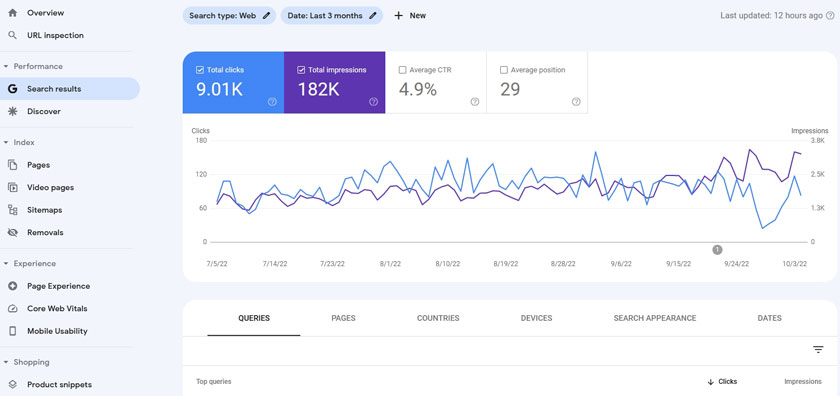
Crawl errors occur when a search engine tries to reach a page on your site but fails (e.g., a broken link leading to a 404 error).
You can find these errors in Google Search Console and should fix them by implementing 301 redirects.
Duplicate content is when the same or similar content appears on multiple URLs.
This can dilute your ranking signals. Use canonical tags to tell Google which version of a page is the primary one you want to be indexed.
9. Advanced SEO Techniques
Once you’ve mastered the fundamentals, you can move on to more advanced strategies to gain a competitive edge in the search results.
Adding schema (FAQ, How-to, Product, Reviews)
Go beyond the basic schema added by your SEO plugin.
By manually adding more specific types of structured data, you can become eligible for a wider variety of rich snippets.
For example, use the FAQ schema on pages with a question-and-answer format, the How-to schema on step-by-step guides, the Product schema on eCommerce pages, and the Review schema to display star ratings directly in the search results. This makes your listings more eye-catching and informative.
Optimizing for Google Discover & AI Overviews
Google Discover is a curated feed of content that Google shows to users on mobile based on their interests.
To optimize for Discover, create high-quality, E-E-A-T-driven content and use large, compelling featured images.
To optimize for AI Overviews (Google’s SGE), structure your content with clear, direct answers to common questions and use a conversational tone, as this is the type of content the AI is designed to summarize.
Leveraging WordPress headless CMS for SEO
A headless CMS is an advanced setup where you use WordPress only for managing content on the backend, and you use a separate, modern JavaScript framework (like React or Vue.js) to build the front end of your website.
This can result in lightning-fast performance and a superior user experience, which are major SEO advantages.
This is a highly technical approach best suited for large-scale sites with development resources.
10. Link Building for WordPress Sites
Link building is the process of acquiring backlinks (links from other websites to yours). High-quality backlinks are one of the most powerful ranking factors in SEO.
Internal linking strategies for better crawlability
A strong internal linking structure is the foundation of your link-building efforts.
Create a “topic cluster” model, where you have a long, comprehensive “pillar page” on a broad topic that links out to more specific “cluster” blog posts.
This strategy helps distribute link equity throughout your site and shows Google that you are an authority on the topic.
How to get backlinks (guest posting, digital PR, resource pages)
There are several ethical “white-hat” strategies for building backlinks.
Guest posting involves writing an article for another reputable website in your industry in exchange for a link back to your site.
Digital PR involves creating newsworthy content or data and pitching it to journalists and bloggers.
You can also find resource pages that link to helpful guides and ask them to include a link to your relevant content.
Avoiding toxic backlinks (using Disavow Tool)
Low-quality, spammy links can harm your site’s reputation and SEO.
You should periodically audit your backlink profile using a tool like Semrush or Ahrefs.
If you find a large number of toxic backlinks pointing to your site, you can use Google’s Disavow Tool.
This is an advanced tool that tells Google to ignore those specific links when assessing your site, which can help you recover from a penalty.
11. Local SEO for WordPress Websites
If you run a business with a physical location or service area, local SEO is critical for attracting nearby customers.
Adding Google Business Profile
Your Google Business Profile (GBP) is your most important asset for local SEO.
It’s the free business listing that appears in Google Maps and the local search results.
Claim and fully optimize your profile with your correct business name, address, phone number, hours, photos, and services. Encourage customers to leave reviews on your GBP listing.
Using local schema & geo-tagging
Add the Local Business schema to your website’s homepage.
This structured data gives Google detailed information about your business, such as your address, phone number, and opening hours, which can help you appear in the “local pack” search results.
You can also geo-tag your images by adding location data to their metadata, providing another local signal to search engines.
NAP (Name, Address, Phone) consistency
It is absolutely crucial that your business’s Name, Address, and Phone number (NAP) are exactly the same across your entire online presence.
This includes your website, your Google Business Profile, and all other online directories like Yelp and Yellow Pages.
Inconsistencies can confuse search engines and harm your local search rankings.
12. WooCommerce SEO (For eCommerce WordPress Sites)
If you use WordPress to run an eCommerce store with the WooCommerce plugin, you need to implement specific SEO strategies for your products.

Optimizing product pages (titles, descriptions, schema)
Your product pages are your most important transactional pages.
Write unique, compelling product descriptions that highlight benefits, not just features.
Create SEO-friendly product titles that include keywords people would use to search for that item.
Ensure your SEO plugin is adding Product schema, which can make your listings eligible for rich snippets with pricing, availability, and review information in the search results.
Handling faceted navigation & product filters
Faceted navigation is the filtering system that allows users to sort products by attributes like size, color, or brand.
If not handled correctly, this can create a huge number of thin, duplicate content URLs that can harm your SEO.
Use your SEO plugin to set filters to “noindex” to prevent Google from indexing these thin pages and to use canonical tags to point to the main category page.
WooCommerce SEO plugins & extensions
While your main SEO plugin will handle the basics, there are specialized extensions designed specifically for WooCommerce.
These can help you with more advanced tasks, such as optimizing your product category pages, improving your internal linking structure for products, and adding more detailed product schema to your store.
13. Measuring WordPress SEO Performance
SEO is not a “set it and forget it” task. You must continuously track and measure your performance to understand what’s working and identify areas for improvement.
Setting up Google Analytics 4 (GA4)
Google Analytics 4 is the latest version of Google’s analytics platform.
It is a powerful tool for understanding your website traffic and user behavior.
Install the GA4 tracking code on your WordPress site (a plugin can make this easy) to track key metrics like the number of users, sessions, engagement rate, and conversions.
Use this data to see which content is performing best and where your traffic is coming from.
Using Google Search Console effectively
Google Search Console (GSC) is a free tool from Google that is essential for any website owner.
It provides invaluable insights into your site’s performance in Google search.
Use it to submit your sitemap, monitor your keyword rankings and click-through rates, identify technical issues like crawl errors, and see which sites are linking to you.
You should check your GSC account at least once a week.
Tracking keyword rankings & traffic
While GSC provides some keyword data, a dedicated rank tracking tool (like those offered by Semrush or Ahrefs) is the best way to monitor your performance for your most important keywords over time.
By tracking your rankings alongside your organic traffic from GA4, you can get a clear picture of how your SEO efforts are directly impacting your site’s visibility and growth.
14. Common WordPress SEO Mistakes to Avoid
Even with the best intentions, it’s easy to make mistakes that can harm your SEO performance. Here are some of the most common pitfalls to avoid.
Keyword stuffing and duplicate content
Keyword stuffing is the outdated practice of excessively loading your content with your target keyword in an attempt to manipulate rankings.
This makes your content unreadable and can lead to a Google penalty.
Duplicate content occurs when you have the same or very similar content on multiple pages of your site.
This dilutes your SEO authority. Always write unique content for every page.
Ignoring Core Web Vitals
In 2026, site speed and user experience are no longer optional.
Core Web Vitals (LCP, FID, CLS) are direct ranking factors. Ignoring slow page load times, layout shifts, or poor mobile performance is one of the biggest mistakes you can make.
Use Google’s PageSpeed Insights tool to test your pages and get actionable recommendations for improvement.
Overusing plugins that slow down performance
One of WordPress’s greatest strengths, its vast plugin library, can also be its greatest weakness.
Installing too many low-quality or redundant plugins is a primary cause of slow website performance.
Only install essential, well-coded plugins from reputable developers. Periodically audit your plugins and deactivate and delete any that you are not using.
15. Future of WordPress SEO (2026 & Beyond)
The world of search is constantly evolving. Staying ahead of the curve means understanding the trends that are shaping the future of SEO.
Impact of AI in search (SGE, ChatGPT in SERPs)
The rise of AI Overviews (formerly SGE) and other generative AI in search results is the biggest shift in SEO in a decade.
It means that getting a top organic ranking is no longer the only goal; you must also create content that is valuable and structured enough to be featured in these AI-generated summaries.
This reinforces the need for clear, factual, E-E-A-T-driven content and structured data.
Voice search optimization strategies
As more people use voice assistants like Siri, Alexa, and Google Assistant, optimizing for voice search is becoming increasingly important.
Voice search queries are typically longer and more conversational than typed queries.
To optimize for them, focus on answering questions directly and concisely, and use a natural, conversational tone in your writing.
The FAQ section of your blog is a great place to target these queries.
Importance of semantic SEO & topic clustering
Modern SEO is less about individual keywords and more about topics.
Semantic SEO is the practice of creating content that thoroughly covers a topic in its entirety.
The topic cluster model is the best way to achieve this.
By creating a comprehensive “pillar page” for a broad topic that links out to more detailed “cluster” pages, you signal to Google that you are an authority on that subject, which can improve your rankings for all related keywords.
Explore more posts like this to grow your WordPress website:
👉Best WordPress Security Plugins to Protect Your WordPress Site
👉WordPress vs Squarespace vs Wix (2026): Which Website Builder Should You Choose?
👉The Top 4 Best WordPress Form Plugins [Drag & Drop]
👉7 Best WordPress Gutenberg Blocks Plugins to Create Stunning Websites in 2026
Final Thoughts
Mastering WordPress SEO is a journey, not a destination. It’s a continuous process of learning, creating, testing, and refining.
This guide has provided you with a comprehensive roadmap, but the most important step is to take action.
Recap of essential strategies
The core of a successful strategy in 2026 is to build a fast, secure technical foundation, conduct thorough keyword research to understand user intent, and consistently create the most helpful, authoritative, and in-depth content on your topic.
Embrace the principles of E-E-A-T, and don’t neglect the power of technical and off-page SEO to support your great content.
Building a sustainable SEO plan for WordPress
Don’t try to do everything at once. Create a sustainable plan. Start by fixing your technical foundation.
Then, develop a content calendar based on your keyword research and commit to publishing one or two high-quality, optimized blog posts per week.
Dedicate time each month to building links and analyzing your performance. Consistency is more important than intensity.
Next steps for scaling content and traffic
As your site grows, focus on building topic clusters to establish your authority.
Refresh and update your older, high-performing content to keep it relevant.
Invest in more advanced tools to gain deeper insights into your competitors and your audience.
By following this guide and committing to a consistent, high-quality strategy, you can transform your WordPress website into a powerful and reliable engine for traffic, leads, and growth.