
Your WordPress website can have amazing content and a beautiful design.
But if it is slow and clunky, none of that matters.
In the highly competitive digital world of 2026, the technical health of your website is a non-negotiable foundation for success.
This is the world of technical SEO for WordPress. It is the science of ensuring your site is fast, secure, and easy for search engines to crawl.
The impact of poor technical performance is severe. Google uses user experience metrics called Core Web Vitals as a confirmed ranking factor.

A slow website directly hurts your ability to rank. It also hurts your business.
A 1-second delay in page load time can lead to a 7% reduction in conversions.
Furthermore, 88% of online shoppers are less likely to return to a site after a single bad experience.
With over 43% of the web built on WordPress, mastering its technical side is a critical skill.
This complete guide will provide you with a clear and actionable framework.
We will show you how to diagnose and fix Core Web Vitals and other common speed issues. These proven strategies will help you improve your user experience.
They will satisfy search engines. And they will unlock higher rankings for your WordPress site.
Key Takeaways
- The Foundation of All SEO: Understand that technical SEO is the bedrock of your entire SEO strategy. Without a healthy foundation, your great content will never reach its full potential.
- Decoding Core Web Vitals: Learn what Google’s key metrics, LCP, INP, and CLS, actually mean in simple terms. Discover why they are so important for your rankings.
- The Power of Caching and CDNs: See how implementing a good caching plugin and a Content Delivery Network (CDN) are two of the most impactful changes you can make to boost your site’s speed.
- Image Optimization is Crucial: Discover why large unoptimized images are one of the biggest causes of slow websites. Learn simple techniques to fix them.
- A Step-by-Step Action Plan: Get a clear and actionable guide to the most effective techniques for improving your site speed and Core Web Vitals scores.
What is Technical SEO (and Why It’s Your Site’s Foundation)?
Technical SEO refers to the optimizations you make to your website’s backend and infrastructure.
Its goal is to help search engines crawl and index your site more effectively.

It is not about keywords or content. It is about the technical health of your site.
This includes site speed, mobile-friendliness, and security.
A strong technical SEO for WordPress ensures that your great content can be easily found and accessed by both users and search engines.
Technical SEO for WordPress: Understanding Core Web Vitals in Simple Terms
Core Web Vitals are a set of three specific metrics that Google uses to measure a webpage’s real-world user experience.
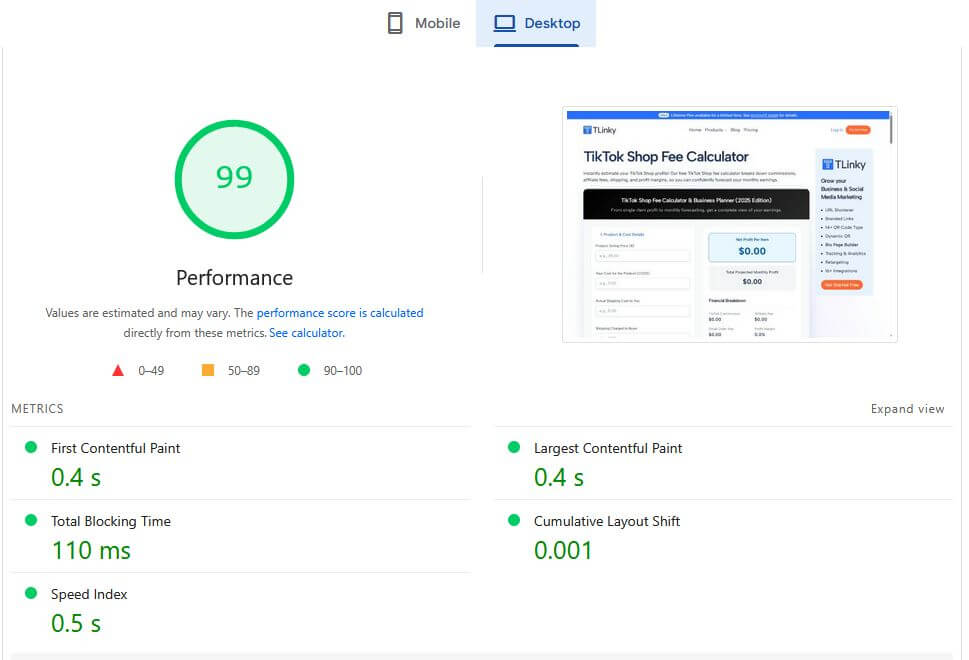
Passing these metrics is a direct signal to Google that your site provides a good experience.
Largest Contentful Paint (LCP):
This measures loading performance.
It is the time it takes for the largest image or text block on your page to become visible. A good LCP score is under 2.5 seconds.
Interaction to Next Paint (INP):
This measures interactivity.
It checks how quickly your page responds to user interactions like a click, a tap, or a key press. A good INP score is under 200 milliseconds.
Cumulative Layout Shift (CLS):
This measures visual stability.
It checks how much your page’s content unexpectedly shifts around as it loads.
A low CLS score means the page is stable and not frustrating for users.
How to Fix Core Web Vitals & Speed Issues
1. Choose High-Performance WordPress Hosting
Your web host is the single most important factor for your website’s speed.
A cheap, slow shared hosting plan will always hold you back.
If you are serious about performance, you need to invest in a quality hosting provider.
What to Look For in a Host
- Managed WordPress Hosting: Companies like Pressable, WP Engine, or Kinsta offer hosting environments that are specifically optimized for WordPress.
- LiteSpeed Servers: Look for hosts that use LiteSpeed web servers instead of the older Apache. LiteSpeed is significantly faster and comes with powerful built-in caching.
- NVMe SSD Storage: This is the latest and fastest type of storage. It can handle data requests much faster than traditional SSDs.

2. Implement a High-Quality Caching Plugin
Caching is the process of storing a static version of your website to serve visitors.
This is much faster than the server having to build the page from the database every single time.
WordPress is a database-driven platform. So a caching plugin is absolutely essential.
Top Caching Plugins
- WP Rocket: This is a premium plugin that is widely considered the best and easiest to use. It offers a comprehensive suite of performance features with a very user-friendly interface.
- LiteSpeed Cache: If your host uses a LiteSpeed server, this free plugin is incredibly powerful. It provides server-level caching that is extremely efficient.
- FlyingPress: A newer competitor to WP Rocket with a strong focus on optimizing for Core Web Vitals and a clean interface.
3. Use a Content Delivery Network (CDN)
A CDN is a network of servers located all over the world. It stores copies of your website’s static assets, like images and scripts.
When a user visits your site, the CDN delivers these assets from the server that is geographically closest to them.
This dramatically reduces latency and page load times for your international visitors.
Top CDN Options
- Cloudflare: This is the most popular CDN in the world and offers an excellent and generous free plan. It is very easy to set up for any WordPress site.
- Bunny.net (BunnyCDN): A very affordable and high-performance premium CDN that is a favorite among developers.
- QUIC.cloud: The CDN that is designed to work perfectly with LiteSpeed Cache.
4. Optimize All of Your Images
Large, unoptimized images are one of the biggest causes of a poor LCP score and a slow website. Every image you upload to WordPress must be optimized.
How to Optimize Your Images
Compress Images: Before you upload an image, use a tool like TinyPNG to compress it.
This can reduce the file size by over 70% without losing quality.
You can also use a plugin like ShortPixel to do this automatically.
Use the Right File Format: Use modern image formats like WebP.
WebP offers much better compression than older formats like JPEG and PNG.
Most image optimization plugins can create and serve WebP versions of your images.
Resize Images to the Correct Dimensions: Do not upload a massive 4000-pixel-wide image for a space that is only 800 pixels wide.
Resize your images to the actual dimensions they will be displayed at.
5. Optimize Your CSS and JavaScript Files
Every plugin and theme on your site adds CSS and JavaScript files.
These files can block the rendering of your page, which hurts your LCP and INP scores.
You need to optimize how these files are loaded.
How to Optimize CSS and JavaScript
- Minify Files: Minification removes unnecessary characters like spaces and comments from your code files, making them smaller and faster to load.
- Combine Files: Combining multiple CSS or JavaScript files into a single file reduces the number of requests the browser has to make.
- Defer and Delay JavaScript: You can defer non-critical JavaScript to prevent it from blocking the initial page render. You can also delay the loading of certain scripts until a user interacts with the page.
A good caching plugin like WP Rocket or FlyingPress can perform all of these optimizations for you with just a few clicks.
6. Choose a Lightweight and Fast Theme
Your WordPress theme is the foundation of your site’s design and code.

A bloated theme with too many features and poorly written code will always be slow.
- Focus on Performance: Choose a theme from a developer who is known for their focus on clean code and speed. Themes like GeneratePress, Astra, Kadence, and Blocksy are all excellent choices.
- Avoid All-in-One Bloated Themes: Be cautious of themes on marketplaces like ThemeForest that promise to do everything. They are often packed with numerous features and scripts, making them very slow.
7. Keep Your WordPress Site and Plugins Updated
This is a simple but crucial step for both security and performance.
Outdated plugins, themes, or WordPress core can have known performance issues or security vulnerabilities.
Always run the latest versions. A well-managed host can help automate this process for you.
Also, regularly audit your plugins and delete any that you are not actively using.
More useful article for you:
👉Top 13 Best SEO Tools for Website Auditing, Monitoring & Optimizing
👉WordPress SEO 2026: The Ultimate Beginner-to-Advanced Optimization Guide
👉What Is Content Optimization & How to Do It in 2026 (Complete Guide)
👉Internal Linking for SEO Success: The Complete Guide
Frequently Asked Questions (FAQ)
1. What tools can I use to measure my Core Web Vitals?
The best tool is Google PageSpeed Insights. It gives you a detailed report with both lab data and real-world field data from actual Chrome users. It also provides specific recommendations on how to improve your scores. Other good tools include GTmetrix and WebPageTest.
2. What is the most important Core Web Vital to fix first?
While all are important, many experts recommend focusing on your Largest Contentful Paint (LCP) first. This is because it is the primary metric for loading speed. Many of the optimizations that improve LCP, such as image compression and caching, will also have a positive impact on your other scores.
3. Can I fix Core Web Vitals without a developer?
Yes, for many common issues. By using a high-quality caching plugin like WP Rocket and an image optimization plugin like ShortPixel, a non-technical user can fix many of the most common causes of poor Core Web Vitals. However, for more complex issues like fixing CLS caused by a theme’s code, you may need to hire a developer.
4. How long does it take to see an improvement in my scores after making changes?
You can see an improvement in your lab data scores in PageSpeed Insights immediately after making a change. However, the field data, which is what Google uses for ranking, is based on a 28-day rolling average of real user data. This means it can take up to 28 days to see your hard work fully reflected in your official Core Web Vitals assessment.
Conclusion: Building a Foundation for SEO Success
Mastering technical SEO for WordPress is no longer an optional task for advanced users.
It is a fundamental requirement for anyone who wants to succeed in the competitive search landscape of 2026.
By focusing on providing a fast, stable, and seamless user experience, you are directly aligning your website with Google’s primary goals.
By following this guide, you can systematically diagnose and fix Core Web Vitals and other speed issues.
Start with a great host. Use a quality caching plugin. Optimize your images.
And choose a lightweight theme. These steps will create a powerful technical foundation that will not only improve your rankings but will also delight your visitors and grow your business.