
So you have chosen WordPress to build your website, a fantastic first step.
The platform powers over 43% of the internet for a reason.
It is powerful, flexible, and has the potential to dominate search engine rankings.
But its greatest strength, its flexibility, can also be its greatest weakness for beginners.
It is incredibly easy to make simple WordPress SEO mistakes that can sabotage your rankings before you even get started.

The consequences of these mistakes are significant.
Organic search drives over 53% of all website traffic. Getting it right means a steady stream of free, qualified visitors.
Getting it wrong means being invisible. With over 90% of online content getting zero traffic from Google, the margin for error is slim.
Many beginners focus only on keywords. But they often overlook foundational errors that make their great content undiscoverable.
This guide is designed to help you avoid those pitfalls.
We will walk you through the most common WordPress SEO mistakes that beginners make.
More importantly, we will show you exactly how to fix them.
Key Takeaways
- Check Your Visibility Settings: Learn about the single checkbox in WordPress that can make your entire site invisible to Google. It is a simple mistake that can be catastrophic.
- The Power of Permalinks: Understand why your URL structure is a critical SEO signal. We will show you the optimal setting that takes just ten seconds to fix.
- Stop Ignoring Image SEO: Discover why large unoptimized images are one of the biggest factors that slow down your site and hurt your rankings. Learn the simple fixes.
- The Danger of Bad Plugins: See how installing too many low-quality plugins can cripple your site’s performance and create security risks that harm your SEO.
- Content is More Than Keywords: Learn why keyword stuffing is an outdated tactic. Discover how focusing on quality and user intent is the key to ranking in 2026.
Why WordPress is a Double-Edged Sword for SEO
WordPress is an SEO powerhouse because it gives you control.
You can install powerful SEO plugins.
You can choose from thousands of themes.
You can modify every aspect of your site. This is great for professionals.
But for beginners, this freedom can lead to mistakes. Unlike a closed platform like Squarespace, WordPress does not have as many guardrails.
You are the one in charge of your site’s technical health. This guide will help you manage that responsibility effectively.
Common WordPress SEO Mistakes to Avoid
Mistake #1: Forgetting to Check Site Visibility Settings
This is the most devastating and surprisingly common mistake a beginner can make.
WordPress has a built-in option to discourage search engines from indexing your site.
This is useful when your site is under construction.
But if you forget to uncheck this box after you launch your site, you are telling Google to ignore you completely.
The Problem
Your site will not appear in any search results. All your hard work on content and design will be for nothing. You will get zero organic traffic.
The Solution
This is a very easy fix.
- Go to your WordPress dashboard.
- Navigate to Settings > Reading.
- Scroll down to the Search Engine Visibility section.
- Make sure the box that says “Discourage search engines from indexing this site” is UNCHECKED.
- Click “Save Changes”.
Mistake #2: Using the Wrong Permalink Structure
A permalink is the permanent URL of your posts and pages. By default, WordPress sometimes uses a “plain” and ugly structure like yoursite.com/?p=123.
This structure is terrible for SEO. It gives search engines and users no information about the content of the page.
The Problem
Non-descriptive URLs are harder for search engines to understand.
They are also less likely to be clicked on by users in the search results.
A clean URL is a signal of trust and relevance.
The Solution
Change your permalink structure to “Post name”. This will create clean keyword-rich URLs.
- Go to your WordPress dashboard.
- Navigate to Settings > Permalinks.
- Select the “Post name” option.
- Click “Save Changes”. It is very important to do this when you first set up your site. Changing it later on a site with existing content can lead to broken links.
Mistake #3: Not Installing an SEO Plugin
WordPress is SEO-friendly.
But it does not include all the tools you need out of the box.
An SEO plugin is essential.
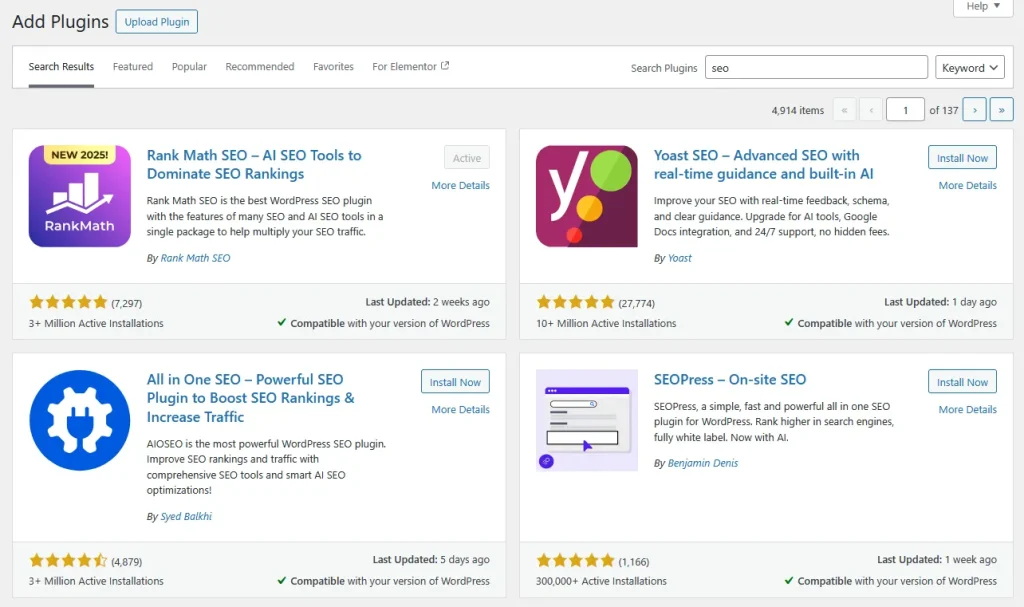
It gives you control over your titles, meta descriptions, sitemaps, and more.
Not using one is like trying to build a house without a hammer.
The Problem
Without an SEO plugin, you have limited control over how your site appears in search results.
You cannot easily create an XML sitemap.
You cannot add structured data (schema). These are all critical SEO tasks.
The Solution
Install a high-quality all-in-one SEO plugin.
- Rank Math: A powerful plugin with many free features.
- Yoast SEO: The long-time market leader and very beginner-friendly.
- All in One SEO: Another excellent and easy-to-use option. Install just one of these plugins. Run through its setup wizard. This will configure the basic SEO settings for your site automatically.
Mistake #4: Ignoring Image Optimization
Large, unoptimized images are one of the biggest reasons for a slow website.
A slow website leads to a poor user experience. It also leads to lower search rankings.
Many beginners upload images directly from their camera or phone without optimizing them first.
The Problem
Large image files increase your page load time.
This hurts your Core Web Vitals scores. A slow site has a higher bounce rate.
Users will not wait for your images to load.
This tells Google your page is not a good result.
The Solution
You must optimize every image you upload.
- Compress Your Images: Use a plugin like ShortPixel or Smush to automatically compress your images. This reduces their file size without sacrificing quality.
- Write Descriptive Alt Text: Alt text describes an image for search engines and visually impaired users. It is a crucial SEO element. Write a clear description of the image.
Mistake #5: Keyword Stuffing and Ignoring User Intent
Many beginners think SEO is just about adding a keyword to a page as many times as possible.
This is called keyword stuffing.
It is an outdated and harmful practice.
Modern SEO is about understanding user intent.
The Problem
Keyword stuffing makes your content sound robotic and unnatural. It creates a terrible reading experience.
Google’s algorithms are very smart. They can easily detect this practice and will penalize your site for it.
The Solution
Focus on creating high-quality, helpful content that answers your users’ questions.
Use your primary keyword in your title in your first paragraph and in a few subheadings, then write naturally, use synonyms, and related phrases.
Your goal is to create the best possible resource for a human reader, not a robot.
Mistake #6: Not Using Categories and Tags Correctly
Categories and tags are tools to organize your content in WordPress.
They help users find related posts. They also help search engines understand your site’s structure and topics.
Many beginners ignore them or use them incorrectly.
The Problem
A messy or non-existent content structure makes your site hard to navigate.
It also prevents search engines from understanding which topics you are an authority on.
Using too many similar tags can create thin duplicate content pages.
The Solution
- Use Broad Categories: Think of categories as the main chapters of your website’s book. Use a few broad, well-defined categories. Every post should belong to only one or two categories.
- Use Specific Tags: Think of tags as the index of your book. Use them to describe the specific details of a post. A post can have multiple tags.
Mistake #7: Neglecting Internal Linking
Internal links are links from one page on your site to another. They are incredibly important for SEO. But they are often overlooked by beginners.
The Problem
Without internal links, your pages are isolated islands. Search engines may have a hard time discovering all of your content.
It also prevents ranking power (link equity) from flowing through your site.
This can lead to a poor user experience as visitors are not guided to other relevant content.
The Solution
Make it a habit to add 2-4 relevant internal links to every new blog post you publish.
Link to your other important posts and pages using descriptive anchor text. This simple practice can significantly improve your SEO.
Mistake #8: Choosing a Bloated Theme
Your WordPress theme is the foundation of your site’s design.

Many beginners are tempted by themes that promise thousands of features and flashy animations.
These themes are often bloated with poorly written code.
The Problem
A bloated theme can be very slow.
This will kill your Core Web Vitals scores and your rankings.
It can also create security vulnerabilities and be difficult to work with.
The Solution
Choose a lightweight performance-focused theme from a reputable developer.
Themes like GeneratePress, Astra, and Kadence are known for their clean code and excellent speed.
A simple, fast theme is always better for SEO than a slow, flashy one.
Mistake #9: Not Using Google Search Console and Analytics
You cannot improve what you do not measure. Not setting up free tools like Google Search Console and Google Analytics is a massive mistake.
The Problem
Without these tools, you are flying blind.
You do not know how many people are visiting your site.
You do not know which keywords you are ranking for.
You do not know if your site has technical errors that are hurting your SEO.
The Solution
Set up both tools from day one.
- Google Search Console: This tool is essential. It shows you how your site is performing in Google search. It helps you find and fix technical errors.
- Google Analytics 4: This tool shows you how users are interacting with your site. It provides detailed data on your traffic and audience.
More useful article for you:
👉Top 13 Best SEO Tools for Website Auditing, Monitoring & Optimizing
👉Technical SEO for WordPress: Fix Core Web Vitals & Speed Issues
👉What Is Content Optimization & How to Do It in 2026 (Complete Guide)
👉Innovate Your Content Strategy with ContentShake AI
Frequently Asked Questions (FAQ)
How long does it take to fix these SEO mistakes and see results?
Some fixes can produce results very quickly. For example, fixing your site visibility settings or permalink structure can get your site indexed and ranking within a few days to a few weeks. Improving your page speed can also have a rapid impact. Other fixes that involve creating better content will take longer to show results.
Can I use more than one SEO plugin to be safe?
No. You should only ever have one main SEO plugin (like Yoast or Rank Math) active. Using more than one will cause them to conflict with each other. This can lead to serious technical problems and will harm your SEO, not help it.
What is the single biggest SEO mistake a beginner can make?
The single biggest and most devastating mistake is leaving the “Discourage search engines from indexing this site” box checked. This one simple error makes all your other SEO efforts completely useless. Always double-check this setting after launching a new site.
How do I know if my theme is slow?
You can use a free tool like Google PageSpeed Insights. Enter your website’s URL. It will give you a performance score for both mobile and desktop. It will also provide specific recommendations on how to improve your speed.
Conclusion: Building a Strong Foundation for Success
Mastering WordPress SEO is a journey of continuous learning. But it starts with building a strong foundation and avoiding these common mistakes.
The flexibility of WordPress is its greatest asset. But it requires a mindful approach to a few key technical and content settings.
By taking the time to set up your site correctly from the beginning, you are paving the way for long-term success.
Focus on creating a great experience for your users. Write helpful content. And avoid these simple pitfalls.
This will put you far ahead of the competition. It will turn your WordPress site into a powerful and reliable engine for organic growth.