

Skyboot AI Markdown
Get Cited by ChatGPT & AI Search
Show up in ChatGPT, Claude, Perplexity and Google AI Overviews with an automatic llms.txt, Markdown pages and proof of every AI crawler visit.
Everything Included
Show Up in ChatGPT and AI Search
Clean Markdown for every page, an automatic llms.txt, instant indexing and real AI crawler data, so AI assistants can reach and quote your content.
Pricing
Simple pricing, sized to how many sites you run
Billed yearly. Cancel anytime.
1 Website
Get started with one site
$49/yr
BEST VALUE
5 Websites
Built for freelancers and small agencies
$99/yr
Unlimited Websites
Every site you’ll ever build
$199/yr

Our Promise
Try it risk-free with our 100% money-back guarantee
Use every feature for a full 30 days. If it is not the right fit, tell us and we will refund every cent. No forms, no fine print and no questions asked.
Full refund, no questions ● 30 full days to decide ● Cancel in one email

Shaddam Hossain
Founder, SkyBootstrap
Works With Your WordPress Stack
No conflicts and no rewrites. It reads your SEO settings and fits the plugins, builders and caches you already run.
SEO
Yoast, Rank Math, AIOSEO, SEOPress, SEO Framework, Slim SEO, SmartCrawl
Builders & Stores
Gutenberg, Elementor, WooCommerce, EDD, SureCart, FluentCart
Caching / CDN
LiteSpeed, Apache, Nginx, FastCGI, Cloudflare
AI Ecosystem
OAI-SearchBot, ChatGPT-User, Claude, PerplexityBot, Googlebot, Bingbot
Full Feature List
A closer look at what’s included in every license.
| Feature | Included |
|---|---|
| Markdown version of every page (.md, ?format=md) | ✓ |
| Content negotiation (Accept: text/markdown) | ✓ |
| Automatic llms.txt with a section per content type | ✓ |
| llms-full.txt content catalog | ✓ |
| Choose which content types AI gets | ✓ |
| noindex and canonical headers on every Markdown page | ✓ |
| IndexNow on publish, update and delete | ✓ |
| AI crawler access test (8 crawlers + robots.txt) | ✓ |
| AI crawler analytics, IP-verified (22 crawlers) | ✓ |
| Visitors from 12 AI assistants | ✓ |
| Fake crawler detection | ✓ |
| Exclude your own IP from analytics | ✓ |
| Citation Readiness score for posts, pages and products | ✓ |
| Fix one issue or a whole page with AI | ✓ |
| Works without an API key (ChatGPT, Claude, Gemini, Copilot, Perplexity) | ✓ |
| Product facts for WooCommerce, EDD, SureCart, FluentCart | ✓ |
| Reads noindex, meta and canonicals from 7 SEO plugins | ✓ |
| Native Gutenberg Markdown importer with SEO FAQ blocks | ✓ |
| Bulk export as ZIP or one combined file | ✓ |
| Role and per-user permissions | ✓ |
| No visitor IPs or cookies stored | ✓ |
Features
A closer look at what’s included in every license.
Visitors from AI
Count the people who click through from ChatGPT, Perplexity, Gemini, Copilot, Claude and DeepSeek, and see the pages they land on.
Fake Crawler Filter
Requests that only pretend to be ChatGPT or Googlebot are caught by IP checks and kept out of your numbers.
Store-Ready Products
Price, stock, SKU, GTIN, brand, rating and specs reach AI shopping answers for WooCommerce, EDD, SureCart and FluentCart.
SEO Plugin Sync
Noindex, meta descriptions and canonicals come from your SEO plugin, and AI fixes save back to it.
AI Markdown Checker
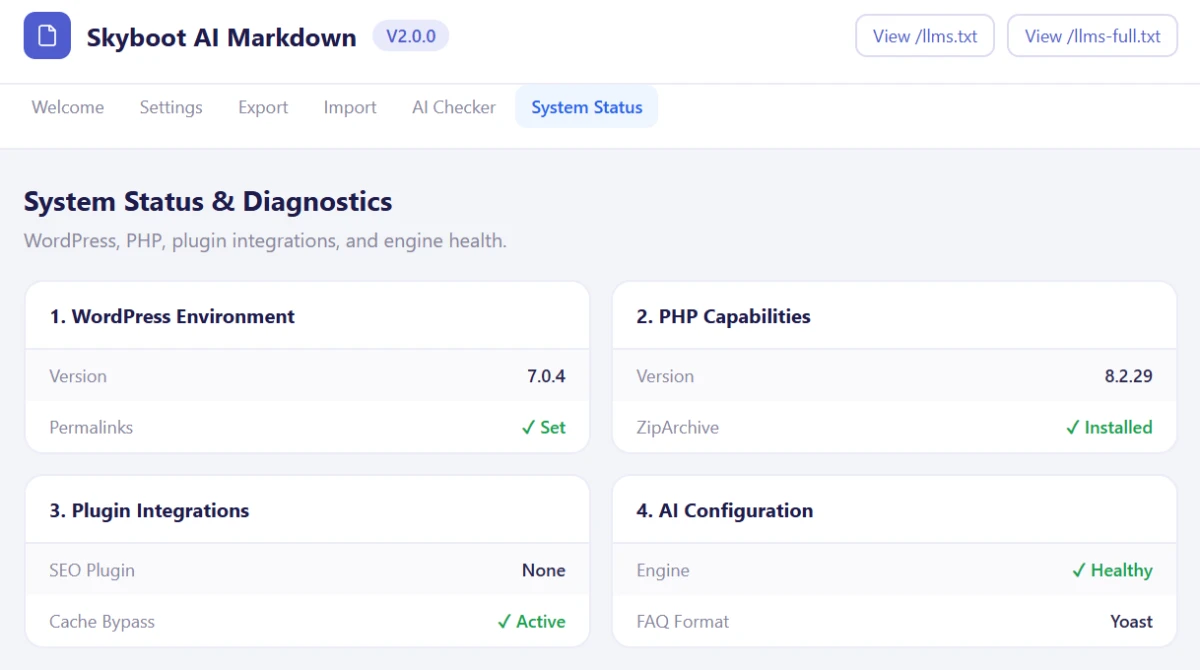
Test any URL on your site and see exactly what an AI agent receives: status, headers, front matter and raw Markdown.
Grounded AI Fixes
Fixes are written from the page itself, and numbers that are not on the page are flagged before anything is applied.
Team Permissions
Decide which roles and which people can see analytics, fix content, use your API key, export or import.
Cache & CDN Bypass
Ready-made rules for Apache, LiteSpeed, Nginx and Cloudflare, so AI agents get Markdown, not a stale cached page.
From WordPress to AI-Ready,
Step by Step
Every part of the pipeline: mapping your content, converting it, testing it and moving it safely, shown in detail.


Automatic /llms.txt
Give AI systems a clear, machine-readable map of your WordPress site.
Every published page, post, product and doc is added automatically, each type in its own section. Change something, and the map updates.
No manual file to touch, ever.
Import a File. Update the Post.

Upload a .md file in the post editor, and the title, content and SEO title update in one step.
FAQ sections become your SEO plugin’s FAQ block, not a wall of HTML.
Export works the same way in reverse: download the post as a .md file, or copy it to your clipboard.
Test Your Markdown. See Every Detail.
Don’t guess whether your Markdown works. Check it.
Enter a URL and see exactly what an AI agent gets back: HTTP status, headers, front matter and the raw output itself.
If something is broken, you see it here first, not after a customer tells you.
Choose What to Export, All at Once

Pick your post types (posts, pages, products or everything) with one click of Select All.
Filter by status, category or date, then download a ZIP of files or one combined document.
Large libraries are processed in batches, so a big export never stalls or times out.

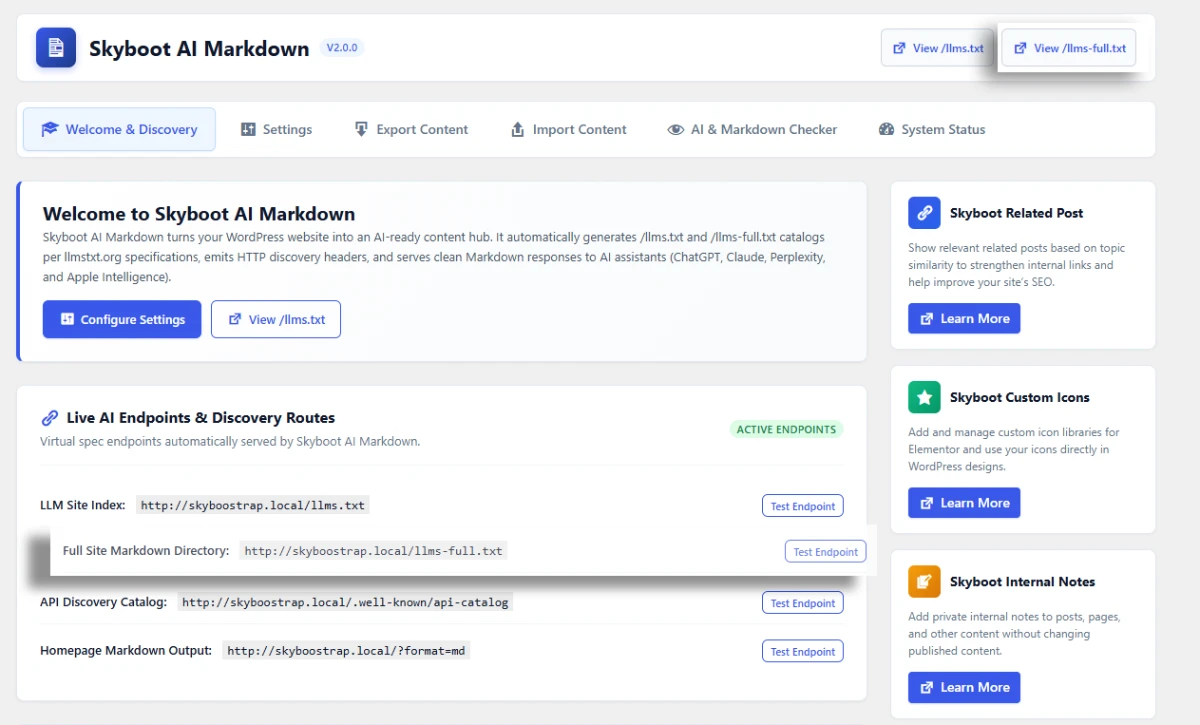
Give AI More Than a Site Map
An index tells AI systems what exists. llms-full.txt gives them something to read.
Your site map and your Markdown content, combined into one file.
More for AI systems to work with, without fetching your site page by page.
Bulk Import, Not Just One File
Upload one .md file or a .zip full of them, and bring everything in at once.
Choose the post type, the status (published, draft, pending or private) and the author, then import.
Files that include a slug or URL keep it, along with the SEO title and description, so migrated posts land on the right URL.
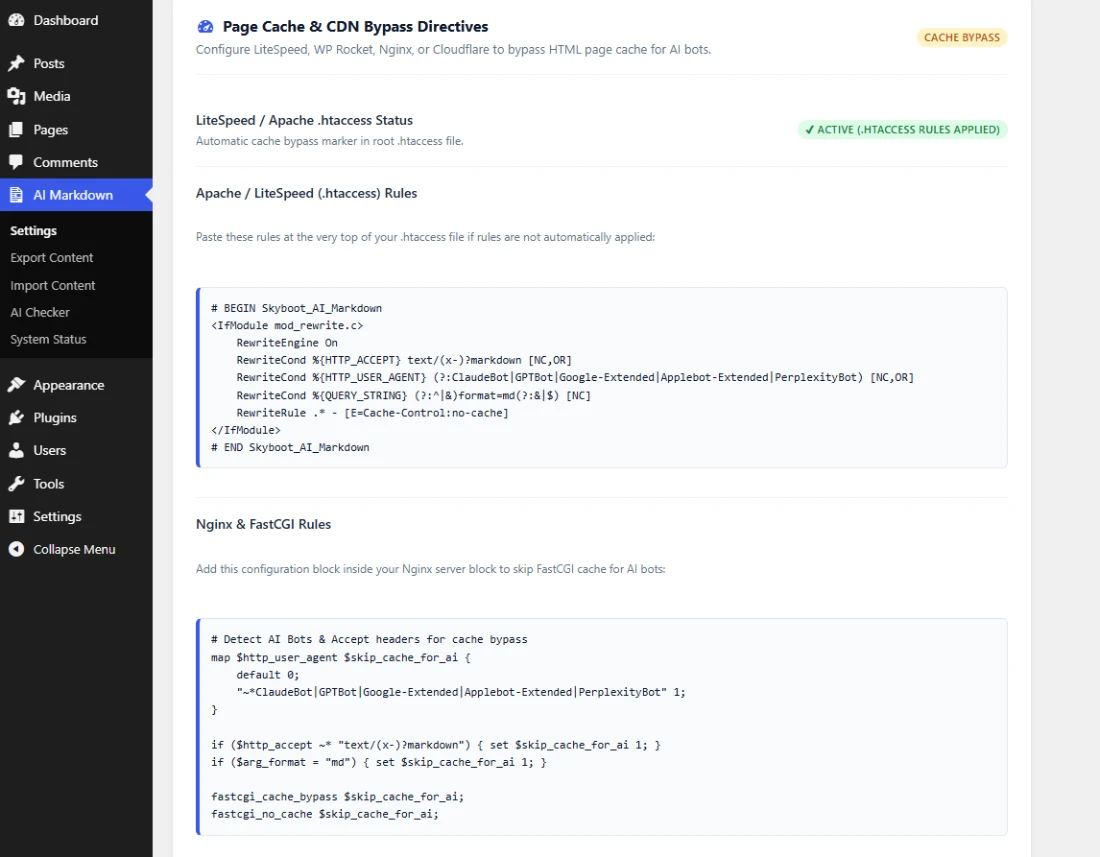
Make AI Requests Cache-Aware
A cache can’t tell an AI agent from a browser. That’s the problem.
It serves the same cached HTML to both, even when the agent asked for Markdown.
Ready-made bypass rules for Apache, LiteSpeed, Nginx and Cloudflare fix that.
AI requests reach the real Markdown, not a stale page.
How It Works
From install to your first verified AI visit, in four steps.
01 – Install
Install and activate. Markdown pages, llms.txt and IndexNow work right away.
02 – Check
Follow the Get cited checklist: describe your site and run the crawler test.
03 – Fix
Scan your content and fix the weakest pages, starting with those AI reads most.
04 – Measure
Watch verified AI crawler visits and visitors from ChatGPT, Perplexity and others grow.
Give AI Assistants a Clean Path to Your Content
Stop serving bloated HTML to agents that only want your content. Give them clean Markdown, an llms.txt and proof they visited, automatically and verifiably.
Common Questions
How do I rank in ChatGPT search results?
Let OAI-SearchBot and ChatGPT-User reach your site, give them an llms.txt and clean Markdown, and answer questions directly with specific facts. Skyboot AI Markdown does the technical part and scores each page for the rest.
How can I see if ChatGPT or other AI bots visit my site?
Open AI Analytics in the plugin. It lists every AI crawler visit per page, including OAI-SearchBot and ChatGPT-User, checked against OpenAI’s official IP list, plus people who click through from AI assistants.
Which SEO plugins are supported?
Yoast SEO, Rank Math, All in One SEO, SEOPress, The SEO Framework, Slim SEO and SmartCrawl. The plugin reads their noindex, meta description and canonical settings, and creates FAQ blocks in the format you choose.
Why does my homepage serve HTML instead of Markdown to AI agents?
Usually a cache (host, CDN or plugin) serves cached HTML whatever the request asks for. Use ?format=md on the URL, or add the plugin’s ready-made bypass rule for Apache, LiteSpeed, Nginx or Cloudflare.
Does this guarantee my content gets cited by ChatGPT or AI search?
No, and we won’t claim that. The plugin removes the technical barriers, shows which pages AI reads and helps you improve them. Citations still depend on how well your content answers questions and on your reputation.
Does Google use llms.txt?
Google Search does not use llms.txt. AI agents and tools that look for the file read it. Markdown pages, IndexNow, crawler checks and content readiness help with every AI assistant either way.
How does site-count licensing work?
Every plan includes every feature. The difference is how many websites you can use it on and the level of support: 1 site for $49, up to 5 sites for $99, or unlimited sites for $199 a year.
What’s the difference between /llms.txt and /llms-full.txt?
/llms.txt is an index: a list of your pages, posts and other content with short descriptions. /llms-full.txt adds the full Markdown content of your 50 most recen
How do I import Markdown files into WordPress?
Upload a single .md file in any post or page editor, or bulk import .md files and .zip packages under AI Markdown > Import. Each file becomes native Gutenberg blocks, with SEO fields and FAQ blocks.
Do I need an OpenAI or Claude API key?
No. Without a key, the fix buttons open ChatGPT, Claude, Gemini, Copilot or Perplexity with a ready prompt. With a key from Anthropic, OpenAI, Google Gemini or OpenRouter, fixes are written inside WordPress.
How do I add an llms.txt file to WordPress?
Install and activate Skyboot AI Markdown. Your /llms.txt is live right away, lists every published page, post, product and doc, and updates itself when you publish. Add a short site summary in the settings.
What are the requirements to run this plugin?
WordPress 5.8 or later and PHP 7.2 or later, with pretty permalinks. The PHP DOM extension gives the most accurate HTML-to-Markdown conversion, and the zip extension is needed for ZIP imports and exports.