
The Cloudflare block AI bots setting now lives in its AI bot policies, under Security Settings. Set Training to Block and Search to Allow to keep training AI crawlers out. Since 15 September 2026, though, Training blocks also cover crawlers that do both search and training, so check that Google still crawls your site.
If you’d rather not take that risk, there’s a narrower route: leave Training on Allow and block the training-only crawlers one by one. Both routes are below, with a test of what Cloudflare’s managed robots.txt does to a WordPress robots.txt.
Cloudflare’s AI bot controls at a glance
Cloudflare gives you three ways to block AI bots: AI bot policies by type, per-crawler blocks in AI Crawl Control, and a managed robots.txt that asks bots to stay out. A fourth, pay per crawl, charges crawlers instead of blocking them.
AI bot policies are three presets, Search, Agent and Training, each set to Block, Block on pages with ads, or Allow. Cloudflare AI Crawl Control is the dashboard where you see AI crawlers and allow or block each one, on all plans.
| Control | What it does | Enforced or requested? | Plans |
|---|---|---|---|
| AI bot policies (Search, Agent, Training) | Blocks bots by type | Enforced at Cloudflare | All plans |
| AI Crawl Control, per crawler | Blocks one named crawler | Enforced with a firewall rule | All plans; Free detects by name only |
| Managed robots.txt | Adds Disallow lines for training bots | Requested; bots choose to obey | All plans |
| Pay per crawl | Charges crawlers, HTTP 402 if unpaid | Enforced | Closed beta |
Enforced options stop a request at Cloudflare. The managed robots.txt only asks; Cloudflare says “robots.txt compliance is voluntary”.
Cloudflare block AI bots presets: Training, Search and Agent
The presets are the quickest route: Training on Block, Search on Allow, and Agent your choice, since those are bots fetching pages for people. Cloudflare’s Block AI Bots page gives the path and the rules. The Training preset blocks training crawlers such as GPTBot.
- In the Cloudflare dashboard, open your site and go to Security Settings, then Configure AI bot policies.
- Set Training to Block. Choose Block on pages with ads instead if you only want to protect pages that show ads.
- Leave Search on Allow. That group includes search crawlers such as OAI-SearchBot.
- Set Agent: Allow if assistants may open pages for their users, Block if not.
- Save, and note the date for later crawl-stat checks.
Agents here are user-driven bots, such as Perplexity-User and DuckAssistBot in Cloudflare’s own category list. To undo any of this, set the preset back to Allow.
The legacy one-switch Block AI Bots setting was due to be retired on 15 September 2026. Move to the presets if your zone still shows it.
The Googlebot catch: mixed-purpose crawlers
A mixed-purpose crawler is a single bot that crawls for both search and AI training. Cloudflare’s page says that from 15 September 2026, such crawlers “will also be blocked by all configurations to block AI training”. It doesn’t name them.
Press coverage does. The Decoder wrote that multi-purpose crawlers like Googlebot “will be treated according to whichever rule is strictest”, and Help Net Security named Googlebot, Applebot and BingBot as examples. So Training on Block may also block Google’s crawler.
There are two ways to handle it:
- Keep Training on Block, then check. Watch Search Console’s crawl stats and Cloudflare’s security events for Googlebot over the next week. If Google’s crawling drops, set Training back to Allow.
- Keep Training on Allow and block one crawler at a time in AI Crawl Control, for training-only bots such as GPTBot, ClaudeBot, CCBot and Bytespider. Cloudflare’s docs don’t say whether per-crawler blocks apply the mixed-purpose rule, so this is the narrower choice, not a guaranteed one.
New domains get a default too. From 15 September 2026, Cloudflare blocks Training and Agent on pages that display ads, with Search allowed. Its page doesn’t say what changed for existing sites, so check your presets if you never chose them yourself.
Block a single crawler in AI Crawl Control
In AI Crawl Control, find the crawler in the Crawlers table and set its action to Block; Cloudflare enforces it with a WAF custom rule. A WAF custom rule is a firewall rule that Cloudflare checks before a request reaches your site.
Cloudflare’s crawler management page describes the details:
- Blocked crawlers get 403 Forbidden, or 402 with a custom message; custom responses need a paid plan.
- On the Free plan, Cloudflare identifies crawlers by their user agent strings. Paid plans use its Bot Management detection instead.
- These rules run before Cloudflare’s other bot features.
Cloudflare’s managed robots.txt and your WordPress robots.txt
Cloudflare’s managed robots.txt puts its rules in front of the robots.txt WordPress serves. In our parser test, its training block left search bots alone. If your site has no robots.txt, Cloudflare creates one.
A managed robots.txt is a robots.txt that Cloudflare writes for you. To turn it on, go to Security Settings, filter by Bot traffic, open Configure AI bot policies, set Training to Disallow, turn on Enable Bot Preference Sync and save. Cloudflare’s managed robots.txt page shows the result:
- A
User-Agent: *group with a Content-signal line,search=yes, ai-train=no, use=reference, andAllow: /. Disallow: /groups for eight names: GPTBot, ClaudeBot, Google-Extended, Applebot-Extended, CCBot, Bytespider, meta-externalagent and Amazonbot.
We rebuilt that structure from Cloudflare’s docs, put it in front of a WordPress robots.txt that already had its own GPTBot group, and checked how Protego 0.7.0 reads the combined file:
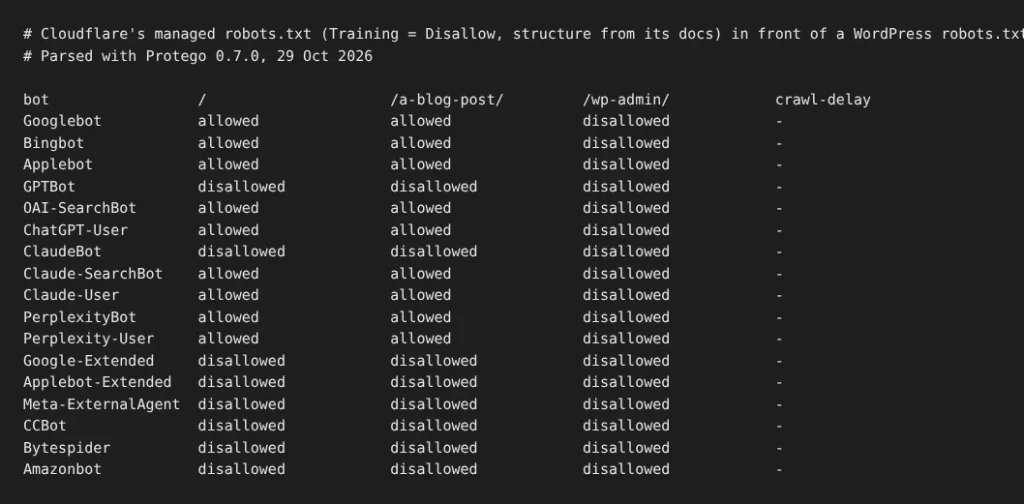
What the test showed:
- The eight listed bots were disallowed everywhere, Amazonbot included.
- Googlebot, Bingbot, OAI-SearchBot, ChatGPT-User, Claude-SearchBot and PerplexityBot could read the site, except
/wp-admin/. - The duplicate GPTBot group, one from Cloudflare and one from WordPress, gave the same answer.
One case goes the other way. Parsers like Protego merge every group for the same bot, so a WordPress group with User-agent: Amazonbot and Allow: / let Amazonbot back in despite Cloudflare’s Disallow. If you want Amazonbot, that’s how to keep it; if you don’t, check that WordPress has no Allow group for it. Where WordPress keeps those rules depends on your SEO plugin, as our robots.txt setup guide explains.
Don’t block ChatGPT search or Google by accident
If ChatGPT search or Google stops reaching your site, check that Search is on Allow and that no rule blocks OAI-SearchBot or Googlebot. Blocking OAI-SearchBot costs ChatGPT search answers, by OpenAI’s account; only navigational links remain.
Run through this after any change:
- Search preset: on Allow.
- Training preset: if it’s on Block, Googlebot may be caught as a mixed-purpose crawler; check its crawl rate.
- AI Crawl Control: OAI-SearchBot, Claude-SearchBot and PerplexityBot not set to Block, unless you meant it.
Check from the WordPress side too. Behind Cloudflare, your server sees Cloudflare’s addresses unless it restores the visitor’s IP from the CF-Connecting-IP header. Counting bot hits in your logs is covered in how to track AI crawlers, and our crawler IP verification guide covers reading that header safely.
Skyboot AI Markdown, our plugin, has a crawler access test that sends requests as each bot from your own server. Its own note says: “CDN rules that trust verified crawler IPs may treat the real crawlers differently, but a block here is a strong warning sign.”
Pay per crawl: charging AI crawlers instead
Pay per crawl lets you charge AI crawlers per request, but it’s in closed beta, and crawlers that don’t pay get HTTP 402 Payment Required. You set one price for the zone.
Cloudflare’s setup page says to turn off the legacy Block AI Bots setting first, and that firewall blocks run before pay per crawl, so a crawler you block never sees the price. Cloudflare’s pay per crawl page has the sign-up link.
If your site isn’t on Cloudflare
Without Cloudflare, block training bots in robots.txt from WordPress, and use server rules for bots that ignore it. Skyboot AI Markdown’s training-crawler setting writes those robots.txt lines, but only when WordPress generates the file; with a physical robots.txt, edit that file instead (our documentation). Which bots to block in the first place is covered in our WordPress hub for AI crawlers.
Frequently Asked Questions
Does Cloudflare block AI bots by default?
For new domains, yes, on pages that show ads. From 15 September 2026, Cloudflare’s default for a new domain blocks the Training and Agent groups on pages that display ads and allows Search. Cloudflare’s page doesn’t say what changed for existing sites, so check your presets if you never chose them yourself.
Is Cloudflare AI Crawl Control free?
Yes. Cloudflare says AI Crawl Control is available on all plans, including the Free plan. What changes with the plan is detection: Free identifies crawlers by their user agent strings, while paid plans use Bot Management detection. Custom block responses also need a paid plan.
Will Cloudflare’s AI blocking hurt my Google rankings?
Blocking training in Cloudflare can affect Google. Since 15 September 2026, Cloudflare’s training blocks also apply to crawlers that do both search and training, and press reports name Googlebot as one. If you set Training to Block, check Search Console’s crawl stats, or keep Training on Allow and block training-only crawlers one at a time.
How we tested
- Managed robots.txt: Cloudflare’s documented structure (updated 22 October 2026) rebuilt, put in front of a WordPress robots.txt, then read by the Protego 0.7.0 parser (29 October), plus a variant with a WordPress Allow group for Amazonbot.
- Settings and limits come from Cloudflare’s developer docs read on 28 and 29 October 2026; we didn’t have a Cloudflare dashboard to screenshot for this guide.