
Yoast’s llms.txt feature is free, and so are Rank Math’s and AIOSEO’s. New to llms.txt? It’s a plain Markdown index of your important pages, placed where AI tools can find it. Rank Math gives you the most control, AIOSEO lists the most pages by default, and Yoast lists the fewest, so the best choice is usually the SEO plugin you already run, set up properly.
This page compares what the three features write, using two of them on one test site. If you don’t run one of these plugins, you can write the file by hand or serve it with a snippet.
Yoast, Rank Math and AIOSEO llms.txt side by side
All three SEO plugins make llms.txt for free, but they differ in how much they list, how often they rebuild, and whether a real file lands on your server. The table below sums up the defaults from each plugin’s documentation and from our test install.
| Yoast SEO | Rank Math | AIOSEO | |
|---|---|---|---|
| Where | Settings → Site features → AI tools | Dashboard → LLMS Txt module | Sitemaps → LLMs.txt |
| Free | Yes | Yes | Yes (llms-full.txt is Pro) |
| On after install | No, opt-in | No, and needs the setup wizard finished | Off in 5.0.3, despite the docs |
| How it’s served | Real file in your root | Generated by WordPress on each request | Real file in your root |
| Rebuilds | Weekly | Every request | Daily, and after you edit a post or term |
| Lists by default | 5 recent items, 5 biggest categories or tags | Posts and Pages, 50 each | Every public post type and taxonomy, up to 1,000 each |
| Choose pages | Manual page selection (pages only) | Post types, taxonomies, limit | Post types, taxonomies, exclusions |
| Site summary | Not configurable in the docs | Summary field | Title and description fields |
| Extra links | No | Additional Content box | No |
| Multisite | Not available | Not tested | Not tested |
Two of those cells contradict the plugins’ own docs. Rank Math’s knowledge base describes a blank file until you pick content, yet version 1.0.280 shipped with both main post types selected and 50 as the cap. AIOSEO’s documentation calls the feature enabled out of the box, while the 5.0.3 code ships it disabled (the setup wizard may switch it on; we didn’t run the wizard).
What each plugin actually puts in the file
Each plugin put a different header on the file. On the same test content, Rank Math and AIOSEO produced near-identical link lists in a different order, and Yoast’s documented rules would have listed far fewer pages.
The test site had ten posts, five pages, and four categories, including WordPress’s sample “Hello world!” post and “Sample Page”. Here’s the top of each file, with the site’s tagline set as the summary:
Generated by Rank Math SEO, this is an llms.txt file designed to help LLMs better understand and index this website.

# LLMs Lab

> Step-by-step WordPress fixes for small-site owners.

## Sitemaps
- [XML Sitemap](http://lab.test:8080/sitemap_index.xml): Includes all crawlable and indexable pages.
# LLMs Lab
> Step-by-step WordPress fixes for small-site owners
> Generated by All in One SEO v5.0.3, this is an llms.txt file, used by LLMs to index the site.
## SitemapsAIOSEO puts your site name first, as the llms.txt proposal asks. Rank Math puts its own line above it. Both then listed every post and page, sample content included.
Yoast couldn’t be installed in our test setup, so here’s what its documentation and a public example show. Yoast picks the five most recently updated items, favoring cornerstone content and skipping posts older than a year, plus the five busiest categories or tags. It also escapes Markdown characters, which is why a site name like “JSONLD.COM” can show up as “JSONLD.COM”. The jsonld.com site published the file Yoast 25.3.1 made for it: an attribution sentence and a pointer to the sitemap come first, the H1 third, then five pages.
Set up Yoast’s llms.txt
Yoast’s llms.txt switch is under Yoast SEO, Settings, Site features, AI tools, and the only real setting is whether you pick pages yourself.
- Open the Site features tab in Yoast’s settings.
- Turn on LLMS.txt in the AI tools group.
- Choose Manual page selection under the customize option.
- Add your About, Start here and other key pages, then save.
Manual selection only overrides the page list; Yoast’s specification says posts keep their automatic selection, and only posts with a custom excerpt get a description. If a file named llms.txt already exists in your root, Yoast won’t replace it.
Set up llms.txt in Rank Math
Rank Math’s llms.txt is the LLMS Txt module, configured under General Settings, Edit llms.txt, and it only works after you finish Rank Math’s setup wizard.
- Complete Rank Math’s wizard (connect a free account or skip it).
- Enable the LLMS Txt card on the Rank Math dashboard.
- Go to the Edit llms.txt tab in General Settings.
- Set post types, taxonomies, a limit and a one-line summary.
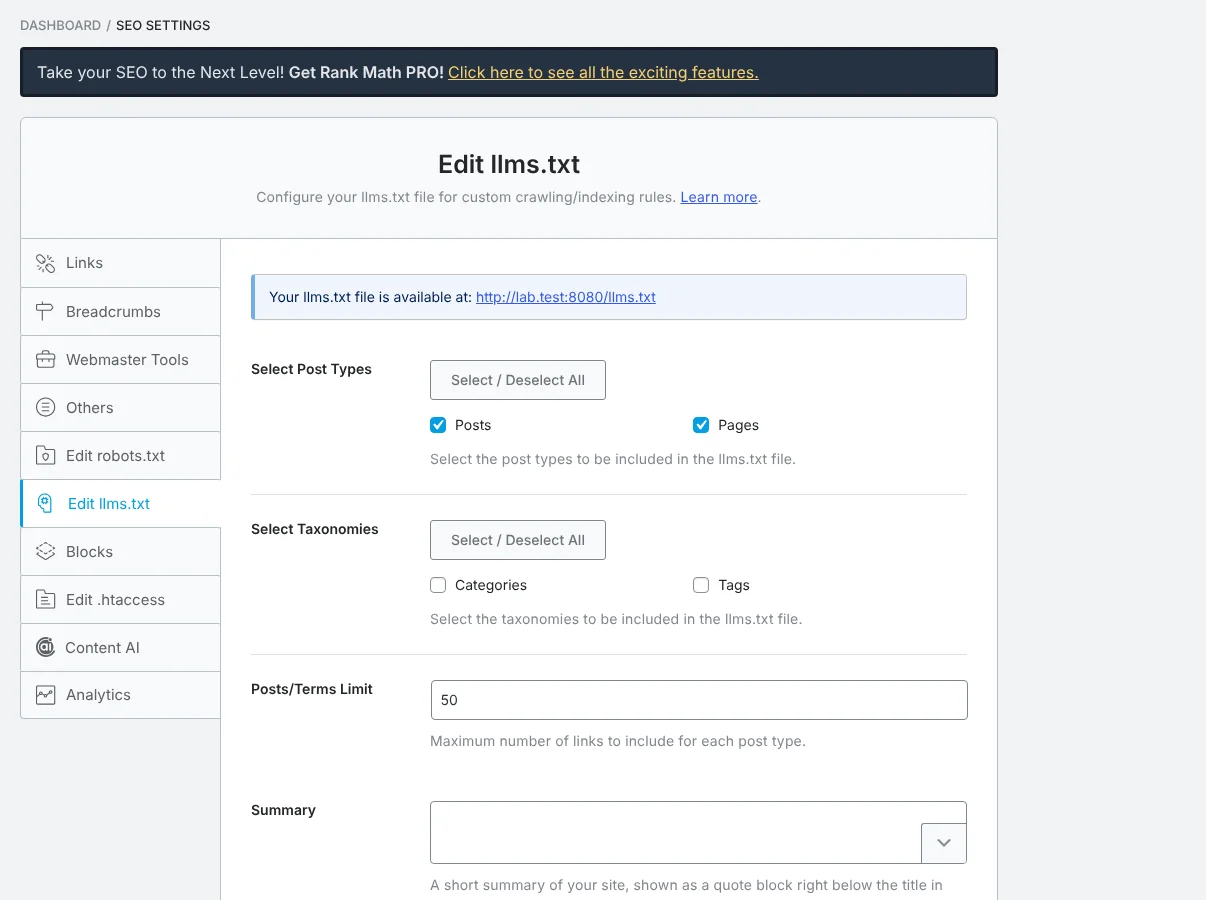
Use the Additional Content box for pages the post-type settings miss, such as a contact page. Rank Math also sends an X-Robots-Tag: noindex, nofollow header with the file, so it won’t show up in search results.
Set up llms.txt in AIOSEO
AIOSEO’s llms.txt lives under All in One SEO, Sitemaps, LLMs.txt. Check that the switch is on, then cut its long default list with the exclusion fields.
- Open the LLMs.txt tab inside AIOSEO’s Sitemaps screen.
- Confirm the main toggle is enabled.
- Lower URLs per Post Type / Taxonomy and untick post types you don’t need.
- Add thin pages to Exclude Posts / Pages, then save.
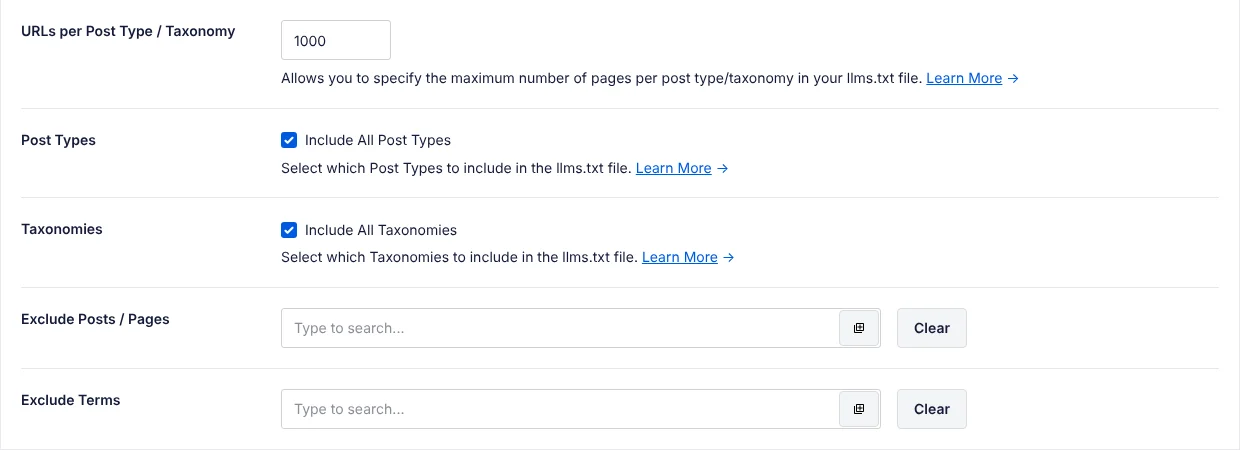
AIOSEO’s default of up to 1,000 links per type helps explain why its files run long. In Common Crawl’s July 2026 sample of llms.txt files, the median AIOSEO llms.txt had 138 links and 8,772 tokens. Switching the feature off deletes the file.
Where all three fall short
None of the three writes good link notes, and Rank Math (plus Yoast, in a 2025 example) puts a “Generated by” line above your site name. Plan on a human edit, or a better tool, if the file matters to you.
- Link notes come from excerpts. Rank Math’s note for “Sample Page” was the page’s opening text, cut off mid-sentence. Pages without excerpts get weak or empty notes.
- Rank Math, and Yoast in the public example, start with a “Generated by” line instead of your site name.
- Sample content isn’t filtered: “Hello world!”, “Sample Page” and the “Uncategorized” category all made it into the test files.
- The links point to normal HTML pages. AIOSEO lists a “Convert Posts to Markdown” option, which WPBeginner reports is Pro-only. You can also serve Markdown copies yourself with a small plugin.
If you’d rather not hand-edit the file, a dedicated plugin can take it over. Our Skyboot AI Markdown plugin runs alongside Yoast, Rank Math, and AIOSEO. It starts the file with your site name and a summary, uses each page’s meta description from your SEO plugin as the link note, and links Markdown copies of the pages. It also leaves out anything you’ve set to noindex there (SEO plugin compatibility; how its llms.txt is built). You’d then switch the SEO plugin’s own llms.txt off, for the reason in the next section.
Four annotated example files show what a well-written file looks like. If you need the full-text version, read when llms-full.txt is worth it first.
Running two of them at once
Only one llms.txt can answer at a time, so a second plugin running it is wasted. In our test, AIOSEO’s real file beat Rank Math’s generated version. Standard server rules suggest a file Yoast writes would win the same way, but Yoast’s own spec says a dynamically served file takes precedence, so open /llms.txt and check which plugin’s header line you get. Yoast won’t overwrite a file it didn’t write.
In the test (AIOSEO 5.0.3, Rank Math 1.0.280), with AIOSEO’s file in the root, visitors got AIOSEO’s version even though Rank Math’s module was on.
Once AIOSEO’s feature was disabled, its file disappeared and Rank Math took over the URL. So if your edits seem to do nothing, another plugin’s file is often the one being served. Turn llms.txt off in every plugin but one, then open your-site.com/llms.txt and check that the header line names the plugin you kept. Then validate the file to catch format and link problems.
Frequently Asked Questions
Is Yoast’s llms.txt feature free?
Yes. Yoast’s llms.txt feature is free, and so are the llms.txt features in Rank Math and AIOSEO. Yoast’s switch sits under Yoast SEO, Settings, Site features, AI tools. Out of the box, it picks the five posts or pages updated most recently plus the five busiest categories or tags, and rebuilds the file once a week.
Which SEO plugin makes the best llms.txt?
Usually the one you already run. Rank Math gives the most control, AIOSEO lists the most pages by default, and Yoast lists the fewest. Switching SEO plugins for llms.txt alone isn’t worth it, because each can be tuned to a sensible list in its own settings. None of the three writes good link notes, so plan a human edit.
Can two SEO plugins make llms.txt at the same time?
Only one llms.txt can answer at a time, so a second plugin generating it is wasted work. In our test, AIOSEO’s real file beat Rank Math’s generated version, but Yoast’s own spec says a dynamically served file takes precedence over its static one. Switch the feature on in one plugin, off in the others, then open the file to confirm which one answers.
Which one to use
Use the llms.txt feature of the SEO plugin you already run. Switching SEO plugins for llms.txt alone isn’t worth it: each one can be tuned to a sensible list in its own settings. If you’re still choosing an SEO plugin for other reasons, start with our WordPress SEO basics.
If you’re on Yoast, turn on manual page selection, or Yoast picks your pages for you; posts stay automatic either way. On Rank Math, finish the wizard, write a summary and use Additional Content for key pages. On AIOSEO, check it’s actually on, then cut the list down with exclusions.
If you need llms-full.txt or Markdown versions of your pages, a dedicated plugin is the better fit, as the setup guide explains.