
A good llms.txt example is a short Markdown file with an H1 title, a one-line summary, and H2 sections of described links, like this one:
# Example Home Fix

> Tested repair guides for homeowners: plumbing, electrical basics and appliance troubleshooting.

Each guide shows the date it was last checked.

## Plumbing guides
- [Fix a running toilet](https://example.com/running-toilet/): flapper, fill valve and chain checks, in the order that solves it fastest
- [Unclog a drain without chemicals](https://example.com/unclog-drain/): plunger, snake and trap methods by drain type

## Optional
- [Newsletter archive](https://example.com/newsletter/): monthly round-ups of new guides
That’s the whole llms.txt format in miniature: a title, a one-line summary, a line of notes, then sections of links, each with a short note on what the page answers. Those notes tell an AI agent (a tool such as ChatGPT or a coding assistant reading your site for someone) where to look. Below are four fuller examples for different kinds of WordPress sites, the rules behind them, and how to fix the file your SEO plugin made. If the file isn’t on your site yet, add it with your SEO plugin, an uploaded file or a snippet first.
The llms.txt format, rule by rule
The llms.txt format is a set order of Markdown parts with one required item, an H1 with the site name; everything else comes after it in a fixed order. The spec is the llmstxt.org proposal, version 2 (August 2026). A file with only a title tells an AI agent almost nothing.
| Part | Required? | What it looks like | Note |
|---|---|---|---|
| H1 title | Yes | # Example Home Fix | Must come first; only a byte-order mark (an invisible character some editors add) may sit before it |
| Blockquote summary | No, but add it | > Tested repair guides for homeowners… | The facts an agent needs to make sense of the rest |
| Notes | No | Plain paragraphs or lists, no headings | Hours, version numbers, how to read the links |
| File lists | No | ## Plumbing guides Then a list | One H2 per group of links |
| List items | In a file list, yes | - [Name](URL): notes | The link is required; the colon and notes are optional |
| Optional section | No | ## Optional | Links an agent can skip when short on space |
Each group of links under an H2 is called a file list, and it’s written as a Markdown list. The blockquote summary is the short > passage under the H1 that says what the site is; keep it to one line. The file can also live in a subfolder, so /docs/llms.txt covers only the pages under /docs/.
Real files often skip the structure. Common Crawl looked at 584,107 llms.txt files in July 2026: only 49.9% had the H1, blockquote, and link sections together, and 22.6% had no links at all. Following the table above already puts your file in the better half.
Four llms.txt examples for WordPress sites
The four llms.txt examples below cover a blog, a store, a local business, and plugin docs. Pick the closest, swap in your own pages and descriptions, and keep each section to the links a stranger would need first.
The spec sets no link count; these examples use four to six, and we’d keep most WordPress files to a few dozen at most. We ran all four through the spec’s reference parser (the llms-txt Python library from Answer.AI), and each one parsed with every link and description intact. The reference parser is Answer.AI’s own code for reading these files mechanically, which makes it a fair test of whether a program can read your file.
A blog
# Example Home Fix

> Example Home Fix publishes tested repair guides for homeowners: plumbing, electrical basics and appliance troubleshooting. Written by a licensed plumber since 2019.

Guides are updated when a product or code changes; each page shows its last review date.

## Start here
- [About the author](https://example.com/about/): who writes the guides and what he's licensed for
- [Start here](https://example.com/start-here/): the ten guides most readers need first

## Plumbing guides
- [Fix a running toilet](https://example.com/running-toilet/): flapper, fill valve and chain checks, in the order that solves it fastest
- [Unclog a drain without chemicals](https://example.com/unclog-drain/): plunger, snake and trap methods by drain type

## Policies
- [Editorial policy](https://example.com/editorial-policy/): how guides are tested and corrected

## Optional
- [Newsletter archive](https://example.com/newsletter/): monthly round-ups of new guides
A blog’s file should point to its best evergreen posts, grouped by topic, not the latest ten. The author and editorial pages answer the “who wrote this?” question an assistant may be asked.
An online store
# Example Coffee Supply

> Example Coffee Supply sells specialty coffee beans and brewing gear online, shipping from Portland, Oregon to the US and Canada.

Prices and stock change daily; check product pages for current prices. Orders over $50 ship free in the US.

## Shop
- [Coffee beans](https://example.com/product-category/beans/): single-origin and blends, roasted weekly
- [Brewing gear](https://example.com/product-category/gear/): grinders, kettles and pour-over kit

## Buying help
- [Which grind for which brewer](https://example.com/grind-guide/): a chart for espresso, pour-over, French press and cold brew
- [Shipping and delivery](https://example.com/shipping/): carriers, costs and delivery times by region
- [Returns and refunds](https://example.com/returns/): 30-day returns on unopened items

## About
- [Our roastery](https://example.com/about/): who roasts the coffee and how beans are sourced
For a WooCommerce store, link to category pages and buying help rather than single products. Products come and go; the shipping and returns pages are what shoppers ask an assistant about. The note on prices keeps an agent from quoting a stale price as fact.
A local business
# Example Dental Studio

> Example Dental Studio is a family dental practice in Leeds, UK, offering check-ups, hygiene, whitening and emergency appointments.

Opening hours: Monday to Friday 8am–6pm, Saturday 9am–1pm. Address: 12 Example Road, Leeds LS1 1AA. Phone: 0113 000 0000.

## Services
- [Check-ups and hygiene](https://example.com/check-ups/): what's included and how long it takes
- [Emergency appointments](https://example.com/emergency/): same-day slots and what counts as an emergency

## Practical
- [Prices](https://example.com/prices/): NHS and private fees
- [Find us](https://example.com/contact/): map, parking and step-free access
A local business site is small, so the notes do most of the work. Hours, address and phone go in plain text, the way the spec’s own restaurant example does it. No Optional section here: every page matters.
A plugin’s documentation
# Example Forms Plugin

> Example Forms is a WordPress plugin for building contact, survey and payment forms. These are its official docs for version 3.x.

Requires WordPress 6.5+ and PHP 8.1+. Code samples use the `exform_` prefix for hooks.

## Getting started
- [Installation](https://example.com/docs/install/): install, activate and connect a license
- [Your first form](https://example.com/docs/first-form/): build and embed a contact form in five minutes

## Developer reference
- [Hooks and filters](https://example.com/docs/hooks/): every action and filter with arguments and examples
- [REST API](https://example.com/docs/rest-api/): endpoints for entries and forms, with authentication

## Troubleshooting
- [Emails not sending](https://example.com/docs/emails/): SMTP setup and the checks to run first

## Optional
- [Changelog](https://example.com/docs/changelog/): release notes since 1.0
Docs are where llms.txt gets used most, by coding assistants looking up an API. State the version and requirements in the notes so the agent doesn’t mix up old and new syntax. If the docs live under /docs/, this file can sit at /docs/llms.txt; structuring the docs themselves for AI tools has its own guide to AI-friendly documentation. Docs sites can also add a full-text companion file, which suits documentation better than blogs.
How to write the description after each link
Write each description as what the page answers or contains, in plain words, so an agent can decide whether to open it without guessing from the title. The spec asks for “brief, informative descriptions” and no unexplained jargon. Most generated files fall short here.
| Weak (from real plugin output) | Better |
|---|---|
| About page. | who runs the site and what they’re qualified to write about |
| Contact page. | email form, phone and response times |
| Includes all crawlable and indexable pages. | (drop the sitemap link; agents don’t need it) |
| Welcome to WordPress. This is your first post… | (delete the post) |
The first three lines on the left came straight from a Rank Math llms.txt on our test site. A few habits make descriptions useful:
- Lead with the task or question the page covers, not the page type.
- Add the detail that separates it from similar pages: “by drain type”, “since 1.0”, “for version 3.x”.
- Keep it to one line. The page itself holds the detail.
If your pages have clean Markdown versions, you can link to those instead of the HTML pages; the spec recommends it. Our Skyboot AI Markdown plugin builds its llms.txt that way: each link points at the page’s .md version. The note is the page’s meta description from your SEO plugin when you’ve set one, so a good meta description doubles as a good link note (how its llms.txt is built). To serve those Markdown versions yourself, a page can answer through a .md URL or content negotiation; our serving tutorial has tested code for both.
What belongs in the Optional section
The Optional section holds links an agent can skip when it’s short on context (the amount of text it can hold at once), such as archives, changelogs and background reading. Answer.AI’s own tooling shows how that works: it builds one context file without the Optional links and a fuller one with them.
Good candidates are a newsletter archive, release notes, an old version’s docs and long background pieces. Keep anything an agent needs to answer a basic question about you out of Optional. Only 9.7% of the files in Common Crawl’s sample used the section at all, so most sites can leave it out.
Fix the llms.txt your SEO plugin generated
Treat the file your plugin made as a first draft: add a real summary, remove default and system pages, rename sections for readers and replace the stock descriptions. Here’s part of the file Rank Math 1.0.280 produced on our WordPress 7.1 test site with default settings (URLs shortened to example.com):
Generated by Rank Math SEO, this is an llms.txt file designed to help LLMs better understand and index this website.

# LLMs Lab

## Sitemaps
- [XML Sitemap](https://example.com/sitemap_index.xml): Includes all crawlable and indexable pages.

## Posts
- [Hello world!](https://example.com/hello-world/): Welcome to WordPress. This is your first post. Edit or delete it, then start writing!
- [How to fix the white screen of death](https://example.com/how-to-fix-the-white-screen-of-death/): A blank page usually means a PHP fatal error. Turn on WP_DEBUG_LOG and read wp-content/debug.log.

## Pages
- [About](https://example.com/about/): About page.
- [Sample Page](https://example.com/sample-page/): This is an example page. It's different from a blog post…
That file fails the spec’s reference parser because nothing sits between the H1 and the first H2. When we put a summary line under the title of the same file, it parsed, though the parser read the summary as notes because an H2 follows it directly (see the mistakes table).
Rank Math’s Summary field adds exactly that line. AIOSEO 5.0.3 does better on structure, with the H1 first and its generator note inside the blockquote, but it still lists Hello world! and Sample Page, and its four category links have no descriptions. The cleaned-up version:
# LLMs Lab

> LLMs Lab publishes short fixes for common WordPress errors, speed problems and login security, written for site owners without a developer.

Fixes are retested on each major WordPress release.

## Fix an error
- [White screen of death](https://example.com/how-to-fix-the-white-screen-of-death/): turn on WP_DEBUG_LOG, read wp-content/debug.log, then disable the plugin it names

## About this site
- [About](https://example.com/about/): who writes the fixes and how they're tested
To get there with any plugin:
- Delete the “Hello world!” post and “Sample Page” (check you haven’t reused either one first), or exclude them in the plugin’s settings.
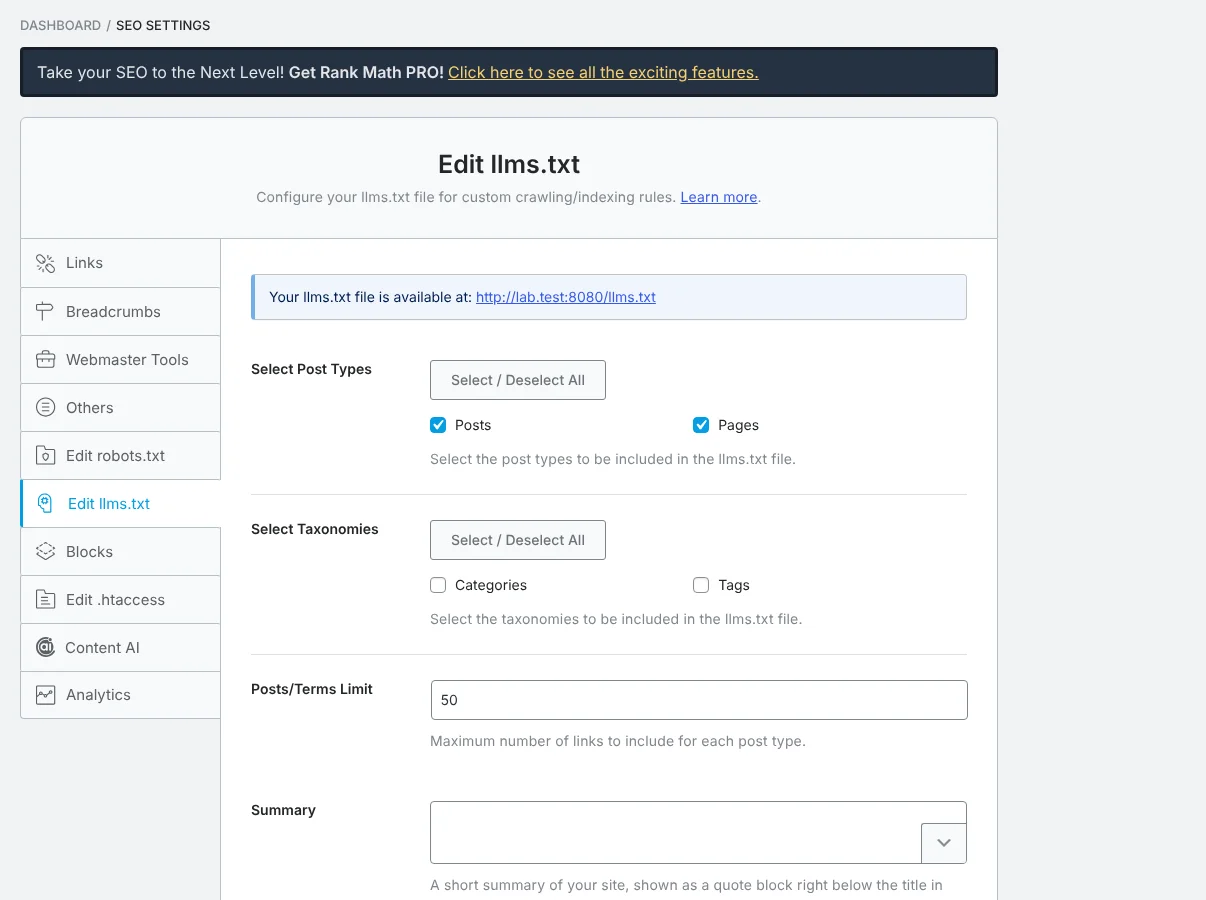
- Fill in the plugin’s summary field so a blockquote appears under the H1. In Rank Math, look for the Summary box among its llms.txt settings. In our plugin it’s llms.txt Blockquote Summary: left empty, it falls back to your site tagline, and a Write with AI button can draft it from your pages for you to edit.
- Exclude system pages in the plugin’s settings. Our own skybootstrap.com file, checked October 19, 2026, included four screens our email plugin shows after someone subscribes or unsubscribes, plus posts unrelated to the site’s topic. Nobody asks an assistant about those.
- Rewrite thin excerpts on the posts you list, because most plugins use the excerpt or meta description as the link note.
- If the plugin can’t do what you need, write the file by hand and turn its generator off, or switch to a dedicated llms.txt plugin that gives you per-page control.
We haven’t tested Yoast’s output for this page; the same five steps apply.
Where the summary and exclusion settings live in each plugin is shown in the setup steps for Yoast, Rank Math and AIOSEO.
Frequently Asked Questions
What is the minimum a valid llms.txt needs?
Only an H1 heading with the site or project name is required by the llms.txt proposal. A file with just a title tells an AI agent almost nothing, though. Add a one-line summary under the title, then H2 sections of links, each followed by a short description of what that page answers.
What goes in the Optional section of llms.txt?
The Optional section holds links an AI agent can skip when it’s short on context, such as archives, changelogs and background reading. Answer.AI’s own tooling builds one context file without the Optional links and a fuller one with them, so put secondary pages there and keep the main sections for what a stranger needs first.
Can I use my SEO plugin’s llms.txt file as it is?
Treat the plugin’s file as a first draft. Most generated files need a real summary, the removal of default and system pages, section names written for readers and better link descriptions than the stock ones. If the plugin can’t give you that control, write the file by hand and turn the plugin’s generator off.
Mistakes that break the reference parser
A missing summary, plugin text above the H1, bare URLs, dashes instead of colons and H3 headings inside sections all trip up the spec’s reference parser. We tested each one with the llms-txt library (version 0.0.8):
| Mistake | What the parser does | Fix |
|---|---|---|
| H1, then straight into an H2 with no summary | Fails with an error | Add a > summary line |
| Plugin text above the H1, no summary | Fails with an error | Add a summary under the H1 |
| List items that are bare URLs | Fails with an error | Use - [Name](URL): notes |
| Summary followed directly by an H2 | Parses, but files the summary as notes | Add one line of notes under the summary |
- instead of : before the note | Keeps the link, drops the note | Use a colon |
| H3 headings inside an H2 section | Turns the H3 into its own section and empties the H2 | Use H2s only |
The spec says only the H1 is required, so the missing-summary failure is a quirk of the parser rather than a broken rule. The parser is a testing tool, and we don’t know of an AI product that rejects a file for failing it. Still, a file that parses cleanly is one nobody has to guess about, and the summary line is worth having anyway.
One more problem the parser won’t flag: 10.6% of the llms.txt URLs that answered in Common Crawl’s sample returned robots.txt content instead.
Check your file after you publish
Open your own /llms.txt in a browser after publishing. If you see robots.txt rules or a web page, something other than your file is answering. If you see an old version, a page cache or CDN is serving a stored copy; purge it. Then run the four checks that catch a broken file: it loads as plain text, the server labels it as UTF-8, it follows the format, and every link works.
Recheck it whenever you add a key page, change a URL or update the plugin. And to see whether AI tools fetch it at all, count the requests in your own server logs.