
A cache serves the wrong version when one URL can return two formats and the cache keeps only one copy. Once your WordPress site answers Accept: text/markdown with Markdown, a page cache ignoring the Vary: Accept header will hand whichever version it stored first to everyone. Visitors then see raw Markdown, or agents keep getting HTML. The fix is to make every cache layer keep a separate Markdown copy, or to send agents to .md URLs that no cache can confuse.
This page assumes your site already serves Markdown; if not, start with our guide to Markdown for AI agents.
Why one URL with two formats confuses caches
A page cache stores one copy per address unless something tells it that the page changes with a request header.
A page cache is any layer that stores finished pages: a WordPress plugin, the web server, your host’s proxy or a CDN. The cache key is the label a cache uses to find a stored copy, usually the scheme, host and path.
The Vary header (Vary) is a response header that lists the request headers the response depends on. Vary: Accept says “a request with a different Accept header may need a different response”. When a cache ignores it, the result is cache poisoning: the wrong version is stored once and served to everyone until it expires.
This isn’t new to Markdown. The ActivityPub plugin, which answers Fediverse servers with JSON at the same URLs, hit the same problem with LiteSpeed Cache and Breeze.
Find which layer serves the wrong version
Request the page twice as a browser and twice as an agent, and read the cache headers each time; the layer whose cache hit returns the wrong type is the one to fix. Purge every cache first, then:
- Fetch it as a browser, twice:
curl -s -o /dev/null -D - -H "Accept: text/html,application/xhtml+xml,application/xml;q=0.9,*/*;q=0.8" https://yoursite.com/my-post/ | grep -i "content-type\|cache"- Now fetch it the way Claude Code does, twice:
curl -s -o /dev/null -D - -H "Accept: text/markdown, text/html, */*" https://yoursite.com/my-post/ | grep -i "content-type\|cache"- Check the browser version once more. If it now says
text/markdown, an agent’s copy was stored and served to visitors.
Use GET requests as above, not curl -I: some caches, including nginx with the key below, store HEAD requests separately, so a HEAD test can miss a poisoned page.
Each layer labels its hits differently: Cloudflare sends cf-cache-status, LiteSpeed sends x-litespeed-cache, and nginx shows whatever header your config adds (often X-Cache). WP Super Cache adds a comment at the bottom of cached HTML instead of a header, so check the end of the page with curl -s https://yoursite.com/my-post/ | tail -n 3. The second request in each pair is the one that tells you something, because the first fills the cache.
Nginx FastCGI cache: honour the Vary: Accept header or key on Accept
Nginx keeps the versions apart only if it honours Vary; if your config ignores Vary, add a two-value Markdown variable to the cache key and skip the cache for mixed headers. We tested nginx 1.24’s FastCGI cache on WordPress 7.1.3 with the Markdown plugin from our serving guide, using the cache settings many WordPress guides recommend (fastcgi_ignore_headers Cache-Control Expires Set-Cookie).
| Cache setup | What happened |
|---|---|
| Default (Vary honoured) | Markdown and HTML stayed apart for agents and browsers |
| Default, two browsers | Chrome and Firefox each got their own stored copy, because their Accept headers differ |
Vary added to fastcgi_ignore_headers | One agent request stored Markdown, and every Firefox visitor after it got Markdown |
| Two-variant cache key alone | Correct for Claude Code, Cursor, OpenCode, Chrome and Firefox, but text/html;q=0.5, text/markdown stored Markdown in the HTML copy |
| Two-variant key plus skip map (below) | All of the above correct; headers that list Markdown later skipped the cache |
Two details matter. Because the config ignores Cache-Control, nginx cached the Markdown even though the plugin said not to; only Vary kept it apart. And honouring Vary stores one copy per distinct Accept string, which lowers your hit rate.
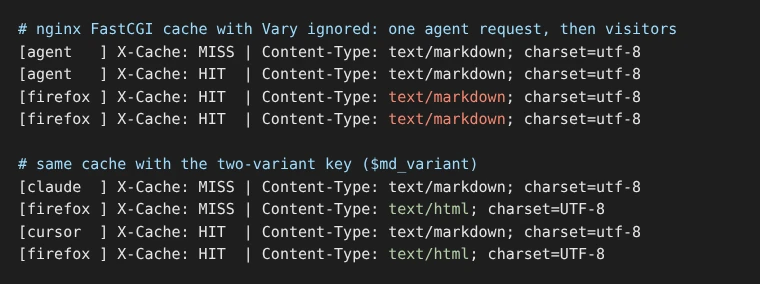
A two-variant key fixes both, with one more rule. Put both maps in the http block:
# Markdown listed first: its own cache copy.
map $http_accept $md_variant {
    default               "html";
    "~*^\s*text/markdown" "md";
}
# Markdown listed anywhere else: skip the cache and let WordPress decide.
map $http_accept $md_skip {
    default               0;
    "~*^\s*text/markdown" 0;
    "~*text/markdown"     1;
}
Then add them to your PHP location:
fastcgi_cache_key "$scheme$request_method$host$request_uri$md_variant";
fastcgi_ignore_headers Cache-Control Expires Set-Cookie Vary;
fastcgi_cache_bypass $md_skip;
fastcgi_no_cache $md_skip;
The skip map matters because a plugin that reads preference weights can serve Markdown even when text/markdown isn’t listed first. Ours does: with the first map alone, a text/html;q=0.5, text/markdown request got Markdown, nginx stored it as the HTML copy, and the next Firefox visitor got Markdown. With the skip map, that request bypassed the cache and browsers kept getting HTML.
Claude Code, Cursor and OpenCode list text/markdown first, so they share the cached Markdown copy. Browsers share the HTML copy, and anything in between goes to WordPress uncached. Test with sudo nginx -t, then restart nginx: in our test, deleting cache files without a restart left stale hits in memory.
If a purge plugin such as Nginx Helper clears pages by cache key, check that updating a post still clears both copies. To undo, remove $md_variant from the key, delete both maps and the two $md_skip lines, take Vary back out of fastcgi_ignore_headers, then restart.
WordPress page-cache plugins
WP Super Cache and LiteSpeed Cache won’t store a Markdown page that defines DONOTCACHEPAGE, but WP Super Cache still hands its cached HTML to agents asking for Markdown unless you add text/markdown to its list. The constant DONOTCACHEPAGE tells page-cache plugins not to store the current page; we checked that WP Super Cache 3.1.4 and LiteSpeed Cache 7.9.1 honour it in their source code. The Markdown plugin in our serving guide defines it on every Markdown response.
Serving is the other half. WP Super Cache 3.1.4 serves a cached file only when it decides the request wants HTML, and by default it only treats JSON types as “not HTML”. We ran its own classifier on real agent headers: every one, including plain text/markdown, was treated as HTML. To fix most of them, save this as wp-content/plugins/wp-super-cache-plugins/markdown-accept.php (create the folder if it doesn’t exist), a folder WP Super Cache loads before it serves anything:
<?php
// Tell WP Super Cache that Markdown requests don't want the cached HTML page.
add_filter( 'wpsc_accept_headers', function ( $types ) {
	$types[] = 'text/markdown';
	return $types;
} );
In the same classifier run with that list, plain text/markdown, Cursor and OpenCode skipped the cache, so they should reach your Markdown code. We checked this in the plugin’s code; a full HTTP test didn’t complete in our lab. Claude Code still gets cached HTML, because it gives Markdown and HTML the same q-value (preference weight) and the plugin breaks ties in favour of HTML.
This only works when PHP serves the cache (WP Super Cache’s Simple mode). In Expert mode, the plugin’s .htaccess rules serve cached files before PHP runs, and those rules don’t check the Accept header, so the filter never fires. On Expert mode, switch to Simple or use .md URLs. For Claude Code, .md URLs are the reliable route either way (last section).
Other plugins vary. Breeze, Cloudways’ cache plugin, has an open feature request from 2024 reporting that it serves whichever type was requested first. The LLM Markdown plugin leaves Accept negotiation off by default for this reason. Run the two-request test on whatever you use.
LiteSpeed server cache: add a Markdown vary
LiteSpeed lets you add a cache variant with a rewrite rule, so add one that marks Markdown requests as a separate variant. LiteSpeed’s support team gave this pattern for ActivityPub’s JSON on WordPress.org; here it is adapted for Markdown (untested, see below), at the top of .htaccess:
<IfModule LiteSpeed>
RewriteEngine On
RewriteCond %{HTTP:Accept} ^\s*text/markdown [NC]
RewriteRule .* - [E=Cache-Control:vary=%{ENV:LSCACHE_VARY_VALUE}+ismarkdown]
</IfModule>
We couldn’t test this, because our lab doesn’t run LiteSpeed.
Back up .htaccess first; to undo, delete the block. On OpenLiteSpeed, restart the server so it rereads .htaccess. Then run the two-request test and check x-litespeed-cache on the second request of each pair.
Cloudflare: turn on Vary in a cache rule
Since July 2026, Cloudflare caches separate versions when your origin sends Vary and a Cache Rule enables Vary for Accept. Before that, the usual workaround was bypassing the cache for Markdown requests. We couldn’t test this in our lab; these steps follow Cloudflare’s Vary docs.
- Go to Caching → Cache Rules and edit the rule that caches your HTML pages. Cloudflare doesn’t cache HTML by default, so if no Cache Rule, Page Rule or Automatic Platform Optimization (APO, its WordPress add-on) caches your pages, you can skip this section. If
cf-cache-statusshowsHITon your HTML, Cloudflare is storing it. - In the rule, find the Vary setting and add
Accept. - Choose normalize, Cloudflare’s suggested action for Accept. Cloudflare then sorts the Accept values by preference and can limit them to the media types you list, such as
text/htmlandtext/markdown, so each browser doesn’t get its own copy. - Purge the cache. Changing the Vary setting doesn’t purge stored pages by itself.
APO caches HTML too, and its docs don’t mention Vary, so on APO run the two-request test and fall back to .md URLs if agents get HTML.
Normalize also rewrites the Accept header Cloudflare sends to your server, so rerun the two-request test with Claude Code’s header afterwards. If you’d rather not store variants, a Cache Rule that bypasses the cache when any(http.request.headers["accept"][*] contains "text/markdown") still works.
If you use Cloudflare’s own Markdown for Agents instead of a WordPress plugin, it adds Vary: Accept to the Markdown it creates.
Which cache layer needs what
Each layer needs its own fix. Of these layers, nginx was the only one we could test end to end, and it kept Markdown and HTML apart once configured:
| Layer | Honours Vary: Accept? | Fix | Tested by us? |
|---|---|---|---|
| nginx FastCGI cache | Yes, unless Vary is in fastcgi_ignore_headers | Two-variant key plus skip map | Yes |
| WP Super Cache | No. Doesn’t store Markdown, but serves cached HTML to agents unless you add the filter | wpsc_accept_headers add-on (Simple mode) | Code and classifier only |
| LiteSpeed server cache | Only through a vary rewrite rule | .htaccess vary rule | No |
| Cloudflare | Since July 2026, when a Cache Rule enables it | Vary setting with normalize | No |
| Proxies you can’t configure | Ask your host | .md URLs | No |
Frequently Asked Questions
Why do visitors see raw Markdown on my WordPress site?
A page cache stored the Markdown version of a page and is handing it to everyone. Caches keep one copy per address unless told the page changes with a request header. Send Vary: Accept and make sure each cache layer honours it, or give Markdown its own .md address so no cache can mix the two.
Does Cloudflare respect the Vary: Accept header?
Since July 2026, Cloudflare caches separate versions when your origin sends Vary and a Cache Rule enables Vary for Accept, according to its documentation. Before that, the usual workaround was to bypass the cache for Markdown requests. We couldn’t test Cloudflare in our lab, so confirm with two requests after setting it up.
How do I find which cache serves the wrong version?
Purge every cache, then request the page twice as a browser and twice as an agent, reading the cache headers each time. The layer whose cache hit returns the wrong content type is the one to fix. In our tests, nginx, the only layer we could test end to end, kept Markdown and HTML apart once it was configured.
When a cache can’t vary, point agents to .md URLs
A .md URL is a different address, so every cache stores it separately, and agents that look for it get Markdown without any cache rules. Advertise it with a rel="alternate" link, a tag that points to another format of the same page.
That helps with Breeze, proxies you can’t configure and WP Super Cache, but only for agents that request the .md address. We haven’t seen Claude Code follow rel="alternate" on its own, so give it the .md URL directly. If your host runs a proxy cache you can’t configure, ask support whether it honours Vary: Accept; if it doesn’t, use .md URLs. The plugin from our Markdown serving guide already sends the .md link on every post. So does our plugin, which also lists each page’s .md address in its llms.txt.
If you’d rather not write cache rules, our Skyboot AI Markdown plugin adds cache rules to .htaccess on activation where the server allows it, according to its setup guide. Its Markdown caching notes say content-negotiated Markdown is sent as no-store and ?format=md responses aren’t cached. .md addresses are cached for 300 seconds by default (the Markdown Response Cache TTL setting) and by a CDN for up to a day. The plugin keeps its own cache in wp-content/cache/skyboot-md/, clears it when content changes and has a Purge Markdown Cache button. On nginx, add a deny all rule for that folder, because nginx ignores the .htaccess file that protects it on Apache (security notes). Whatever serves your Markdown, run the two-request test above after setting it up.
If you also publish llms.txt, link your pages’ .md versions there; the llms.txt setup guide for WordPress shows where the file lives, and our llms.txt examples show how to write those entries.