
Google-Extended is a robots.txt token that lets you opt your content out of training Google’s Gemini models and out of grounding in Gemini Apps and Vertex AI. It isn’t a crawler: Googlebot keeps visiting as usual, and Google says the token has no effect on whether or where your pages rank in Search.
What it doesn’t do matters just as much. Google’s documentation doesn’t name the token as a control for AI Overviews; for those, it points to snippet controls instead.
What Google-Extended is, and why you’ll never see it in your logs
Google-Extended is a control token rather than a crawler. It tells Google whether your pages may be used to train Gemini models and to ground their answers. Blocking it changes how your content may be used, not which bots visit.
Google’s list of its common crawlers calls it a standalone product token used “in a control capacity”.
Google’s page, last updated on 15 October 2026, names two uses. The first is training future Gemini models, the ones behind Gemini Apps and the Vertex AI API for Gemini. The second is grounding, which Google describes as giving the model content from the Google Search index at prompt time. That covers grounding in Gemini Apps and Grounding with Google Search on Vertex AI.
Because the token has no user agent string of its own, no request from Google will carry its name. Every visit comes from Googlebot or another regular Google crawler, and Google reads your Google-Extended rule to decide how the content may be used afterwards.
Some guides get this wrong. One bot directory lists it as a crawler with Googlebot’s user agent that ignores robots.txt, and another explainer says it identifies itself with its own user agent. Google’s page says neither. A server rule that matches “Google-Extended” in the user agent won’t catch any Google request.
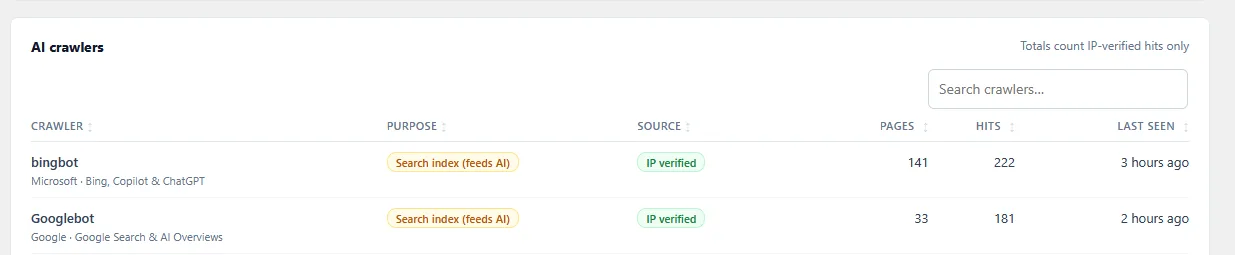
On tlinky.com, a WordPress site we run, Googlebot made 181 IP-verified hits on 33 pages in about one week up to 28 October 2026. Requests like these are what you’ll see from Google, and none of them names Google-Extended. Whether that crawling may feed Gemini is decided by your robots.txt rule for the token, not by anything visible in the request.
What Google-Extended does not control: Search and AI Overviews
Google says the token doesn’t affect whether your site is included or how it ranks in Google Search. For limiting what AI Overviews and AI Mode show from your pages, Google’s AI features page points to snippet controls, not Google-Extended.
Google’s page on AI features in Search sets out the rules. A page can appear as a supporting link in AI Overviews or AI Mode if it’s indexed and eligible to show with a snippet. Google adds that there are no extra technical requirements.
To limit what Search shows from your pages, it lists four controls: nosnippet, data-nosnippet, max-snippet and noindex. Google-Extended appears on that page only for AI training and grounding in some of Google’s other systems.
Snippet controls are robots meta tags or HTML attributes that limit how much of a page Google may quote. They are not AI-only switches: they also shrink or remove the normal search snippet, and noindex removes the page from Search entirely.
| What you want | The Google control | What else it affects |
|---|---|---|
| Keep content out of Gemini training and grounding | User-agent: Google-Extended with Disallow: / | Grounding in Gemini Apps and Vertex AI; not Search, per Google |
| Limit what AI Overviews and AI Mode quote | nosnippet, data-nosnippet or max-snippet | Your normal search snippets too |
| Keep a page out of AI Overviews entirely | noindex | Removes the page from Search |
| Stop Google crawling a section | Disallow under User-agent: Googlebot | Search for that section. A Googlebot group stops Googlebot reading your * rules, so repeat them there (see case 3) |
So if your goal is “don’t use my articles to train Gemini”, this token is the tool. If your goal is “don’t summarise my pages in AI Overviews”, Google’s page lists no AI-only control: the ones it names also change your normal search snippets.
How to set Google-Extended in robots.txt, tested
Give Google-Extended its own robots.txt group with Disallow: /. In our parser test, that blocked the token and left Googlebot free to crawl.
User-agent: Google-Extended
Disallow: /
We checked three versions of a WordPress robots.txt with Protego 0.7.0, a robots.txt parser that follows Google’s matching rules. It shows how each file reads, not what Google does with your content.
Case 1: Google-Extended in its own group
Googlebot        /a-blog-post/: allowed
Google-Extended  /a-blog-post/: disallowed
Googlebot-Image  /a-blog-post/: allowed

Case 2: Googlebot blocked instead (the mistake)
Googlebot        /a-blog-post/: disallowed
Googlebot-Image  /a-blog-post/: disallowed

Case 3: Googlebot and Google-Extended sharing one group with Disallow: /drafts/
Googlebot        /checkout/: allowed   (the * group had disallowed it)
Google-Extended  /checkout/: allowed
You want the first case. The second is the mistake to avoid: it blocks Google Search crawling, including Googlebot-Image, which falls back to the Googlebot group.
The third is subtler. Google follows the group that matches best and doesn’t combine it with the * group, so once Googlebot is named in any group, it follows only that group and ignores the * rules. Our test file had disallowed /checkout/ for everyone, but Googlebot was allowed there. The token was too: in that shared group it was blocked only from /drafts/, so the opt-out did nothing else.
Keep the token in a group of its own, and start it on a new line after another group’s last rule, because a User-agent line placed straight under another one joins that group.
Add the group wherever your robots.txt is managed. The steps for Yoast, Rank Math, AIOSEO or a physical file are in our robots.txt guide for AI bots, along with templates that cover other training bots too.
Several tools can write the line for you. Our Skyboot AI Markdown plugin includes Google-Extended in its training-crawler setting, next to GPTBot, ClaudeBot, Applebot-Extended and others (our documentation). Block adds the Disallow lines only when WordPress generates your robots.txt. If your site has a physical robots.txt file, the plugin says so and you add the group to that file instead.
Cloudflare’s managed robots.txt also adds the group when its training setting is Disallow, on all Cloudflare plans; our guide to blocking AI bots with Cloudflare covers that route.
Expect a delay of up to a day, or longer if Google’s refresh fails: that’s how long Google may keep a cached copy of robots.txt.
Google’s other AI-related crawlers: Google-CloudVertexBot and GoogleOther
On the same crawler page, Google lists two more bots with AI uses. Google-CloudVertexBot crawls sites whose owners ask for it to build Vertex AI Agents, and GoogleOther is a general crawler for Google’s product teams. Google says neither one affects Google Search.
Unlike the training token, both are real crawlers with their own user agents, so they can appear in your logs. Google-CloudVertexBot only covers crawls a site owner requested. GoogleOther handles things like one-off internal research crawls.
Set Google-Extended in one place and check it
Decide whether Gemini may use your pages, add the Google-Extended group wherever your robots.txt is managed, and confirm Googlebot is still allowed: no User-agent: Googlebot group should hold Disallow: /. Open your live robots.txt the next day and check that the group appears once and that no Googlebot group blocks your content.
Other AI companies need their own lines. Anthropic runs three separate Claude crawlers. Perplexity has a search bot and a user fetcher. Our AI crawler guide for WordPress puts every company’s bots in one decision table.
Frequently Asked Questions
Will Google-Extended show up in my server logs?
No. Google says the token has no user agent string of its own, so no request from Google carries the name. Google crawls with its regular user agents, mostly Googlebot, and reads your rule for the token as a control on how the content may be used. A server or firewall rule that matches “Google-Extended” in the user agent won’t match any Google request.
Should I block Googlebot to stop Gemini training?
Don’t use it that way. Blocking Googlebot stops Google Search from crawling those pages, and in our parser test it also covered Googlebot-Image. Google doesn’t document a Googlebot block as a Gemini opt-out; the opt-out it documents is a Google-Extended group. Use that and leave Googlebot alone.
How long does Google take to notice a robots.txt change?
Up to about a day. Google’s robots.txt documentation gives a cache time of up to 24 hours, longer if refreshing it fails. Check that your live file shows the Google-Extended group right after saving, then give Google a day before expecting the change to apply.
Is Applebot-Extended the same kind of thing?
Yes, it’s Apple’s version of the same idea. Apple says Applebot-Extended doesn’t crawl web pages; it controls whether content that Applebot collected may train Apple’s models. Blocking it doesn’t affect Apple’s search features, just as Google says Google-Extended doesn’t affect Google Search. Add both groups if you want to opt out of both.
How we tested
- robots.txt: three files (the token in its own group, Googlebot blocked by mistake, Googlebot and the token sharing a group) parsed with Protego 0.7.0 on 29 October 2026 for Googlebot, Google-Extended, Googlebot-Image, Bingbot and GPTBot. The parser follows Google’s matching rules; it doesn’t show what Google does with your content.
- Live data: Googlebot’s IP-verified hits from Skyboot AI Markdown’s AI Analytics on tlinky.com, roughly seven days up to 28 October 2026.
- Google’s behaviour comes from its crawler, AI-features and robots.txt documentation, linked in the article, not from our tests.