
AI crawlers that visit a WordPress site fall into three groups: training crawlers that collect pages for future AI models, AI search crawlers that index pages for an assistant’s answers, and user-triggered fetchers that open a page because someone asked. For most sites, the sensible default is to keep the last two, decide on training crawlers by how your site makes money, and remember that robots.txt only asks.
Checking matters as much as blocking. In about one week on tlinky.com, our own WordPress site, requests pretending to be ChatGPT-User outnumbered the real ones.
Three kinds of AI bot reach your WordPress site
Three kinds of AI bot reach a WordPress site, each run for a different job: training (OpenAI’s GPTBot), search (OAI-SearchBot) or one user’s request (ChatGPT-User). An AI crawler is any bot an AI company sends to fetch your pages.
Each company runs separate bots for separate jobs: OpenAI’s crawler documentation lists one bot per job, and so does Anthropic’s page. Perplexity runs only two of them, a search bot and a user-triggered fetcher. The job decides what blocking costs you.
OpenAI says the settings for its three bots are independent, so a site can allow OAI-SearchBot and disallow GPTBot at the same time. Anthropic describes the same three-way split for its own bots.
Training crawlers
Training crawlers are bots that collect pages that may be used to train future models. OpenAI’s GPTBot and Anthropic’s ClaudeBot are the best-known ones. OpenAI says blocking GPTBot doesn’t remove you from ChatGPT search, which uses OAI-SearchBot, and Anthropic runs search on a separate bot too.
AI search crawlers
AI search crawlers are bots that build the index an assistant searches when it answers. OAI-SearchBot does this for ChatGPT search, and PerplexityBot does it for Perplexity. OpenAI says sites that opt out of OAI-SearchBot won’t appear in ChatGPT search answers, though they can still show as navigational links.
User-triggered fetchers
User-triggered fetchers are bots that open one page because a person asked an assistant something. ChatGPT-User, Claude-User and Perplexity-User are examples. They are the closest thing to a reader, and several of their owners say robots.txt may not apply to them.
The AI bots you’ll see, and which rules each one follows
The bots that matter most on a WordPress site come from OpenAI, Anthropic, Google, Perplexity, Apple, Meta, Amazon, Common Crawl and ByteDance. They differ in two ways that change what you can do: whether they follow robots.txt, and whether their owner publishes the IP addresses they crawl from. The table uses each owner’s own documentation, checked on 28 October 2026.
| Bot | Owner | Group | Follows robots.txt? | IP list published? |
|---|---|---|---|---|
| GPTBot | OpenAI | Training | Yes | Yes |
| OAI-SearchBot | OpenAI | AI search | Yes | Yes |
| ChatGPT-User | OpenAI | User-triggered | “May not apply” | Yes |
| ClaudeBot | Anthropic | Training | Yes, plus Crawl-delay | Yes |
| Claude-SearchBot | Anthropic | AI search | Yes | Yes |
| Claude-User | Anthropic | User-triggered | Yes, per Anthropic | Yes |
| Google-Extended | Training control token | It is a robots.txt token | Not a crawler | |
| PerplexityBot | Perplexity | AI search | Not stated; Perplexity asks you to allow it | Yes |
| Perplexity-User | Perplexity | User-triggered | “Generally ignores” it | Yes |
| Applebot | Apple | Search (Siri, Spotlight); data may also train Apple models | Yes | Yes |
| Applebot-Extended | Apple | Training control token | It is a robots.txt token | Not a crawler |
| Meta-ExternalAgent | Meta | Training and indexing | Yes | Not on Meta’s page |
| Meta-ExternalFetcher | Meta | User-triggered | “May bypass” it | Not on Meta’s page |
| Amazonbot | Amazon | May train Amazon AI models | Yes | Yes |
| Amzn-User | Amazon | User-triggered | “May not follow all” rules | Yes |
| CCBot | Common Crawl | Open web dataset | Yes, plus Crawl-delay | Yes |
| Bytespider | ByteDance | AI crawler (Cloudflare’s label) | No official documentation found | No official list found |
Two rows aren’t crawlers at all. Google says Google-Extended “doesn’t have a separate HTTP request user agent string”; it is a control token. Google crawls with its normal bots and reads the token to decide whether your pages may train future Gemini models or ground Gemini’s answers, which is what opting out with Google-Extended controls.
Apple says the same about its own token, in so many words: “Applebot-Extended does not crawl webpages”. You won’t find either name in your logs, whatever some guides say.
Two other details trip up older guides. Anthropic’s current page lists ClaudeBot, Claude-User and Claude-SearchBot, so rules written for older names such as “Claude-Web” miss the bots Anthropic runs today. Anthropic also publishes its crawler IP addresses now, at claude.com/crawling/bots.json, and still recommends robots.txt as the way to opt Anthropic’s crawlers out.
What a week of AI bot traffic looked like on our own site
In about one week on tlinky.com, regular search crawlers made most of the verified visits and GPTBot made just 5. Another 291 requests borrowed a well-known bot’s name from an IP address its owner doesn’t use. tlinky.com is our link-tools site and runs WordPress with our own paid Skyboot AI Markdown plugin. Its AI Analytics screen counts a crawler only when the request comes from that company’s published IP addresses or DNS.
The analytics feature went live about a week before 28 October 2026, so treat these as a small real sample, not monthly figures. Requests a CDN answers from its cache don’t reach WordPress, so they aren’t counted either.
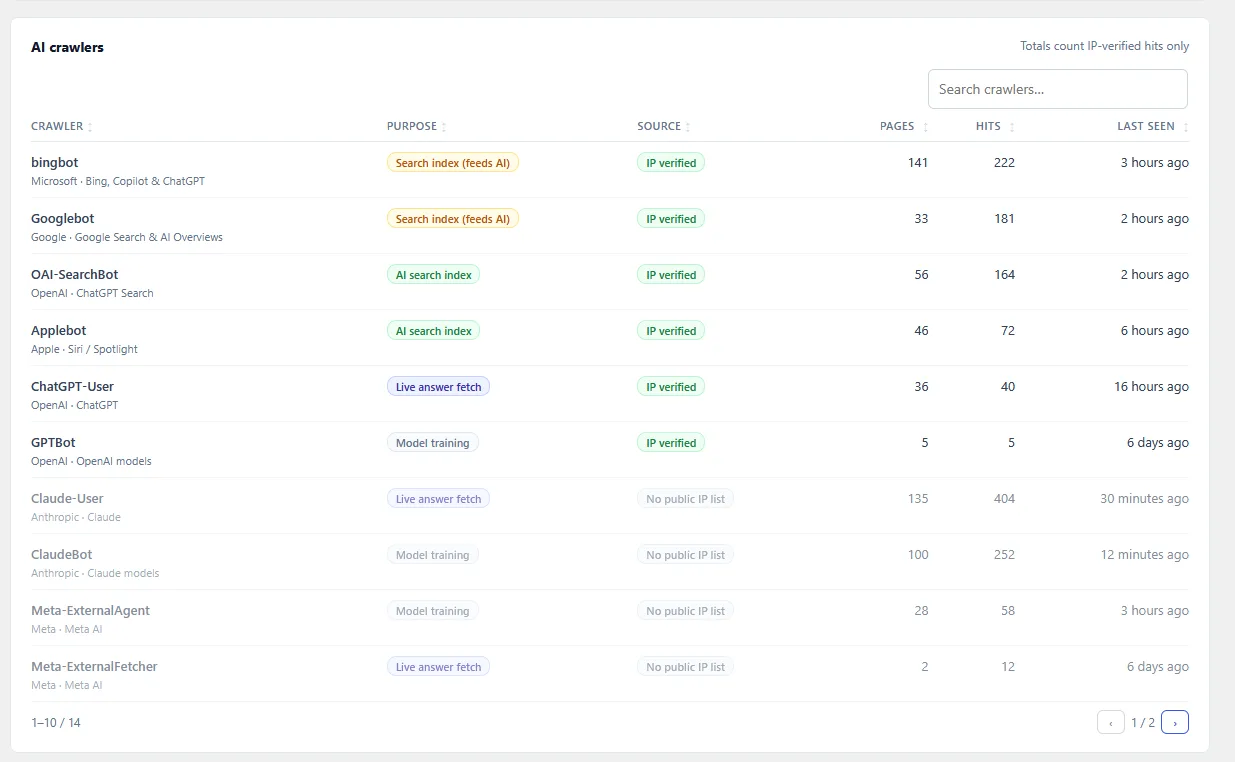
| Crawler | Group | Verified hits in the week |
|---|---|---|
| bingbot | Search index | 222 |
| Googlebot | Search index | 181 |
| OAI-SearchBot | AI search | 164 |
| Applebot | AI search (plugin’s label) | 72 |
| ChatGPT-User | User-triggered | 40 |
| GPTBot | Training | 5 |
Requests calling themselves Anthropic’s and Meta’s bots were common too: 404 as Claude-User, 252 as ClaudeBot and 58 as Meta-ExternalAgent. The plugin doesn’t check Anthropic’s IP list yet, so these are listed by user agent only and left out of the verified totals.
Then came the fakes. The plugin filtered 291 requests that used a known crawler name from an IP address that crawler’s owner doesn’t use. Fake ChatGPT-User requests (56) outnumbered real ones (40), and fake OAI-SearchBot requests reached 48.
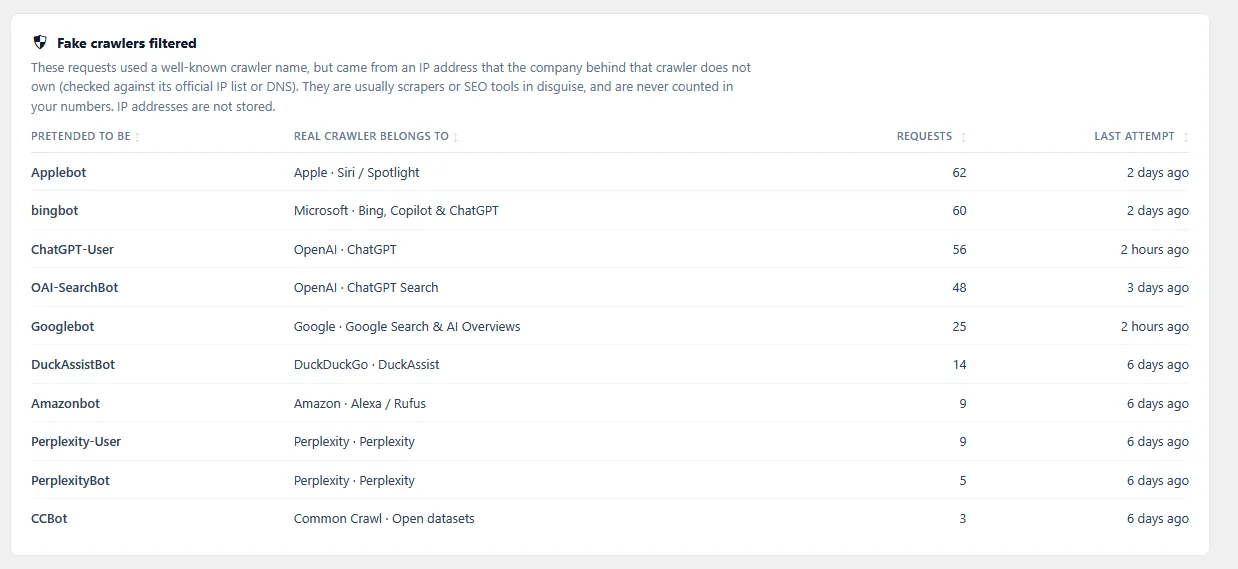
Two lessons follow.
A user agent is just text any scraper can copy, so a log that counts by name overstates real AI traffic; checking each hit against the owner’s published IP list is the fix. To verify a crawler’s IP yourself, you need that list or a reverse DNS lookup. And the bots that sent people mattered: the same week, the plugin counted 35 visits from AI assistants (unique visitors per page per day), 29 of them from ChatGPT. You can get the same numbers for your own site by tracking AI crawlers in your logs, Cloudflare or a plugin.
Allow, block or watch: decide by the kind of site you run
Most WordPress sites should allow AI search crawlers and user-triggered fetchers, because those are the bots that can send visitors, and decide on training crawlers by how the site earns money. OpenAI, Google and Apple each say their training control doesn’t affect their search results; blocking their search bots can.
| Site type | Training crawlers | AI search crawlers | User-triggered fetchers |
|---|---|---|---|
| Publisher (ads, subscriptions, original reporting) | Lean towards blocking | Allow | Allow |
| Membership or course site | Block | Allow on public pages only | Allow on public pages |
| SaaS, agency or service business | Allow | Allow | Allow |
| WooCommerce store | Allow, unless your product copy is costly original work | Allow | Allow |
| Agency running client sites | Per client, written down | Allow by default | Allow by default |
Watch means a weekly look at your verified hits and fake-crawler counts, for user-triggered fetchers and for any bot name that shows fake requests.
Publishers sell the writing itself, so a training crawler takes the product. Blocking GPTBot, ClaudeBot, Google-Extended, Applebot-Extended and CCBot asks those companies to leave your pages out of future training, and Common Crawl to leave them out of its dataset, by their own documentation. It doesn’t touch OAI-SearchBot or PerplexityBot, the bots behind ChatGPT search and Perplexity. Google says Google-Extended “does not impact a site’s inclusion in Google Search nor is it used as a ranking signal in Google Search”.
Membership and course sites should keep anything valuable behind a login, because bots see what a logged-out visitor sees. For the public pages, use the same rules as a publisher.
Service businesses and SaaS usually want the opposite. Your pages exist to explain what you sell, and you lose little when that text is reused. We’d allow all three groups and spend the effort on checking that nothing blocks them by mistake.
Stores sit in between. Product pages are written to be found, so search and user-triggered bots should get through. Block training only if your descriptions are original work you’d mind seeing reused.
Agencies should make it a written client decision. Set a default (allow search and user-triggered bots, ask about training), record each client’s choice, and apply it the same way on every site.
Their share is rising on at least one large host. In Kinsta’s own traffic data, AI bots went from about 1 in 200 visits to about 1 in 31. If you’re still unsure, weighing whether to block AI bots against the referral traffic they bring is the next read.
Five ways to block AI crawlers on WordPress, and what each one stops
You can apply the decision on WordPress in five ways, and each one stops something different. robots.txt asks bots that follow it to stay out, and a plugin writes those rules for you. Cloudflare can ask and also refuse at its edge, and a server rule refuses by user agent, which any scraper can change.
| Method | What it does | Stops | Doesn’t stop |
|---|---|---|---|
| robots.txt rules | Asks named bots to stay out | Bots that follow it | Bots that ignore it; user-triggered fetchers that may not apply it |
| A plugin that adds to WordPress’s robots.txt | Same as above, from a settings screen | Same as robots.txt | Same; and nothing if a physical robots.txt exists |
| Cloudflare managed robots.txt | Adds AI rules in front of your robots.txt | Bots that follow it | Bots that ignore it |
| Cloudflare bot rules | Refuses requests at Cloudflare | Matching requests, before WordPress | Anything you didn’t match |
| Server user-agent rule | Refuses by user agent (403) | Requests that admit the name | The same scraper with a changed user agent |
robots.txt: a polite request
robots.txt is a plain-text file at your domain root that lists which bots may crawl what. In the words of RFC 9309, the standard behind it, these rules “are not a form of access authorization”. On our test site (WordPress 7.1.3, PHP 8.3.6, nginx 1.24.0), we added Disallow rules for five training bots with a short test plugin we wrote.
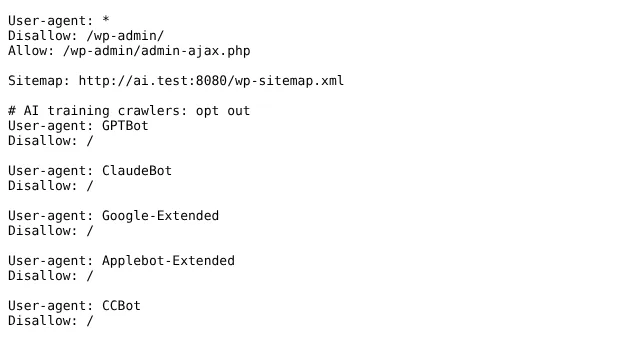
Then we requested a post with GPTBot’s user agent. The server answered HTTP 200 and sent the whole page, 68,132 bytes. Nothing on the server enforces robots.txt. The real GPTBot stays out only because OpenAI says it honours the rule.
WordPress builds a virtual robots.txt on the fly and lets code add to it through the robots_txt filter. This is the test plugin we used. To try it, upload it with your host’s File Manager or SFTP into wp-content/mu-plugins/ (make that folder first if your site lacks one), and delete the file to undo it:
<?php
defined( 'ABSPATH' ) || exit;
/**
 * Plugin Name: AI bot groups in robots.txt (test plugin)
 * Description: Adds AI crawler groups to the robots.txt that WordPress generates. Has no effect if a physical robots.txt file exists.
 */
add_filter( 'robots_txt', function ( $output, $public ) {
	if ( ! $public ) {
		return $output; // "Discourage search engines" is on: leave WordPress's output alone.
	}
	$output .= "\n# AI training crawlers: opt out\n";
	foreach ( array( 'GPTBot', 'ClaudeBot', 'Google-Extended', 'Applebot-Extended', 'CCBot' ) as $bot ) {
		$output .= "User-agent: {$bot}\nDisallow: /\n\n";
	}
	return $output;
}, 10, 2 );
One catch: a real robots.txt file in your site’s root folder replaces the one WordPress generates, and every plugin rule with it. When we added a three-line file on our test site, the web server served it and the five AI groups were gone (grep -c GPTBot returned 0). Before you paste anything, use tested robots.txt rules for AI bots and check which file your site actually serves.
A plugin setting that blocks training bots only
If you want training bots out and everything else in, our Skyboot AI Markdown plugin has a setting for exactly that. According to our documentation, Block adds Disallow rules for GPTBot, ClaudeBot, Google-Extended, Applebot-Extended, Meta-ExternalAgent, CCBot, Bytespider, cohere-ai and Diffbot. Search and user-triggered bots are left alone, and the setting is Allow by default.
Like any robots.txt method, it only works when WordPress generates robots.txt, and only bots that follow robots.txt will obey it. tlinky.com has a physical robots.txt, and the setting says so instead of failing silently. Its warning reads “A physical robots.txt file exists, so these rules cannot be added automatically”, followed by an instruction to edit that file.
Other tools do similar jobs. Yoast SEO Premium, for example, has a switch that adds robots.txt lines for GPTBot, CCBot and Google-Extended. Whichever you use, let only one tool manage the file.
Cloudflare: ask and refuse at the edge
If your site sits behind Cloudflare, its managed robots.txt adds AI rules in front of your own file, on all plans. With the training policy set to Disallow, it asks Amazonbot, Applebot-Extended, Bytespider, CCBot, ClaudeBot, Google-Extended, GPTBot and meta-externalagent to stay out. Cloudflare’s own documentation notes that “robots.txt compliance is voluntary”.
Cloudflare can also refuse requests outright. Its policies cover search and agent bots as well as training ones, so a broad block can shut out bots you meant to keep. One catch: from 15 September 2026, a Training block also applies to mixed-purpose crawlers, and Googlebot is one press coverage names, so check Google’s crawl rate after switching it on. Test each Cloudflare setting for AI bots against the bots you want before you leave it on.
Server rules: refuse by name
A server rule can refuse a bot that ignores robots.txt. On our test site this one-line nginx rule, placed inside the site’s server {} block and loaded after nginx -t, returned 403 Forbidden to any request whose user agent contained “Bytespider”:
# Block requests that call themselves Bytespider
if ($http_user_agent ~* "bytespider") { return 403; }
as Bytespider: HTTP 403
same client, browser user agent: HTTP 200Managed hosts usually don’t let you edit this file, and pages served from a CDN cache don’t reach it.
The second line is the weakness. The same client sent a normal browser user agent and got the page. A user-agent rule stops honest bots and lazy scrapers, not determined ones. ByteDance publishes no IP list we could find, so for Bytespider add a Cloudflare or host firewall rule as well, and block Bytespider and other scrapers at more than one layer.
Check that the bots you allowed can reach you
Check that the bots you allowed can still reach you after every change: request a page with the bot’s user agent, read your live robots.txt, and watch verified hits for a week. A CDN, firewall or host setting can block a bot you meant to allow, and robots.txt alone won’t tell you.
- Request a page as the bot. In Terminal (Mac, Linux) or PowerShell (Windows),
curl -sIL -A "OAI-SearchBot" https://example.com/should end in200. A403,429or challenge is a warning sign that something may be refusing the bot, but a CDN that checks crawler IPs can treat your test differently from the real bot, so confirm in its bot settings. No terminal? Use the access test below. - Read the live file. Open
https://example.com/robots.txtin a private window and confirm your groups are there. A physical file or a CDN can change what’s served. - Watch verified hits. Compare each hit’s IP with the owner’s published list. OpenAI, Anthropic, Perplexity, Apple, Amazon and Common Crawl all publish one.
Our plugin runs the first two checks for you. Its crawler access test requests your homepage from your own server as each of eight bots (OAI-SearchBot, ChatGPT-User, Claude-SearchBot, Claude-User, PerplexityBot, Perplexity-User, Googlebot and Bingbot), then checks your live robots.txt, as our documentation describes. On tlinky.com every bot came back reachable and allowed.
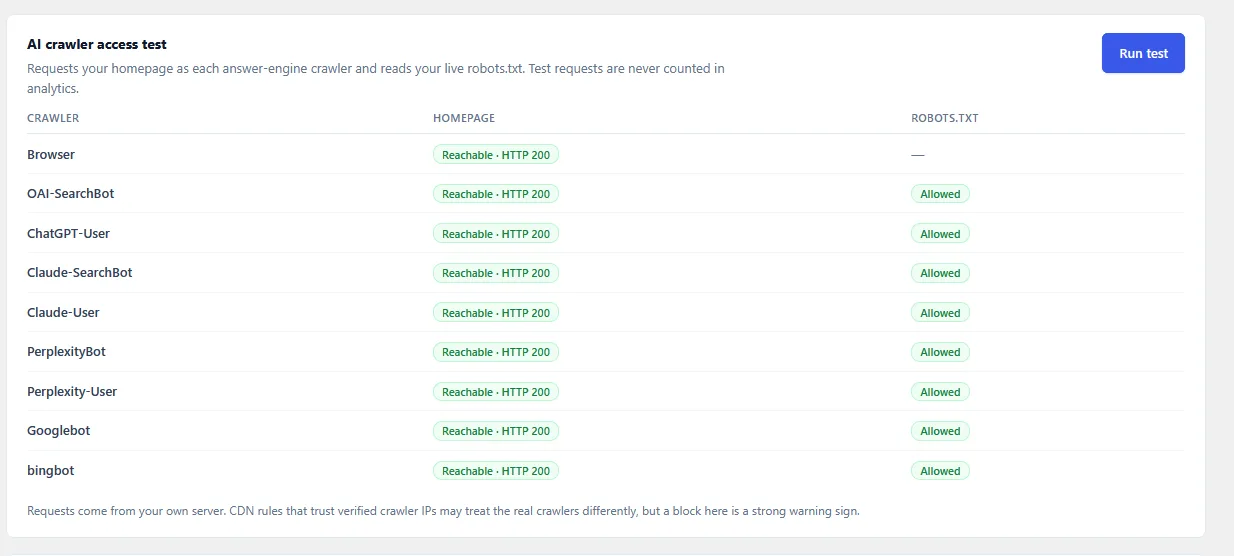
Because the test runs from your own server, as the plugin itself notes, a CDN that lets known crawler IPs through may answer the real bots differently. A block in the test is still a strong warning sign.
If the test shows a Cloudflare challenge, our troubleshooting page covers that case. For the third check, the plugin’s AI Analytics shows verified hits by crawler, kept for 90 days by default, as in the tlinky.com week above. If crawler traffic is slowing your server, measure the server load from AI bots before you block anything you’d rather keep.
Your next step: set one bot group this week
Start with the training group: OpenAI, Google and Apple each say their training control doesn’t change their search results. Pick allow or block from the table above, apply it with one method, and run the access test. A week later, look at your verified hits and fake-crawler counts.
Then decide on the other two groups with real numbers in front of you. Once the bots you want can reach you, give them something clean to read by adding llms.txt to WordPress. Then keep your pages easy to quote with content optimized for AI answers.
Frequently Asked Questions
Does blocking GPTBot remove my site from ChatGPT?
No. OpenAI uses GPTBot to collect content that may train its models, and OAI-SearchBot to show sites in ChatGPT search. OpenAI says the two settings are independent, so you can disallow GPTBot and still allow OAI-SearchBot. Blocking GPTBot only signals that you don’t want your content used for training, and ChatGPT-User, which opens pages when a user asks, is a separate bot again.
Will blocking Google-Extended hurt my Google rankings?
Google says it won’t: Google-Extended “does not impact a site’s inclusion in Google Search nor is it used as a ranking signal in Google Search”. It’s a control token, not a crawler. Google’s normal bots keep crawling, and the token only decides whether your content may train Gemini models or ground Gemini’s answers. That entry doesn’t mention AI Overviews.
Can an AI bot ignore the rules I set?
Yes, if the rules live only in robots.txt. robots.txt is a request, and the RFC 9309 standard says its rules are not a form of access authorization. Most major crawlers say they follow it. On our test site, a request using GPTBot’s user agent still got the full page after GPTBot was disallowed. Only compliant crawlers stay away; anything else needs a server or CDN rule.
Which AI bots skip the rules when a person asks?
Four user-triggered fetchers, by their owners’ own words. OpenAI says robots.txt rules may not apply to ChatGPT-User, and Perplexity says Perplexity-User generally ignores them. Meta says Meta-ExternalFetcher may bypass them, and Amazon says Amzn-User may not follow every rule. Anthropic, by contrast, says its bots, Claude-User included, honour robots.txt.
How we tested
Three tests ran on 28 October 2026 against our WordPress 7.1.3 lab install (PHP 8.3.6, nginx 1.24.0, no SEO or security plugin), sending requests with curl from the same machine.
- T1: a must-use test plugin added five Disallow groups through the
robots_txtfilter, and we requested a post with GPTBot’s user agent. - T2: an nginx rule refused user agents containing “Bytespider”, and we repeated the request with a browser user agent.
- T3: we added a physical robots.txt and checked which file the server returned.
The tlinky.com figures come from Skyboot AI Markdown’s AI Analytics (version 3.0.0) on that live site and span roughly seven days ending 28 October 2026. They are a small sample from one link-tools site, and requests answered from a CDN cache aren’t counted.