
To block Bytespider, add a robots.txt group with Disallow: /, then refuse its user agent at the server with an .htaccess rule on Apache or a map rule on nginx. Those server rules matter because nobody can say for sure that Bytespider reads robots.txt.
CCBot, Common Crawl’s crawler, is simpler: Common Crawl says it obeys robots.txt. Both rules below were tested on WordPress test sites, including a way to let the blocked bots still read your robots.txt.
Bytespider and CCBot: who runs them
Bytespider identifies itself as ByteDance’s crawler (its user agent points to bytedance.com), and CCBot is Common Crawl’s; Common Crawl documents its bot and says it obeys robots.txt, while we found no ByteDance documentation for Bytespider. ByteDance is the company behind TikTok, and Common Crawl publishes a free web dataset.
Each bot identifies itself with a user agent, the name it sends with every request. Third-party bot directories record Bytespider’s in slightly different forms, such as Bytespider (+http://www.bytedance.com) and Mozilla/5.0 (compatible; Bytespider; [email protected]). Matching the word Bytespider catches both.
| Bytespider | CCBot | |
|---|---|---|
| Run by | ByteDance | Common Crawl |
| Owner’s documentation | None found | Common Crawl FAQ |
| Follows robots.txt? | Disputed by third parties | Yes, Common Crawl says |
| Published IP list | None found | index.commoncrawl.org/ccbot.json |
The robots.txt question is genuinely open. DataDome lists Bytespider as “Not respected”, another directory says it respects robots.txt, and cside cites unnamed reports from 2023. None of them cites ByteDance, so treat it as unknown and enforce at the server.
Start with robots.txt
Add a robots.txt group for each bot with Disallow: /. It’s enough for CCBot, which says it obeys, and a cheap first step for Bytespider.
User-agent: Bytespider
Disallow: /

User-agent: CCBot
Disallow: /
In our parser test, WordPress’s default robots.txt plus these two groups disallowed Bytespider and CCBot on every path we checked. Googlebot, GPTBot and the other bots kept the home page and posts, and only /wp-admin/ stayed closed to them, as before. Our guide to robots.txt rules for AI bots shows where these lines go in each SEO plugin.
If you’d rather not edit robots.txt, there’s the training-crawler setting in our Skyboot AI Markdown plugin. It covers CCBot and Bytespider along with other training bots, such as GPTBot and Google-Extended, which it disallows at the same time. It writes robots.txt lines only, and only when WordPress generates the file (our documentation).
Apache or nginx? Check first
Apache and nginx need different server rules, so check which one you have first. In WordPress, go to Tools, Site Health, Info, then Server: the Web server line shows it, such as Apache/2.4.58 or nginx/1.24.0 on our test sites. If it says something else or can’t tell, ask your host which rule to use.
Block Bytespider in .htaccess (Apache)
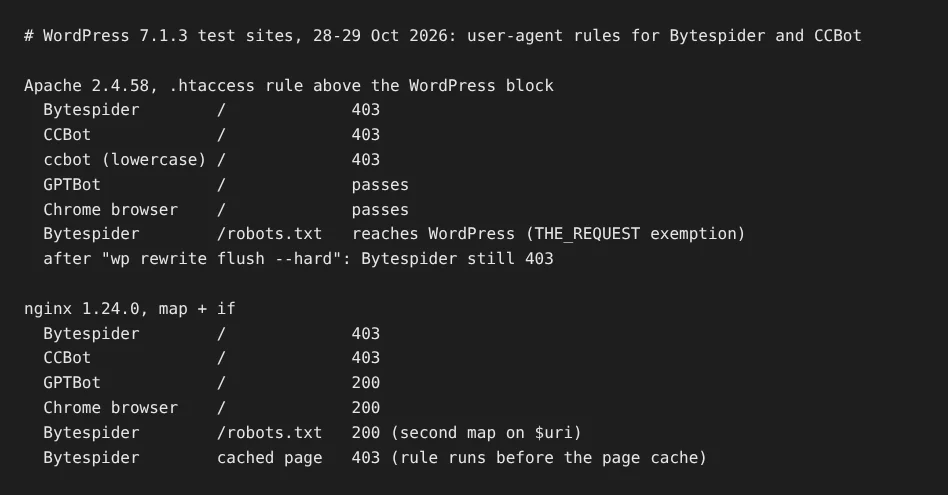
On Apache, put a mod_rewrite rule that matches Bytespider and CCBot above WordPress’s own block in .htaccess. In our test it returned 403 to both and survived a rewrite flush. The .htaccess file is the per-folder settings file Apache reads, and mod_rewrite is the Apache module that rewrites or refuses requests.
Back up .htaccess first; some FTP programs hide it, so turn on hidden files. Then add this above the # BEGIN WordPress line. If the site stops loading after you save, put the backup back:
# BEGIN Block AI scrapers (keep this block outside the WordPress markers)
<IfModule mod_rewrite.c>
RewriteEngine On
RewriteCond %{HTTP_USER_AGENT} (Bytespider|CCBot) [NC]
RewriteCond %{THE_REQUEST} !\s/robots\.txt[\s?]
RewriteRule .* - [F,L]
</IfModule>
# END Block AI scrapers
[NC] makes the match case-insensitive, and [F] sends 403 Forbidden, the status that tells a client it’s refused. The second condition lets the bots still fetch robots.txt; the next section explains why it’s written that way.
We tested this exact block on Apache 2.4.58 with WordPress 7.1.3:
- Bytespider, CCBot and a lowercase
ccbotuser agent got 403. - GPTBot, a normal browser and an empty user agent were not blocked.
- robots.txt stayed reachable for Bytespider, CCBot and ccbot.
- After
wp rewrite flush --hard, which makes WordPress rewrite its own.htaccessblock, Bytespider still got 403.
WordPress only rewrites what sits between its # BEGIN WordPress and # END WordPress markers, which is why the rule goes outside them.
Block Bytespider in nginx
On nginx, a map in the http block sets a flag for Bytespider and CCBot, and one if line in your server block returns 403; it ran before the page cache in our test. An nginx map turns one value, here the user agent, into another, here 1 for blocked and 0 for allowed.
# In the http {} block, for example /etc/nginx/conf.d/ai-scrapers.conf:
map $http_user_agent $block_ai_scraper {
    default        0;
    ~*bytespider   1;
    ~*ccbot        1;
}
# Let blocked bots still read robots.txt
map $uri $block_ai_scraper_path {
    default        $block_ai_scraper;
    /robots.txt    0;
}

# In your site's server {} block:
if ($block_ai_scraper_path) { return 403; }
Run sudo nginx -t to check the syntax; if it reports an error, remove the lines and don’t reload. Otherwise reload with sudo systemctl reload nginx. If your site has more than one server {} block, such as www and non-www, add the if line to each one that serves pages. On a managed host where you can’t edit nginx, ask the host to add it.
With this exact config on nginx 1.24.0, Bytespider, CCBot and ccbot got 403 on pages and 200 on robots.txt, while GPTBot, a browser, and an empty user agent got 200. With nginx’s page cache on, a page already in the cache still went to Bytespider as 403, because the rule runs before the cache answers.
Let blocked bots still read robots.txt
Exempt /robots.txt from the rule so a bot can still read your Disallow lines; on Apache, match THE_REQUEST, not REQUEST_URI, because WordPress rewrites robots.txt. A bot that gets 403 on robots.txt never sees your rules.
On nginx, the second map in the code above did the job: Bytespider and CCBot got 200 for /robots.txt and 403 for pages.
On Apache, our first try used RewriteCond %{REQUEST_URI} !^/robots.txt$, and Bytespider still got 403 for robots.txt. WordPress serves robots.txt through index.php, so the rule runs a second time on that internal request, where the path no longer says robots.txt. %{THE_REQUEST} holds the original request line, so the exemption held.
What user-agent server rules can’t stop
A user-agent rule stops only bots that send their real name; a scraper posing as a browser gets through. In a related test, a request with a Chrome user agent passed the same kind of rule untouched.
For those, you need checks that don’t trust the name: an IP check against a published list, as in our crawler IP verification guide, or a CDN that classifies bots. Cloudflare’s managed robots.txt includes Bytespider and CCBot, and its AI Crawl Control can block a single crawler; our Cloudflare guide covers both. ByteDance publishes no IP list that we found, so an IP allowlist isn’t an option for Bytespider.
Set it once and check it
Set the robots.txt groups and the server rule once, then check them:
- Add the two robots.txt groups.
- Add the
.htaccessor nginx rule, keeping a backup. - Test with curl:
curl -I -A "Bytespider" https://yoursite.com/should return 403, the same request for/robots.txtshould not, andcurl -I https://yoursite.com/with no user agent should return your normal 200 or redirect. - A week later, check your logs. Bytespider and CCBot will still appear, now with status 403; a 200 means the rule isn’t matching. For where to look, see how to track AI crawlers.
On our own live site, tlinky.com, Skyboot AI Markdown filtered 3 fake CCBot requests in about one week of data to 28 October 2026, a reminder that the name alone proves little. Which other AI bots deserve a rule is a question for our WordPress AI crawler hub.
Frequently Asked Questions
Is Bytespider known to ignore robots.txt?
Nobody can say with authority. We found no ByteDance documentation for Bytespider, and the third-party sources disagree: DataDome lists it as “Not respected”, while another bot directory says it complies. That’s why the server rule above is worth adding even if you’ve already disallowed it in robots.txt.
Will blocking Bytespider affect my Google rankings?
Not through these rules. Googlebot and Google’s other search crawlers have their own names, and our rules match only the words Bytespider and CCBot. In our tests, GPTBot and normal browsers passed both the Apache and nginx rules, and in the robots.txt test Googlebot kept the home page and posts.
Can I block Bytespider by IP address?
Not reliably. We found no IP list published by ByteDance, so any range list would come from third parties and could block the wrong addresses. Common Crawl does publish CCBot’s addresses, at index.commoncrawl.org/ccbot.json, with reverse DNS to crawl.commoncrawl.org.
How we tested
- Lab: Apache 2.4.58 and nginx 1.24.0 with WordPress 7.1.3, 28-29 October 2026. We tested the user-agent line alone first. Then we re-ran the exact code above with six user agents, robots.txt, a hard rewrite flush and nginx’s page cache.
- tlinky.com numbers are live-site data from Skyboot AI Markdown (version 3.0.0), separate from the lab.
- robots.txt groups read with the Protego 0.7.0 parser.
- Bytespider’s behaviour is not documented by ByteDance; the claims about it are third parties’, named in the article.