
To verify a GPTBot IP, check whether the request’s address falls inside one of the ranges in OpenAI’s published list, openai.com/gptbot.json. A match means the request came from OpenAI; no match means it’s unverified, whatever its user agent says.
That’s IP verification, and it works for crawlers whose owners publish an IP list, such as OpenAI’s, Anthropic’s and Perplexity’s. Googlebot is usually checked with a reverse DNS lookup instead. Below are tested scripts for both checks, the right way to read a visitor’s IP behind Cloudflare, and a small WordPress plugin file that refuses fake crawler requests.
Why a crawler’s name proves nothing
A crawler’s name is just text in the request, so anyone can send GPTBot’s user agent; only the IP address shows whether it came from OpenAI. Each request carries a user agent, the label a client picks for itself, and nothing stops a scraper from copying it.
A fake crawler is any request using a famous bot’s label while coming from somewhere its owner doesn’t crawl from. On tlinky.com (a WordPress link-tools site we own), Skyboot AI Markdown’s fake-crawler table listed 291 in the seven or so days up to 28 October 2026.
The most-faked names were:
- Applebot: 62 fake requests, against 72 real ones
- bingbot: 60 fake, against 222 real
- ChatGPT-User: 56 fake, against 40 real
- OAI-SearchBot: 48 fake, against 164 real
- Googlebot: 25 fake, against 181 real
For ChatGPT-User, the fakes outnumbered the real requests. Count by name alone and you’d overstate OpenAI’s traffic and miss the scrapers using its name.
Verify GPTBot IP addresses against OpenAI’s list
Download https://openai.com/gptbot.json (for example with curl -o gptbot.json https://openai.com/gptbot.json) and check whether the request’s IP falls inside one of its ranges; a match means the request came from OpenAI’s GPTBot. GPTBot is OpenAI’s training crawler, and OpenAI’s bots page gives every bot its own list: gptbot.json, searchbot.json, chatgpt-user.json and adsbot.json.
An IP list here is a JSON file of CIDR ranges. A CIDR range is a block of addresses written as a start address and a size, such as 20.171.206.0/24, which covers 256 addresses from 20.171.206.0 to 20.171.206.255.
The copy we downloaded on 28 October 2026 was dated 22 September 2026 and contained 18 ranges, all IPv4. Back on 5 August 2026, cloudinsight.cc counted 21, which suggests the list changes; download it fresh rather than copying ranges from any article, this one included.
This Python script takes a list file and one or more addresses. It handles IPv4, IPv6 and IPv4-mapped addresses such as ::ffff:20.171.206.15, rejects text that isn’t an address, and refuses to judge if the list is missing, empty or broken:
#!/usr/bin/env python3
"""Check whether an IP address is inside a crawler owner's published IP list.
Usage: verify_crawler_ip.py <list.json> <ip> [<ip> ...]
Tested with OpenAI's gptbot.json and Anthropic's bots.json, which use
{"prefixes": [{"ipv4Prefix": ...} or {"ipv6Prefix": ...}]}. Check other lists use the same layout."""
import ipaddress, json, sys

def load(path):
    try:
        data = json.load(open(path, encoding="utf-8"))
    except (OSError, ValueError) as err:
        sys.exit(f"{path}: list unreadable ({err.__class__.__name__}); refusing to judge")
    nets = []
    for p in data.get("prefixes", []) if isinstance(data, dict) else []:
        cidr = p.get("ipv4Prefix") or p.get("ipv6Prefix")
        if cidr:
            nets.append(ipaddress.ip_network(cidr, strict=False))
    if not nets:
        sys.exit(f"{path}: no prefixes found; refusing to judge (a broken list is not proof of a fake bot)")
    return data.get("creationTime", "unknown"), nets

created, nets = load(sys.argv[1])
print(f"list {sys.argv[1]}: {len(nets)} prefixes, creationTime {created}")
for raw in sys.argv[2:]:
    try:
        ip = ipaddress.ip_address(raw.strip())
    except ValueError:
        print(f"{raw}: not an IP address")
        continue
    if ip.version == 6 and ip.ipv4_mapped:  # ::ffff:20.171.206.15 on dual-stack servers
        ip = ip.ipv4_mapped
    hit = next((n for n in nets if ip.version == n.version and ip in n), None)
    print(f"{raw}: {'MATCH ' + str(hit) if hit else 'no match (treat as unverified)'}")
We ran it against OpenAI’s list with two OpenAI addresses, one of them also written in IPv4-mapped form, a loopback address, one of Google’s, an IPv6 address, and some text that isn’t an address:
$ python3 verify_crawler_ip.py gptbot.json 20.171.206.15 74.7.227.200 ::ffff:20.171.206.15 127.0.0.1 66.249.66.1 2001:db8::1 not-an-ip
list gptbot.json: 18 prefixes, creationTime 2026-09-22T02:00:07.000000
20.171.206.15: MATCH 20.171.206.0/24
74.7.227.200: MATCH 74.7.227.128/25
::ffff:20.171.206.15: MATCH 20.171.206.0/24
127.0.0.1: no match (treat as unverified)
66.249.66.1: no match (treat as unverified)
2001:db8::1: no match (treat as unverified)
not-an-ip: not an IP address
PHP matched the Python results for the addresses we ran it on, including the edges of a range (20.125.66.95 inside, .96 outside), an IPv6 /60 range and missing or broken lists. It’s the first file of the WordPress plugin further down. To pull the addresses out of your log first, see our guide to tracking AI crawlers.
Use the list that matches the name in the request: searchbot.json for OAI-SearchBot, chatgpt-user.json for ChatGPT-User. More on what each OpenAI bot does is in our GPTBot explainer.
IP verification for other AI crawlers
OpenAI, Anthropic, Perplexity, Google, Apple and Common Crawl each publish a way to check their crawlers, either an IP list, a reverse DNS domain or both. We ran our script on OpenAI’s and Anthropic’s lists; the other files weren’t downloaded for this test, so check they use the same prefixes layout first.
| Company | IP list | Reverse DNS |
|---|---|---|
| OpenAI | openai.com/gptbot.json, searchbot.json, chatgpt-user.json, adsbot.json | IP lists only, per its docs |
| Anthropic | claude.com/crawling/bots.json | IP list only, per its docs |
| Perplexity | perplexity.com/perplexitybot.json, perplexity-user.json | IP lists only, per its docs |
common-crawlers.json and four other files, listed on Google’s verification page | googlebot.com, google.com, googleusercontent.com | |
| Apple | Applebot IP list (Apple’s page) | *.applebot.apple.com |
| Common Crawl | index.commoncrawl.org/ccbot.json | crawl.commoncrawl.org |
Anthropic says that a crawler whose source address is on its list is coming from Anthropic; more on its three bots is in our ClaudeBot explainer. Our copy, dated 20 October 2026, held 14 entries, and the script matched 216.73.217.4 to its 216.73.216.0/22 range.
Perplexity recommends matching the user agent and the IP range together, which is what the WordPress plugin below does for GPTBot.
Spot a fake Googlebot with reverse DNS
To spot a fake Googlebot, look up the IP’s host name, check that it ends in googlebot.com, google.com or googleusercontent.com, then look that name up and confirm it points back to the same IP. That two-way check is reverse DNS with forward confirmation.
Reverse DNS turns an IP address into a host name. On its own, a host name can be faked by whoever controls that IP’s reverse record, which is why the forward lookup back to the same address matters. Google’s verification page gives this example:
$ host 66.249.66.1
1.66.249.66.in-addr.arpa domain name pointer crawl-66-249-66-1.googlebot.com.

$ host crawl-66-249-66-1.googlebot.com
crawl-66-249-66-1.googlebot.com has address 66.249.66.1
Our test setup has no outside DNS, so we couldn’t run these lookups ourselves; the commands and output are Google’s. Google also publishes its ranges as JSON files, but we didn’t test our script on them.
On tlinky.com, Skyboot AI Markdown’s check (against Google’s IP list or DNS) flagged 25 requests claiming to be Googlebot in about one week, against 181 IP-verified ones. Blocking a real Googlebot by mistake costs search traffic, so check before you block.
Read the real visitor IP behind Cloudflare
CF-Connecting-IP is the header Cloudflare adds with the visitor’s real address, but trust it only when the request comes from Cloudflare’s own IP ranges. Without that rule, anyone can send the header with a GPTBot address and pass your check.
Cloudflare’s guide to restoring visitor IPs says to accept traffic only from Cloudflare’s IPs, “otherwise, the header could be spoofed”. On nginx, the real_ip settings it describes rewrite the address before WordPress sees it.
In our WordPress test, a request with a forged CF-Connecting-IP holding a GPTBot address got 403 Forbidden when the sender wasn’t a trusted proxy. Cloudflare’s range list changes too, so refresh it like the crawler lists.
Refuse fake crawler requests in WordPress
A small must-use plugin can return 403 to any request that says GPTBot but comes from outside OpenAI’s list, and let it through if the list is missing or broken. A must-use plugin is a PHP file in wp-content/mu-plugins/ that WordPress loads on every request without activation.
It needs two files in wp-content/mu-plugins/, plus a copy of gptbot.json in wp-content/uploads/crawler-ips/. The first, verify-crawler-ip.php, holds the matching functions:
<?php
/**
 * Check whether an IP address sits inside a crawler's published IP list (IPv4 and IPv6).
 * Usage (CLI): php verify-crawler-ip.php <list.json> <ip>
 */
function sb_ip_in_cidr( $ip, $cidr ) {
	if ( 0 === stripos( $ip, '::ffff:' ) && false !== filter_var( substr( $ip, 7 ), FILTER_VALIDATE_IP, FILTER_FLAG_IPV4 ) ) {
		$ip = substr( $ip, 7 ); // IPv4-mapped IPv6 address on dual-stack servers
	}
	list( $net, $bits ) = explode( '/', $cidr ) + array( 1 => null );
	$ip_bin  = @inet_pton( $ip );
	$net_bin = @inet_pton( $net );
	if ( false === $ip_bin || false === $net_bin || strlen( $ip_bin ) !== strlen( $net_bin ) ) {
		return false; // invalid address, or IPv4 checked against an IPv6 range
	}
	$bits  = ( null === $bits ) ? strlen( $ip_bin ) * 8 : (int) $bits;
	$bytes = intdiv( $bits, 8 );
	$rest  = $bits % 8;
	if ( substr( $ip_bin, 0, $bytes ) !== substr( $net_bin, 0, $bytes ) ) {
		return false;
	}
	if ( 0 === $rest ) {
		return true;
	}
	$mask = chr( ( 0xff << ( 8 - $rest ) ) & 0xff );
	return ( $ip_bin[ $bytes ] & $mask ) === ( $net_bin[ $bytes ] & $mask );
}

function sb_ip_in_list( $ip, $json ) {
	$data = json_decode( $json, true );
	if ( empty( $data['prefixes'] ) || ! is_array( $data['prefixes'] ) ) {
		return null; // list missing or broken: unknown, not "fake"
	}
	$read = 0;
	foreach ( $data['prefixes'] as $p ) {
		$cidr = isset( $p['ipv4Prefix'] ) ? $p['ipv4Prefix'] : ( isset( $p['ipv6Prefix'] ) ? $p['ipv6Prefix'] : '' );
		if ( ! $cidr ) {
			continue;
		}
		$read++;
		if ( sb_ip_in_cidr( $ip, $cidr ) ) {
			return true;
		}
	}
	return $read ? false : null; // no usable ranges: don't judge
}

if ( PHP_SAPI === 'cli' && isset( $argv[2] ) ) {
	$r = sb_ip_in_list( $argv[2], (string) @file_get_contents( $argv[1] ) );
	echo $argv[2] . ': ' . ( null === $r ? 'list unreadable' : ( $r ? 'match' : 'no match' ) ) . PHP_EOL;
}
The second, sb-block-fake-crawlers.php, applies the check. Fill in SB_TRUSTED_PROXIES first if your site sits behind Cloudflare or a similar proxy and your web server doesn’t already restore the visitor IP. Otherwise every request comes from the proxy’s address, and real GPTBot gets 403 too (case C below). Cloudflare publishes its ranges at cloudflare.com/ips.
<?php
/**
 * Plugin Name: Block fake AI crawlers
 * Refuses requests that use a listed crawler's name but come from outside its owner's IP list.
 * Save each list to wp-content/uploads/crawler-ips/ and refresh them regularly.
 */
require_once __DIR__ . '/verify-crawler-ip.php'; // sb_ip_in_list() and sb_ip_in_cidr()

// Name in the user agent => list file in wp-content/uploads/crawler-ips/. Add one line per bot.
const SB_CRAWLER_LISTS = array(
	'GPTBot' => 'gptbot.json',
);

// Proxies whose CF-Connecting-IP header you trust. Behind Cloudflare, list its ranges
// from https://www.cloudflare.com/ips/ (format: '192.0.2.0/24', one per line), unless
// your web server already restores the visitor IP. Leave empty only if no proxy sits in front.
const SB_TRUSTED_PROXIES = array();

function sb_client_ip() {
	$remote = isset( $_SERVER['REMOTE_ADDR'] ) ? $_SERVER['REMOTE_ADDR'] : '';
	foreach ( SB_TRUSTED_PROXIES as $cidr ) {
		if ( sb_ip_in_cidr( $remote, $cidr ) && ! empty( $_SERVER['HTTP_CF_CONNECTING_IP'] ) ) {
			return trim( $_SERVER['HTTP_CF_CONNECTING_IP'] );
		}
	}
	return $remote; // not from a trusted proxy: ignore the header, it could be forged
}

add_action( 'init', function () {
	$ua = isset( $_SERVER['HTTP_USER_AGENT'] ) ? $_SERVER['HTTP_USER_AGENT'] : '';
	foreach ( SB_CRAWLER_LISTS as $name => $list ) {
		if ( false === stripos( $ua, $name ) ) {
			continue;
		}
		$file = WP_CONTENT_DIR . '/uploads/crawler-ips/' . $list;
		$json = is_readable( $file ) ? file_get_contents( $file ) : '';
		if ( false === sb_ip_in_list( sb_client_ip(), $json ) ) { // null = list missing or broken: don't judge
			status_header( 403 );
			exit( 'Forbidden' );
		}
		return;
	}
}, 0 );
We ran it on our lab copy of WordPress 7.1.3, with PHP 8.3 and nginx 1.24.0. For the test, the local machine played the trusted proxy, standing in for Cloudflare:
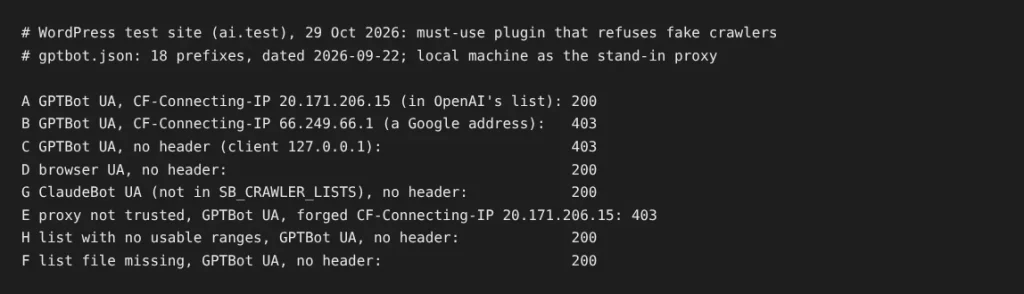
ai.test, 29 Oct 2026: eight requests, one rule (lab output)
Every case behaved as designed. A listed OpenAI address, sent through our stand-in proxy, passed. Borrowed names got 403, other visitors and bots were untouched, and an unusable or missing list let everything through instead of blocking real crawlers. After installing, test from your own computer with GPTBot’s user agent: you should get 403.
Three limits apply. It covers only the names in SB_CRAWLER_LISTS; add a line per bot there, and don’t copy the file, because a second copy would redeclare its function and stop the site with a fatal error.
If a page cache answers the request, WordPress never runs, so cached pages still reach fakes; in our cache test, four of five GPTBot requests were served without PHP. And you must refresh gptbot.json yourself.
For blocks that run before the cache, use a server rule or your CDN.
Let a plugin run the check
If you don’t want to maintain scripts, an analytics plugin can check crawler IPs for you. Our Skyboot AI Markdown plugin checks requests against six companies’ published lists (Apple, Bing, DuckDuckGo, Google, OpenAI, Perplexity) and sets fakes aside in its AI Analytics (our documentation).
It leaves fakes out of its numbers, and it doesn’t yet check Anthropic’s list, so Claude rows are listed as “No public IP list” and kept out of the verified totals.
Keep your crawler IP lists fresh
Download each list again on a schedule, keep the last good copy, and never treat a failed download as proof that a bot is fake. Our script and plugin both refuse to judge when a list is empty or unreadable. Which bots to allow in the first place is a separate decision, which our WordPress AI crawler hub helps with.
Frequently Asked Questions
How often do crawler IP lists change?
Often enough that a copied list goes stale. OpenAI’s GPTBot list had 21 ranges on 5 August 2026 by one third-party count, and 18 in our copy dated 22 September. Download fresh copies on a schedule, such as weekly, and keep the last good one if a download fails.
Is a request that fails the check always malicious?
No, it’s unverified. It could be a scraper using a famous name, or a real crawler from an address added after your copy of the list. That’s why the plugin above lets requests through when the list is missing, and why it’s worth refreshing lists before blocking anything on a large scale.
Can I just block OpenAI’s IP ranges instead?
You can, but it isn’t the documented way to opt out. OpenAI’s bots page describes a robots.txt setting for each bot, and its ranges change over time, so a range block needs the same upkeep as a verification list. If you only want GPTBot out, a robots.txt group is simpler.
Does Anthropic publish IP addresses for ClaudeBot?
Yes. Anthropic publishes claude.com/crawling/bots.json and says its list identifies requests that really come from Anthropic. Our copy, dated 20 October 2026, held one /22 range and 13 single addresses. The same script checks it.
How we tested
- IP checks: Python 3 and PHP 8.3 scripts against OpenAI’s gptbot.json (dated 22 September 2026) and Anthropic’s bots.json (dated 20 October 2026), downloaded 28 October 2026, plus a one-range IPv6 test list.
- WordPress: the two plugin files on a WordPress 7.1.3 lab install behind nginx 1.24.0, eight requests on 29 October 2026 with the local machine as the trusted proxy, then removed.
- Reverse DNS: not run (no outside DNS in our lab); the example is Google’s.
- Live numbers: the fake-crawler table in Skyboot AI Markdown (version 3.0.0) on tlinky.com, roughly a week ending 28 October 2026.