
To track AI crawlers on WordPress, search your server logs for their names, check Cloudflare’s AI Crawl Control if your site runs through Cloudflare, or use a plugin with AI crawler analytics inside WordPress. Each one sees a different slice of the traffic, so their numbers won’t match.
Whichever you pick, don’t trust a bot’s name on its own. On tlinky.com, a WordPress site of ours, requests faking ChatGPT-User’s name (56) outnumbered the real ones (40) in about one week.
Three ways to track AI crawlers on WordPress
You can track AI crawlers in your server’s access log, in Cloudflare if your site uses it, or with a WordPress plugin, and each one sees a different slice of the traffic. An access log is the file your web server writes with one line per request it answers.
| Where you look | What it sees | Checks the bot is real? | Effort |
|---|---|---|---|
| Server access log | Every request your server answers, cached pages included | No, it records the name the bot gives | Command line or your host’s log viewer |
| Cloudflare AI Crawl Control | Requests that pass through Cloudflare | On paid plans, with Bot Management; the Free plan goes by name | A dashboard, if you already use Cloudflare |
| A WordPress plugin | Requests that reach WordPress | Depends on the plugin; some check the company’s published IP list | A settings screen |
The user agent is the name a bot gives in each request, for example GPTBot. All three methods start from it. The difference is what they do next: a log only records it, while some tools check the request’s address against the company’s published IP list.
Find AI bots in your server logs
Search your server logs for AI bot names with the grep command. Grep is a command-line tool that finds lines containing a word. The commands below count requests per bot, read older log files, and show the pages each bot asked for and where they came from.
We tested these on a WordPress test site running nginx, after sending it requests with AI bot names. The log uses the combined format, which ends each line with the user agent in quotes. If your lines don’t end that way, your log has no bot names and these commands will find nothing; ask your host to switch it to combined.
The routine has three steps:
- Get the access log: download it from your host’s control panel, or open a shell on the server over SSH. Ask your host where it is if you can’t find it.
- Run the commands below in a terminal, in the folder that holds the log. On Windows, WSL or Git Bash gives you
grep,zgrepandawk. - Check the IP addresses of any bot you plan to act on.
Count requests for one bot:
$ grep -c "GPTBot" access.log
5
Count every AI bot at once, busiest first:
$ grep -oE "GPTBot|OAI-SearchBot|ChatGPT-User|ClaudeBot|Claude-User|Claude-SearchBot|PerplexityBot|Perplexity-User|Google-Extended|Bytespider|CCBot|Amazonbot|Meta-ExternalAgent" access.log | sort | uniq -c | sort -rn
      5 GPTBot
      4 ClaudeBot
      3 OAI-SearchBot
      2 ChatGPT-User
      1 PerplexityBot
Hosts usually keep older days in separate files, such as access.log.1 or a compressed access.log.2.gz, so access.log alone may cover only part of the week. zgrep reads plain and compressed files together. In our split test log, grep on access.log found no GPTBot lines, while this found every bot:
$ zgrep -hoE "GPTBot|OAI-SearchBot|OAI-AdsBot|ChatGPT-User|ClaudeBot|Claude-User|Claude-SearchBot|PerplexityBot|Perplexity-User|Applebot|DuckAssistBot|Meta-ExternalAgent|Meta-ExternalFetcher|Bytespider|CCBot|Amazonbot" access.log* | sort | uniq -c | sort -rn
      2 GPTBot
      2 Applebot
      1 OAI-SearchBot
      1 OAI-AdsBot
      1 Meta-ExternalFetcher
      1 DuckAssistBot
      1 ClaudeBot
      1 ChatGPT-User
Google-Extended was in the first list but never showed up: Google says it has no user agent of its own, so it’s a robots.txt setting, not a crawler. The longer list drops it.
See which pages one bot asked for, and the status it got:
$ grep "GPTBot" access.log | awk '{print $7, $9}' | sort | uniq -c | sort -rn
      1 /robots.txt 200
      1 /post-by-writer1/ 200
      1 /nope/ 404
      1 /hello-world/ 200
      1 / 200
In this log format, the seventh field is the path and the ninth is the HTTP status. A 404 means the bot asked for a page that doesn’t exist, maybe an old or made-up link.
See where the requests came from:
$ grep -E "GPTBot|ClaudeBot" access.log | awk '{print $1}' | sort | uniq -c
      9 127.0.0.1
The first field is the client’s IP address. On our test site every request came from the same machine, which is exactly why a name proves nothing: anyone can send a request that says GPTBot. To check an address against OpenAI’s or Anthropic’s published list, use our crawler IP verification guide.
Behind Cloudflare, that first field holds a Cloudflare address unless your server restores the visitor’s IP; Cloudflare puts the original in a CF-Connecting-IP header. The verification guide covers how to read it safely.
Cloudflare’s AI crawler analytics
If your site runs through Cloudflare, its AI Crawl Control shows AI crawler requests on every plan, though the Free plan identifies them by user agent only. Cloudflare describes it as a way to monitor and control how AI services reach your content.
It also helps you spot crawlers that ignore your robots.txt rules, according to Cloudflare. On paid plans, detection uses Cloudflare’s Bot Management signals rather than the name alone.
Cloudflare only sees traffic that goes through it. Blocking from the same screen is covered in our Cloudflare AI bot guide.
An AI crawler analytics plugin inside WordPress
A plugin can count AI crawler hits from inside WordPress and, depending on the plugin, check them against the company’s IP list, which a plain log search can’t do. AI crawler analytics is any tool that counts these requests by bot and page; the useful ones also tell you which requests were real.
There are free and paid options. AI Crawler Control by Citlyze, a free plugin with fewer than 10 active installs at our check, passes crawler requests to Citlyze’s service, which its listing says verifies them by IP address; tracking needs a Citlyze account. Our Skyboot AI Markdown plugin (paid, from $49 a year) does the check inside WordPress in its AI Analytics. It compares each crawler’s address with the lists that Apple, Bing, DuckDuckGo, Google, OpenAI and Perplexity publish, sets fake crawlers aside and keeps 90 days of data by default (our documentation).
On tlinky.com, its totals counted IP-verified hits only, in about one week to 28 October 2026. Search crawlers that also feed AI led, bingbot with 222 and Googlebot with 181, followed by OAI-SearchBot 164, Applebot 72, ChatGPT-User 40 and GPTBot 5.
A fake crawler is a request that borrows a famous bot’s name but comes from an address the company doesn’t own. The plugin’s fake-crawler table held 291 of them that week. ChatGPT-User had 56 fakes against 40 real requests.
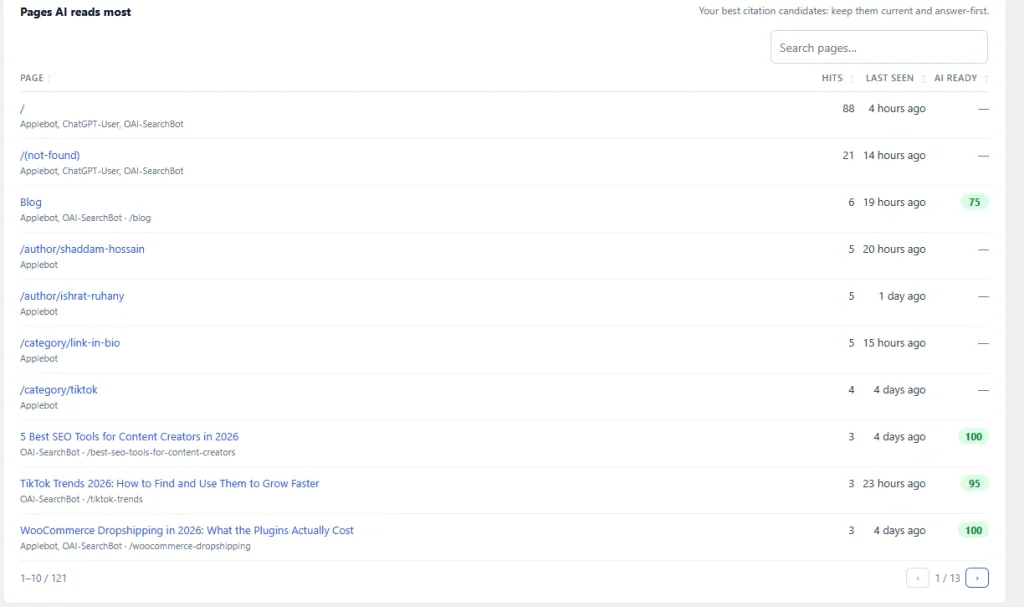
It also shows which pages the bots read. The home page led with 88 hits, and the not-found page had 21, from the same three bots.
Two limits apply. Anthropic and Meta rows, 726 requests that week, were listed but left out of the totals, because the plugin can’t yet match them: it doesn’t check Anthropic’s list or Meta’s addresses. And like any plugin, it can’t see requests that a CDN answers from its own cache.
Why your numbers won’t match
Your numbers won’t match because logs, Cloudflare and plugins each see a different layer: a page cache hides hits from WordPress, fakes inflate logs, and some tools count only verified hits. The cache gap is the easiest to miss, so we measured it.
A page cache stores a finished copy of a page and serves it without running WordPress again. We turned on nginx’s page cache on our test site, added a small logger that records every request WordPress handles, and sent five GPTBot requests to one post:
request 1: HTTP/1.1 200 OK X-Cache: MISS
request 2: HTTP/1.1 200 OK X-Cache: HIT
request 3: HTTP/1.1 200 OK X-Cache: HIT
request 4: HTTP/1.1 200 OK X-Cache: HIT
request 5: HTTP/1.1 200 OK X-Cache: HIT

$ grep -c "GPTBot" /var/log/nginx/ai-access.log
5
$ grep -c "GPTBot" /tmp/l9-php-hits.log   # what a WordPress plugin sees
1
The server log counted five requests. WordPress saw one, because the cache answered the other four before WordPress ran. We didn’t run our plugin in this test; the logger stands in for any plugin that counts requests in PHP, so expect the same gap with ours. Our docs already note it can’t see requests a CDN serves from cache.
The other differences pull the other way. A log counts every fake, while a plugin that checks IPs drops them. A tool that counts only verified hits will also leave out bots it can’t check. On tlinky.com, that left 726 Anthropic and Meta requests out of the totals.
So a log number higher than your plugin’s isn’t an error. Use the log for “how much hit the server” and a verifying tool for “how much was real”. If load is the worry, our test of what AI bots cost a WordPress server shows how much a cache saves.
Check your AI crawler numbers once a month
Pick one source, write down last month’s counts by bot, and compare each month. Note the verified total separately from the raw names. When a number jumps, check its IP addresses before you block anything; the AI crawler guide for WordPress helps you decide what each bot is allowed to do.
Frequently Asked Questions
Does Google Analytics show AI crawlers?
Usually not the crawlers. Analytics that rely on a tracking script only see visitors whose browser runs it, and crawlers that just fetch HTML don’t. What a visitors-from-AI report can show is the people who arrive from AI assistants. On tlinky.com, Skyboot AI Markdown counted 35 of them (unique visitors per page per day) in about one week, 29 from ChatGPT.
Can I see which pages AI bots read?
Yes. In a server log, pull the path field for one bot’s lines, as in the awk '{print $7, $9}' command above. A plugin with AI analytics can show it per page; on tlinky.com, the home page led with 88 verified hits in about one week. Pages that get a lot of 404s are worth fixing or redirecting.
How do I know an AI bot hit is real?
Check its IP address against the list the company publishes. OpenAI publishes one list per bot, for example. A name alone proves nothing: on tlinky.com, ChatGPT-User had 56 fake requests in about one week against 40 real ones. The verification guide linked above has scripts for the check.
How we tested
- Log commands: nginx 1.24.0 log, WordPress 7.1.3 lab install, requests sent with AI bot user agents (28 October); rotated-log check on that log split in three (29 October).
- Cache test: nginx fastcgi page cache plus a stand-in logger in WordPress (not our plugin), five GPTBot requests to one post (29 October 2026); both removed after.
- Site data: tlinky.com, read in Skyboot AI Markdown (version 3.0.0), roughly a week ending 28 October 2026.