
PerplexityBot is Perplexity’s search crawler: it visits pages so Perplexity can surface and link them in its answers. It runs a second bot, Perplexity-User, which fetches a page when someone asks it a question. The two need different controls, because the company says the second one generally ignores robots.txt.
Perplexity says neither bot collects content for training AI foundation models. The choice is about being found.
PerplexityBot and Perplexity-User: what each one does
PerplexityBot crawls pages so Perplexity can surface and link them in its search answers. Perplexity-User is the fetcher that opens a page when a person asks it a question. Perplexity’s crawler page lists both, each with its own IP list.
| PerplexityBot | Perplexity-User | |
|---|---|---|
| Job | Finds pages for Perplexity’s search results and links to them | Opens a page to answer one person’s question, then links to it |
| Used for AI foundation-model training? | No, Perplexity says | No, Perplexity says |
| Follows robots.txt? | Managed there, per Perplexity, which recommends allowing it | “Generally ignores robots.txt rules”, in Perplexity’s words |
| User agent contains | PerplexityBot/1.0 | Perplexity-User/1.0 |
| IP list | perplexity.com/perplexitybot.json | perplexity.com/perplexity-user.json |
A user agent is just a name a bot sends, and anyone can copy one.
Does Perplexity respect robots.txt?
For PerplexityBot, Perplexity says you can manage it in robots.txt and that changes can take up to 24 hours. For Perplexity-User, it says the bot generally ignores robots.txt, because a person asked for that page.
Third-party bot directories disagree about PerplexityBot: DataDome lists it as “Not respected” without a method, while usehall says it complies.
On 4 August 2025, Cloudflare said Perplexity dodged blocks by posing as Chrome on a Mac when its own crawler was blocked. Perplexity replied that day that Cloudflare had mixed it up with 3 to 6 million daily requests from BrowserBase. BrowserBase is a cloud browser service Perplexity uses now and then. Contrary Research sets out both sides; neither is testable from a WordPress site.
Blocking PerplexityBot in robots.txt
A PerplexityBot group holding Disallow: / is all robots.txt needs. When we parsed it, PerplexityBot lost every path we tried, and Perplexity-User kept the same access as other bots.
User-agent: PerplexityBot
Disallow: /
Protego 0.7.0, the Python parser Scrapy uses, read the group inside a short WordPress robots.txt for us. PerplexityBot was disallowed on /, a blog post and /wp-admin/, while Perplexity-User, Googlebot and GPTBot could still read / and the post. Perplexity-User has a different name, so the group doesn’t apply to it.
Blocking it is a choice about showing up in Perplexity’s answers, since this is the bot that finds and links sites for its search. To keep it out of some folders only, list them instead of /. Copy your * rules into the group too, since a bot with its own group skips them.
Where to add the lines in Yoast, Rank Math, AIOSEO, or a physical file is in our robots.txt setup guide for WordPress.
The crawler access test in our Skyboot AI Markdown plugin requests your homepage as both bots and reads your live robots.txt (our documentation). On tlinky.com, where we haven’t blocked them, both came back reachable and allowed in a test about a week before 28 October.
Stopping Perplexity-User takes a server rule
To stop Perplexity-User, block its user agent on the server, since Perplexity says robots.txt generally doesn’t apply to it. On our nginx test site, the rule below returned 403 Forbidden to Perplexity-User and let PerplexityBot and a normal browser through.
map $http_user_agent $block_ai_scraper {
    default        0;
    ~*bytespider   1;
    ~*ccbot        1;
    ~*perplexity-user 1;
}
# in the site's server block:
if ($block_ai_scraper) { return 403; }
The map goes in nginx’s http block and the if line in your site’s server block. Drop the Bytespider and CCBot lines if you don’t need them; if you already have this map, add only the perplexity-user line.
Run sudo nginx -t, then reload. No server access? Ask your host.
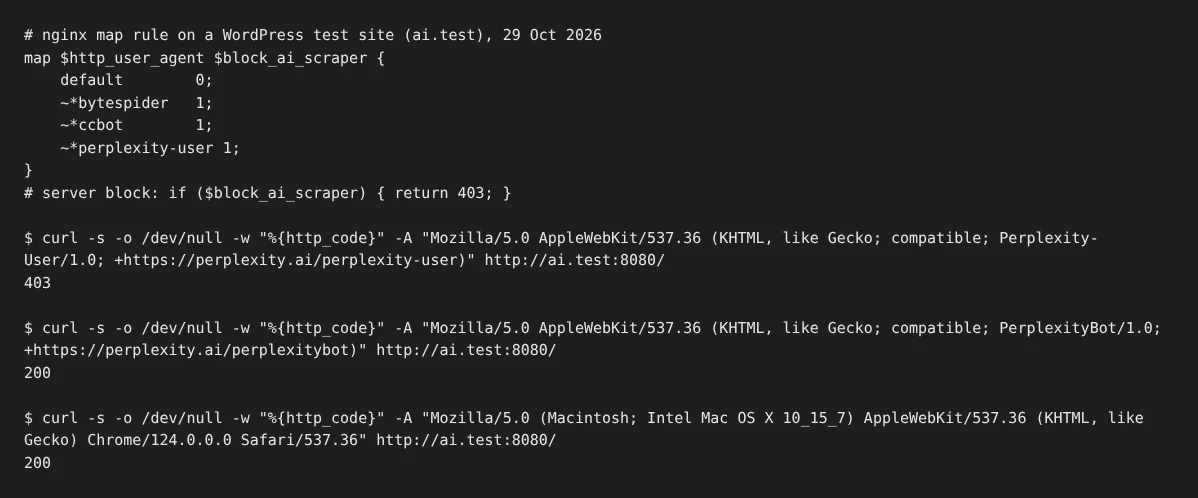
The third request shows the limit: a Chrome-on-macOS user agent got straight through, and that’s the disguise Cloudflare described. A user-agent rule only stops traffic that admits to being Perplexity-User.
On Apache, the same idea is a few .htaccess lines, shown in our guide to blocking Bytespider. Behind Cloudflare, you can match the user agent and Perplexity’s IP ranges together, as our Cloudflare AI bot guide explains.
Perplexity on a real WordPress site
On tlinky.com, a link-tools site we run on WordPress, Perplexity’s names turned up 14 times as fakes in roughly a week ending 28 October 2026. Our plugin filtered 9 fake Perplexity-User requests and 5 fake PerplexityBot ones, sent from addresses Perplexity doesn’t own.
Real Perplexity traffic didn’t make the first page of the crawler table, which shows 10 of its 14 rows, so we can’t give a verified count. Perplexity sent no visitors that week either: the assistants that did were ChatGPT (29), Claude (5) and Gemini (1).
Check a Perplexity request against its IP lists
Perplexity publishes one IP list per bot, and it recommends checking both the user agent and the IP address. A web application firewall (WAF) is a layer of rules in front of a site, and Perplexity’s advice for one is to let a request in only when both match.
The ranges change regularly, so download the JSON files fresh. Our plugin’s AI Analytics checks requests against Perplexity’s lists and leaves out fakes (our documentation), which is how the 14 on tlinky.com were caught. To script it yourself, our crawler IP verification guide has Python and PHP scripts that work with any published list.
Choosing your Perplexity settings
Keep PerplexityBot if you want to appear in Perplexity’s answers, treat Perplexity-User as a separate choice, and judge both by IP, not name. Our guide on whether to block AI bots weighs the wider question, and the AI crawler guide for WordPress covers other companies.
Frequently Asked Questions
Does Perplexity use my content to train AI models?
Not through these two bots, according to Perplexity. Its crawler page says neither one is used to crawl content for AI foundation models, and it lists no training crawler at all.
How long until Perplexity notices a robots.txt change?
Up to 24 hours, Perplexity says. Open your live robots.txt once saved, and allow the bot a day to follow it. The change won’t reach Perplexity-User, which generally ignores robots.txt, so that one needs a server rule.
Why does PerplexityBot show up in my logs when Perplexity sends no visitors?
Crawling and sending visitors are separate. Cloudflare’s crawl-to-referral ratio counts crawls per visit sent back, and Perplexity’s rose from 54.6 in January 2025 to 194.8 by July. Some may be fakes, like the 14 our plugin filtered on tlinky.com in about a week.
How we tested
- Lab, 29 October 2026: Protego 0.7.0 read the PerplexityBot group, a stand-in for a standard parser rather than Perplexity’s crawler; the nginx rule was tried with three user agents on WordPress 7.1.3 and nginx 1.24.0.
- Site data: Skyboot AI Markdown on tlinky.com, version 3.0.0, about a week to 28 October. Perplexity’s and Cloudflare’s claims are their own.