
Skyboot AI Markdown
Make Your WordPress Content AI-Readable
Turn your WordPress content into clean, structured Markdown that AI crawlers and AI-powered search systems can actually discover, understand, and process.
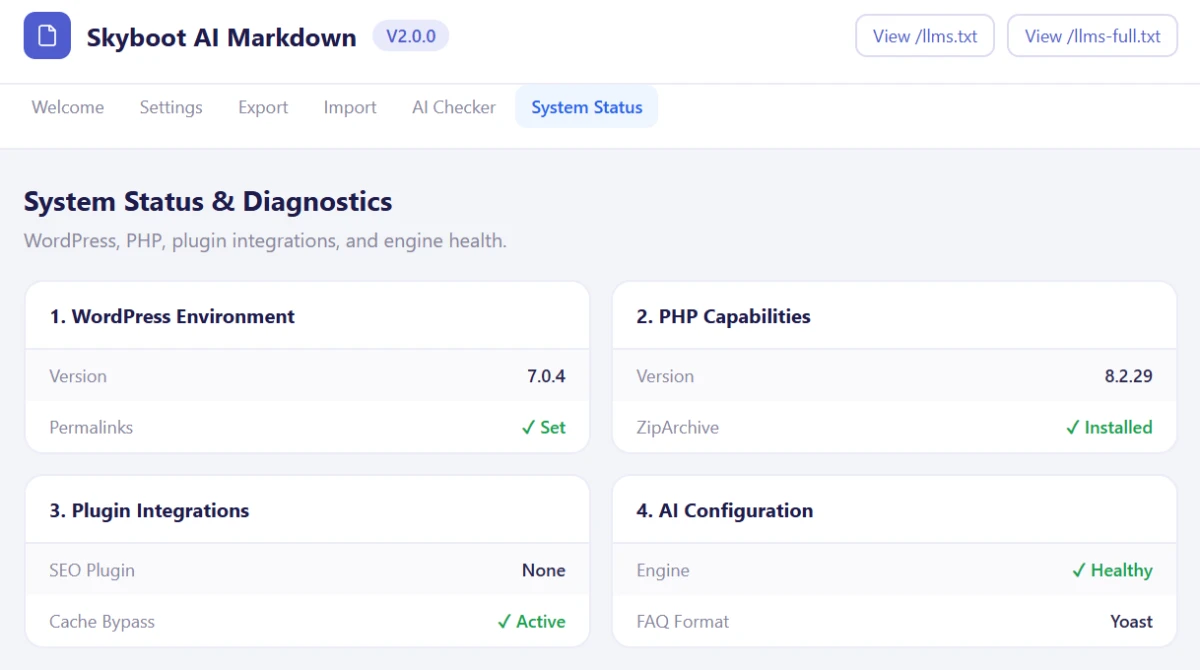
Everything Included
Automatic Markdown for Every Page
Posts, pages, custom post types, archives, author pages, search results, even your homepage, all converted without maintaining separate .md files by hand.
Pricing
Simple pricing, sized to how many sites you run
Billed yearly. Cancel anytime.
1 Website
Get started with one site
$49/yr
BEST VALUE
5 Websites
Built for freelancers and small agencies
$99/yr
Unlimited Websites
Every site you’ll ever build
$199/yr

Our Promise
Try it risk-free with our 100% money-back guarantee
We’re confident you’ll love it. Use it for a full 30 days, and if it’s not the right fit, tell us, and we’ll refund every cent. No forms, no fine print, no questions asked.
Full refund, no questions ● 30 full days to decide ● Cancel in one email

Shaddam Hossain
Founder, SkyBootstrap
Works With Your WordPress Stack
No conflicts, no rewrites – it fits the plugins, builders, and infrastructure you already run.
SEO
Yoast, Rank Math, AIOSEO, SEOPress
Page Builders
Gutenberg, Elementor
Caching / CDN
LiteSpeed, Apache, Nginx, FastCGI, Cloudflare
AI Ecosystem
GPTBot, ClaudeBot, PerplexityBot, Google-Extended, Applebot-Extended
Full Feature List
A closer look at what’s included in every license.
| Feature | Included |
|---|---|
| Automatic Markdown for every page | ✓ |
| Content negotiation (Accept: text/markdown) | ✓ |
| .md URLs for any page | ✓ |
| ?format=md query parameter | ✓ |
| llms.txt automatic generation | ✓ |
| llms-full.txt content catalog | ✓ |
| API discovery catalog | ✓ |
| HTTP Link headers | ✓ |
| YAML front matter | ✓ |
| Native Gutenberg Markdown importer | ✓ |
| SEO FAQ block conversion | ✓ |
| Automatic Gutenberg block recovery | ✓ |
| AI Markdown Checker | ✓ |
| Bulk Markdown export | ✓ |
| ZIP or combined export | ✓ |
| SEO metadata export & import | ✓ |
| Yoast, Rank Math, AIOSEO & SEOPress support | ✓ |
| Gutenberg & Elementor compatible | ✓ |
| Cache/CDN bypass guidance | ✓ |
| Custom database tables (built for speed) | ✓ |
| Zero frontend impact | ✓ |
Features
A closer look at what’s included in every license.
Automatic Markdown
Every page, post, and custom post type converts to clean Markdown automatically, no separate .md files to maintain by hand.
AI Discovery
Exposes llms.txt, llms-full.txt, and an API discovery catalog automatically, so AI systems can find your content on their own.
Flexible Access
Content negotiation, .md URLs, or a query parameter, whichever method an AI client uses to ask for Markdown, it gets a clean response back.
Gutenberg Importer
Markdown converts into real, native Gutenberg blocks, headings, tables, lists, and more, not a wall of raw HTML dumped into one block.
FAQ Conversion
arkdown Q&A sections convert directly into Yoast, Rank Math, or AIOSEO’s native FAQ blocks, so your SEO plugin sees them properly.
AI Markdown Checker
Test any URL and see exactly what an AI crawler receives, HTTP status, headers, and the raw Markdown output itself.
Bulk Export
Export a handful of posts, or your entire site, filtered by status, category, or date, as a ZIP of files or one combined document.
Cache & CDN Bypass
Ready-made configuration for Apache, LiteSpeed, Nginx, and Cloudflare, so caching never serves stale HTML to an AI bot expecting Markdown.
From WordPress to AI-Ready,
Step by Step
Every part of the pipeline, mapping your content, converting it, testing it, and moving it safely, shown in detail.
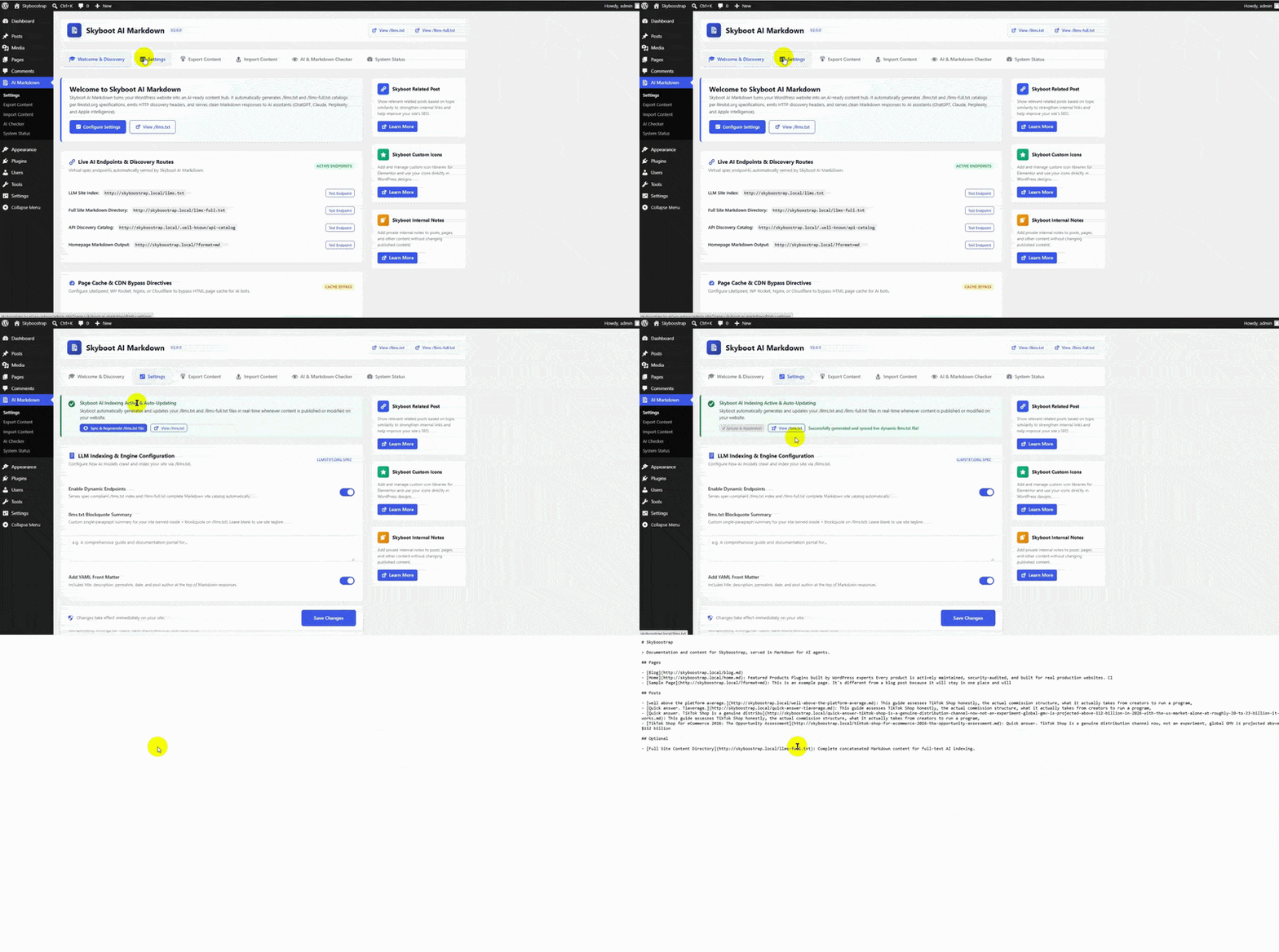
Automatic /llms.txt
Give AI systems a clear, machine-readable map of your WordPress site.
Every published page, post, and custom post type gets added automatically. Change something, and the map updates.
No manual file to touch, ever.
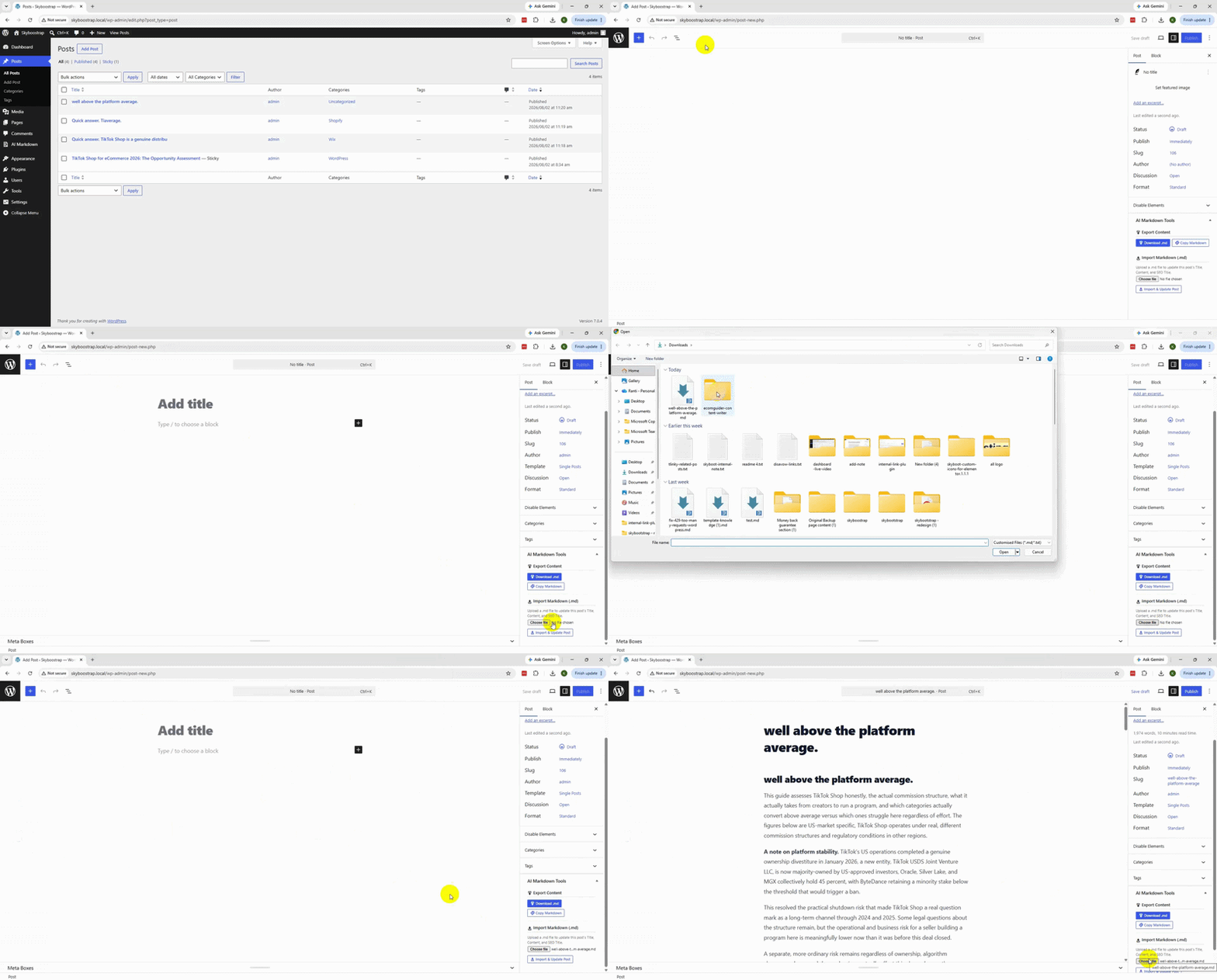
Import a File. Update the Post.
Upload a .md file from the post editor, and it updates the Title, Content, and SEO Title automatically.
No reformatting. No copying paragraph by paragraph into the editor by hand.
Export works the same way in reverse, download the post as a .md file, or copy it straight to your clipboard.
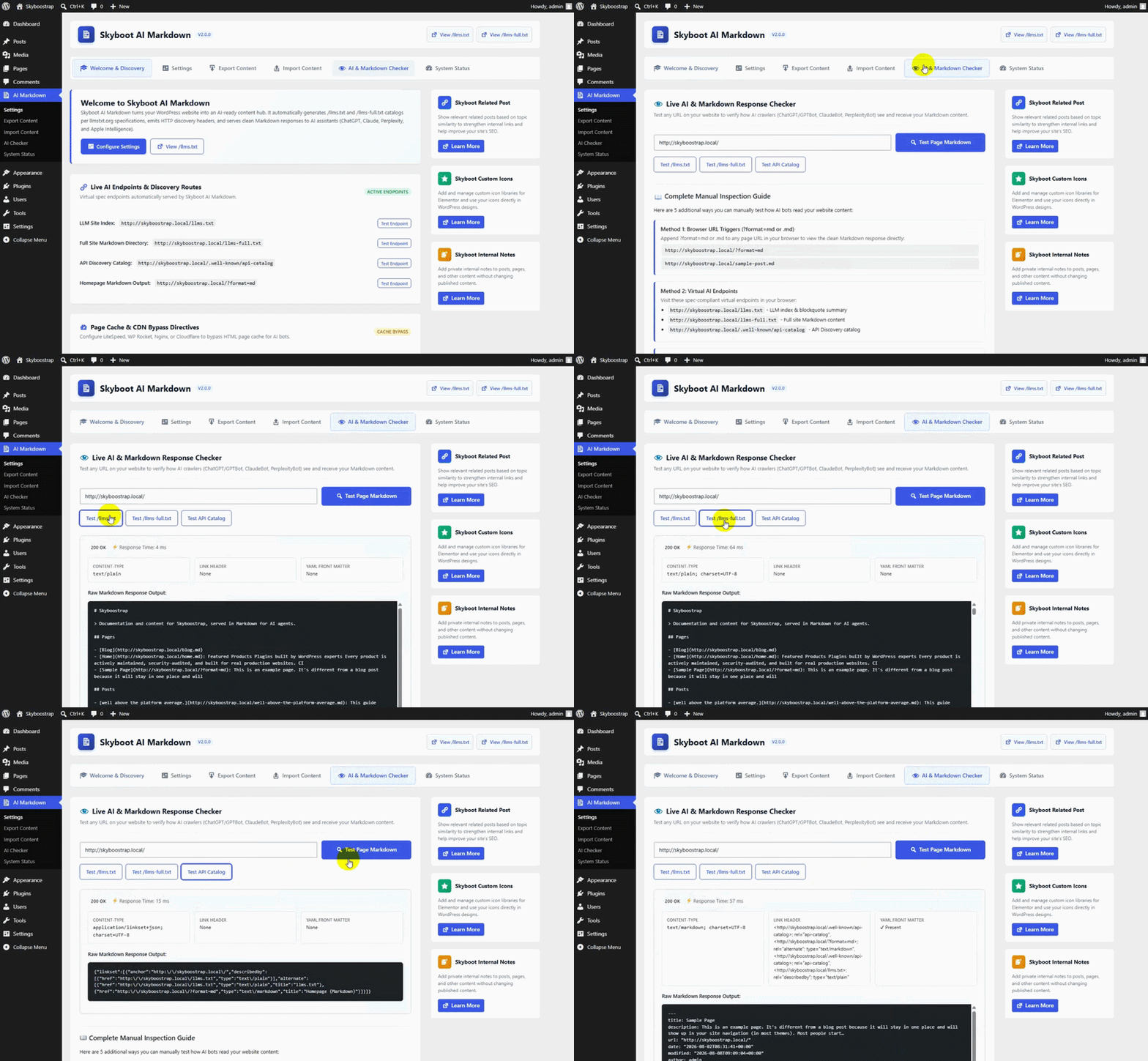
Test Your Markdown. See Every Detail.
Don’t guess whether your Markdown works. Check it.
Enter a URL and see exactly what an AI crawler gets back. HTTP status, response time, headers, front matter, the raw output itself.
If something’s broken, you’ll see it here first, not after a customer tells you.
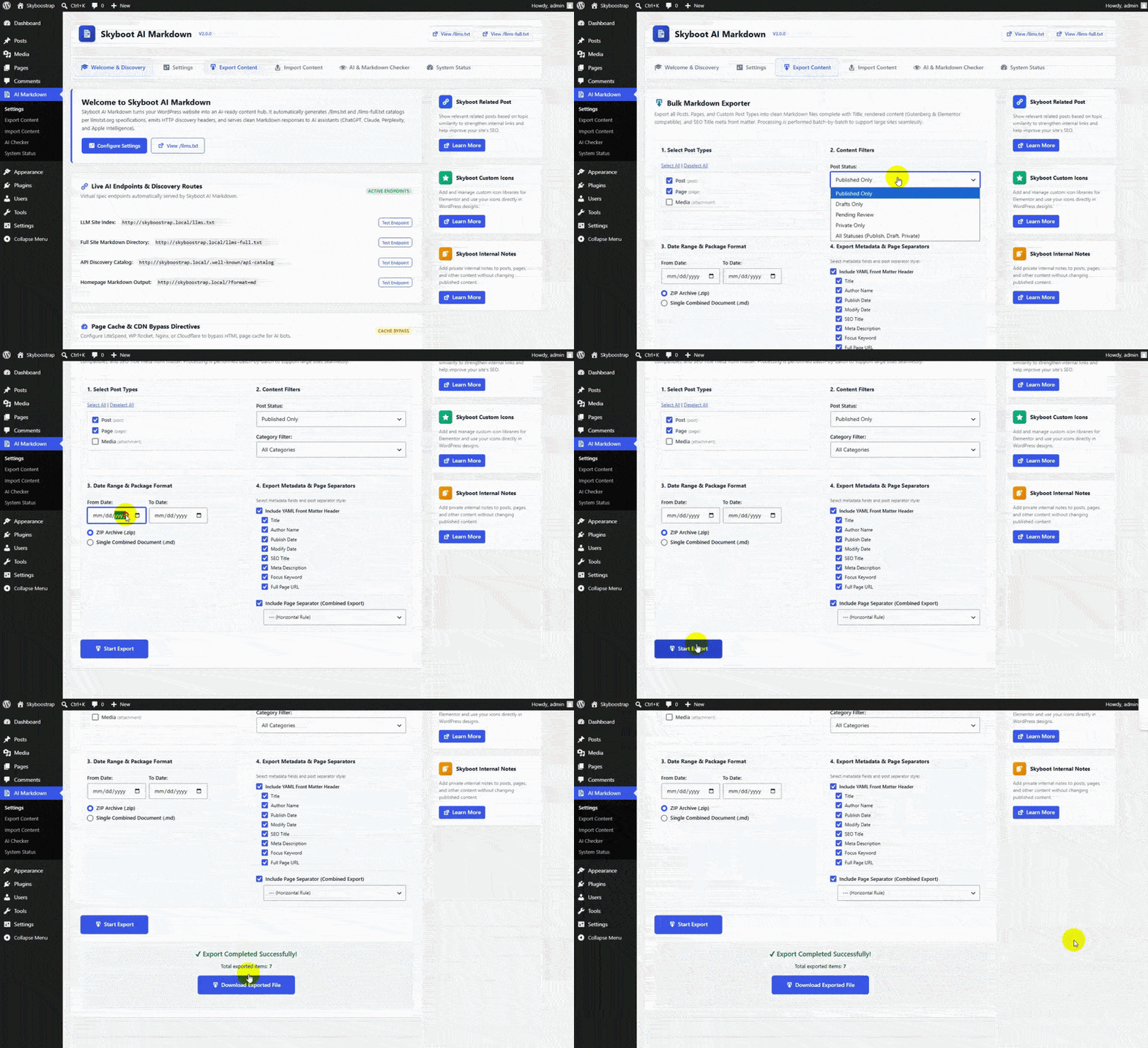
Choose What to Export, All at Once
Pick your post types, Posts, Pages, Media, or everything with one click of Select All.
Filter by type, status, category, or date, then choose individual files or one combined document.
Larger libraries process in batches, so a big export doesn’t stall or time out.
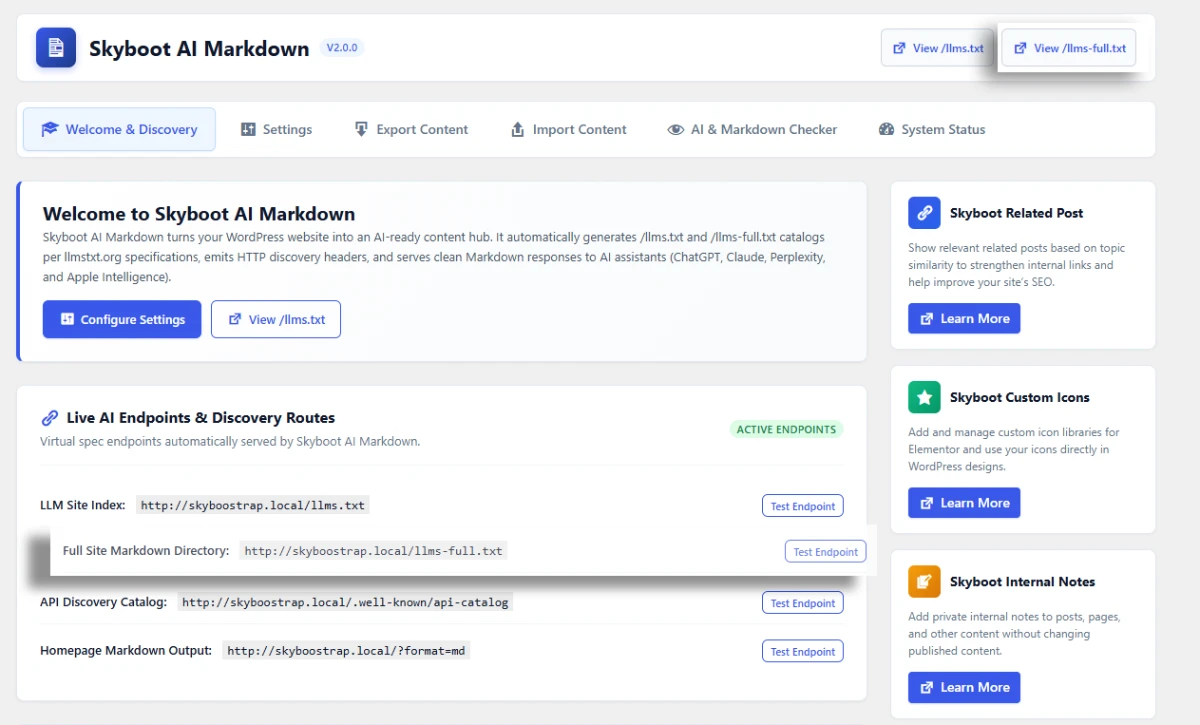
Give AI More Than a Site Map
An index tells AI systems what exists. This gives them something to actually read.
Your site’s map and your Markdown content, combined into one resource.
More for AI systems to work with, without asking them to piece it together page by page.
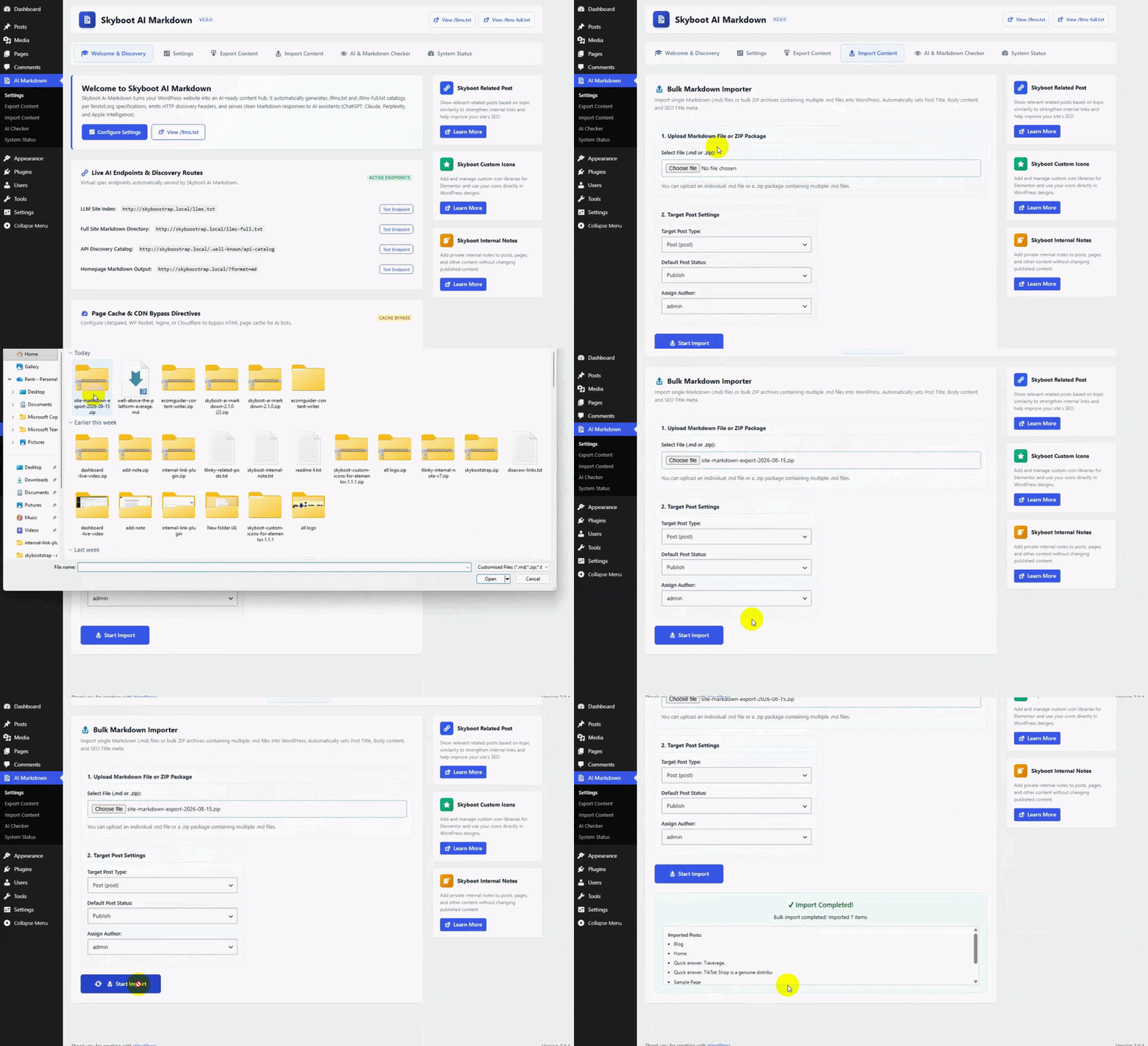
Bulk Import, Not Just One File
Upload a single .md file, or a .zip full of them, and bring in everything at once.
Choose the target post type, the default status (published, draft, pending, or private), and which author to assign, then import.
Built for migrating content in, not just moving one post at a time..
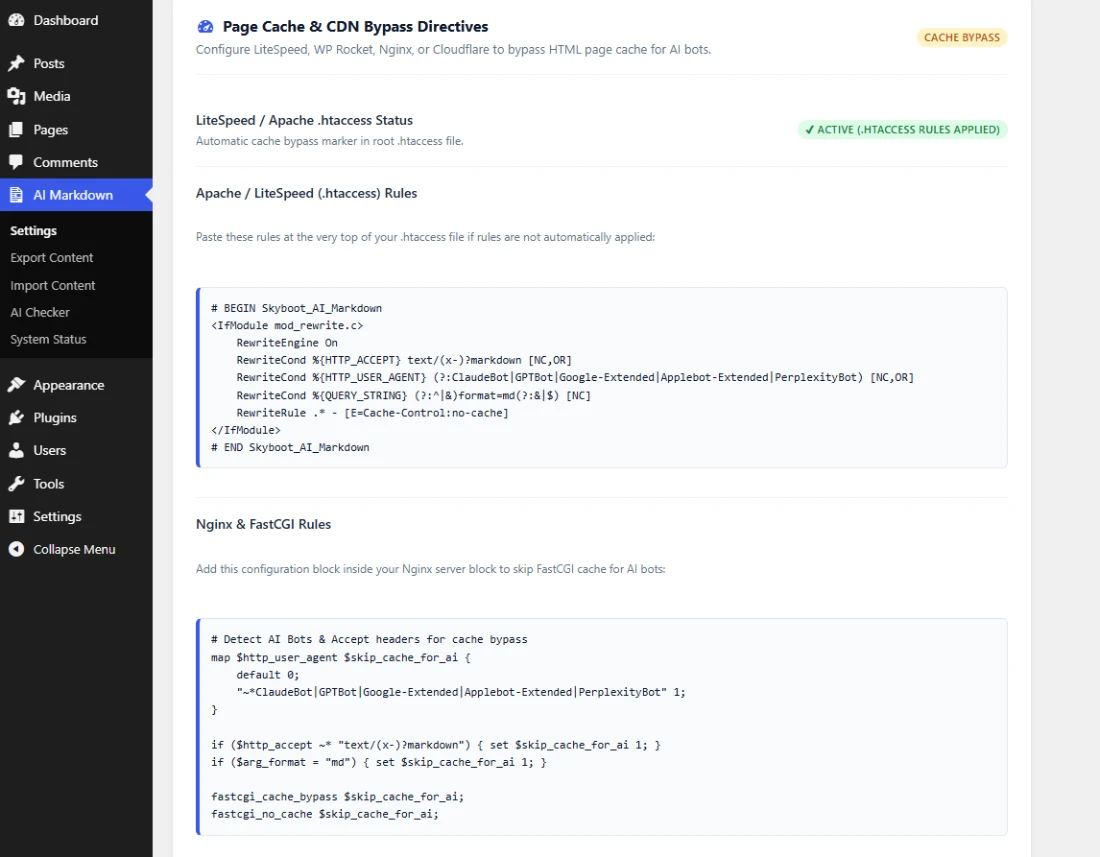
Make AI Requests Cache-Aware
A cache can’t tell an AI bot from a browser. That’s the problem.
It serves the same cached HTML to both, even when the bot asked for Markdown.
Ready-made bypass rules for Apache, LiteSpeed, Nginx, and Cloudflare fix that.
AI requests reach the actual Markdown, not a stale page.
How It Works
From install to verified, four steps, nothing left to guesswork.
01 – Install
Install Skyboot AI Markdown on your WordPress site.
02 – Configure
Choose your Markdown, SEO, caching, and import/export preferences.
03 – Publish & Discover
Your content becomes AI-readable the moment it’s published, discoverable automatically.
04 – Verify
Use the built-in AI Markdown Checker to see exactly what a crawler receives, no guessing.
Give AI Systems a Clean Path to Your Content
Stop serving bloated HTML to agents that just want your content. Give them structured Markdown instead,
automatically, verifiably.
Common Questions
How do I import Markdown files into WordPress?
Import single .md files directly inside any Post or Page edit screen, or bulk-import .md files and .zip packages from the Import Content screen.
Which SEO plugins are supported?
Yoast SEO, Rank Math, AIOSEO, and SEOPress, for both metadata and FAQ block conversion. Select your active plugin from Settings.
Does this plugin help with broken Gutenberg blocks?
Yes. Enable automatic block recovery under Settings, and the plugin repairs invalid blocks when the editor loads, regardless of how they got broken.
Why does my homepage serve HTML instead of Markdown to AI agents?
Usually a caching layer (host, CDN, or plugin) is serving cached HTML regardless of the request. Append ?format=md to the URL, or exclude that parameter from your page cache. The plugin also provides ready-made bypass configuration for Apache, LiteSpeed, Nginx, and Cloudflare.
Does this guarantee my content gets cited by ChatGPT or shows up in AI search results?
No, and we won’t claim that. What this plugin does is make your content genuinely discoverable and readable by AI systems, clean Markdown, proper discovery endpoints, verifiable responses. Whether a given AI platform crawls, indexes, or cites your content is entirely up to that platform.
How does site-count licensing work?
Every tier includes the full feature set, the difference is how many websites you can activate it on, plus support level. You can move to a different tier at your next renewal.
What’s the difference between /llms.txt and /llms-full.txt?
/llms.txt is an index, a map of your pages, posts, and custom post types with short descriptions. /llms-full.txt goes further and includes the actual Markdown content alongside that index, giving AI systems more to work with than just a list of links.
Do I need Elementor to use this plugin?
No. The plugin works on any WordPress site regardless of page builder. If you do use Elementor, it can also export the rendered frontend output of Elementor-built pages, converting that into Markdown as well.
What happens to my data if I uninstall the plugin?
By default, deactivating or deleting the plugin leaves your settings and any generated files in place. If you want everything removed cleanly, options, cached files, and rewrite rules, enable “Remove Data on Uninstall” in Settings before deleting it.
What are the requirements to run this plugin?
WordPress 5.8 or later, and PHP 7.2 or later. Two PHP extensions matter for full functionality: DOMDocument for accurate HTML-to-Markdown conversion, and ZipArchive for ZIP export and import. Most standard hosting includes both by default.