
Skyboot Internal Note
Give your editorial team a private workspace inside WordPress.
Leave notes on any post or page – admin only, never shown to visitors.
Everything Included
Every module, one purchase
Everything below ships in the box the moment you buy – no free tier, no separate add-ons to chase down.
Pricing
Simple pricing, sized to how many sites you run
Billed yearly. Cancel anytime.
1 Website
Get started with one site
$49/yr
BEST VALUE
5 Websites
Built for freelancers and small agencies
$99/yr
Unlimited Websites
Every site you’ll ever build
$199/yr
Our Promise
Try it risk-free with our 100% money-back guarantee
We’re confident you’ll love it. Use it for a full 30 days, and if it’s not the right fit, tell us, and we’ll refund every cent. No forms, no fine print, no questions asked.
Full refund, no questions ● 30 full days to decide ● Cancel in one email

Shaddam Hossain
Founder, SkyBootstrap
Everything Included
Every license includes the full feature set below – nothing is held back by tier.
| Feature | Included |
|---|---|
| Inline note-taking in the post editor | ✓ |
| Note statuses & priorities | ✓ |
| Assign notes & set due dates | ✓ |
| Special Notes (pinned, permanent) | ✓ |
| Note history | ✓ |
| Dashboard with live stat cards | ✓ |
| Resolution progress tracking | ✓ |
| WordPress dashboard widget | ✓ |
| All Notes screen | ✓ |
| Bulk actions | ✓ |
| CSV export & import | ✓ |
| Reports & analytics | ✓ |
| My Workspace (private notes) | ✓ |
| Frontend admin bar integration | ✓ |
| Role & capability permissions | ✓ |
| WooCommerce & custom role support | ✓ |
| Administrator safety lock | ✓ |
| Toggleable modules | ✓ |
| Data-safe module toggling | ✓ |
| Custom database tables (built for speed) | ✓ |
| Zero frontend impact | ✓ |
Full Feature List
A closer look at what’s included in every license.
Inline Note-Taking
Leave feedback directly inside the post editor sidebar, with statuses, priorities, assignees, and due dates on every note.
Site-wide Dashboard
See open, overdue, and high-priority notes the moment you log in, plus a native widget on your main WordPress dashboard.
All Notes Screen
Search, filter, and bulk-manage every note across your entire site from one screen, with one-click CSV export and imports.
My Workspace
Keep a private sticky-note scratchpad just for you, locked to your own account so not even other admins can ever see it.
Frontend Admin Bar
Check unresolved notes for any page while browsing your own live site, then jump straight into the editor with a click.
Role Permissions
Control exactly who can view, add, edit, delete, or assign notes, down to each individual role and every single member.
Toggleable Modules
Turn off any feature you don’t need and its code stops loading completely, keeping your entire site fast and lightweight.
Zero Frontend Impact
No hooks, queries, or scripts are ever loaded for your public visitors, so your site’s page speed always stays unaffected.
Built for How Editorial Teams Actually Work
No shortcodes, no separate app, no learning curve. Just WordPress, with the
workflow you’re missing.
Inline Notes
Leave feedback right where the work happens, without ever opening a second app.

Write a note directly in the post editor, set its status and priority, assign it to a teammate, and give it a due date, all without leaving the page you’re reviewing.
Pin the ones that matter most as Special Notes so they stay at the top until the job’s done.
Live Dashboard
Open WordPress and know instantly what needs attention.
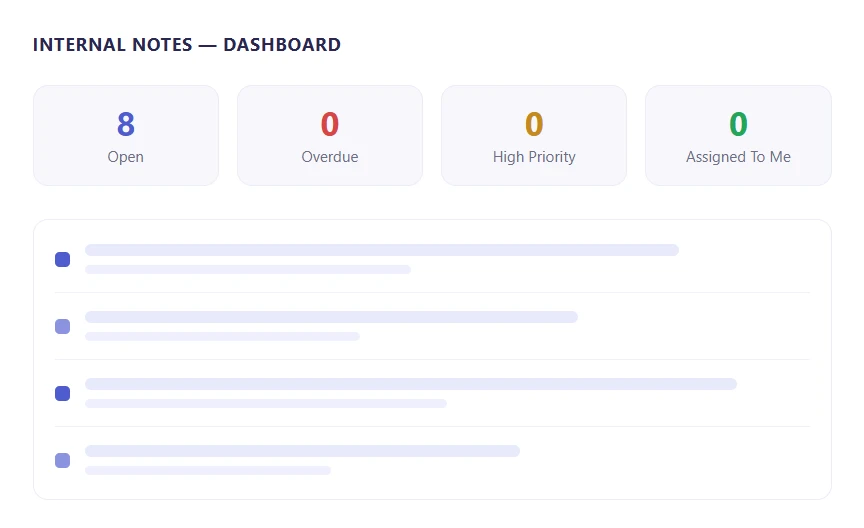

Every open, overdue, and high-priority note is counted the moment you log in. A resolution progress bar shows how the whole site is doing.
Scroll down for your latest notes, recently resolved items, and upcoming due dates.
Everything else is one tab away too. My Workspace, All Notes, Reports, Settings, Modules, and Permissions all sit right there on the same screen. Nothing slips through, and nothing is ever more than a click away.
My Workspace
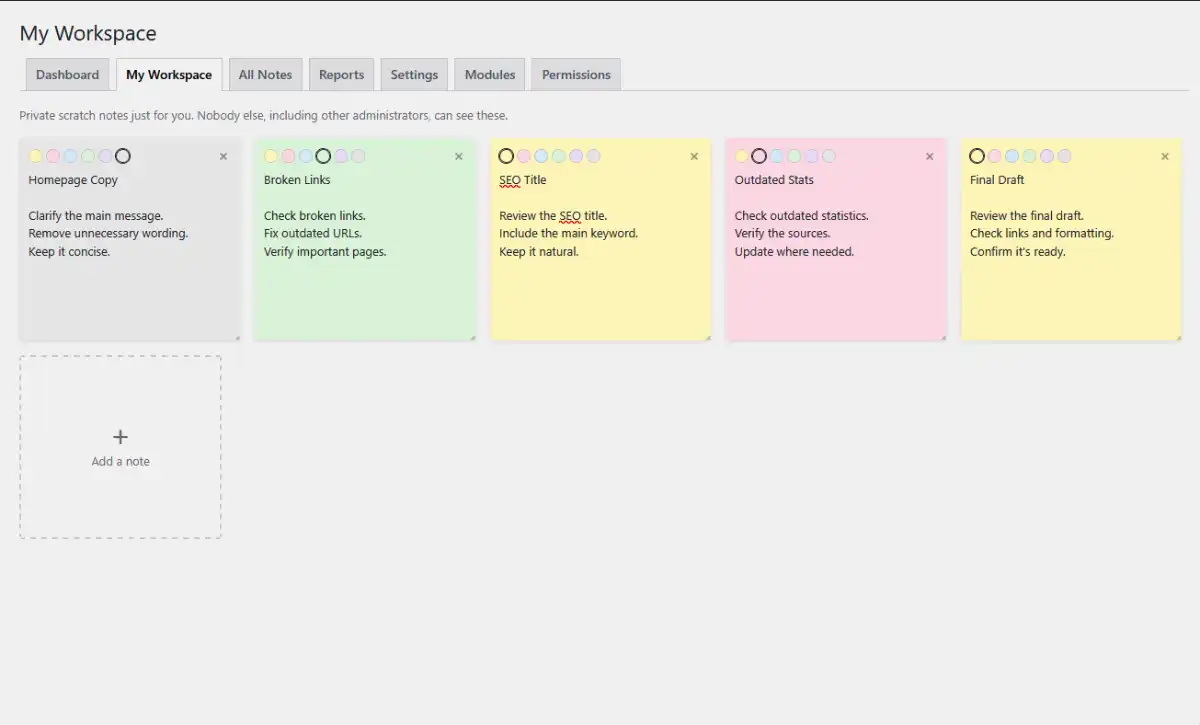
This is your own private scratchpad. Nobody else can see it, not even other administrators.
Jot down anything. Final Draft. Outdated Stats. Broken Links. Whatever’s on your mind right now.
Pick a color for each note. Keep them loose, or turn them into real tasks later.
Adding one takes a click. There’s always an empty card waiting for your next thought.
All Notes
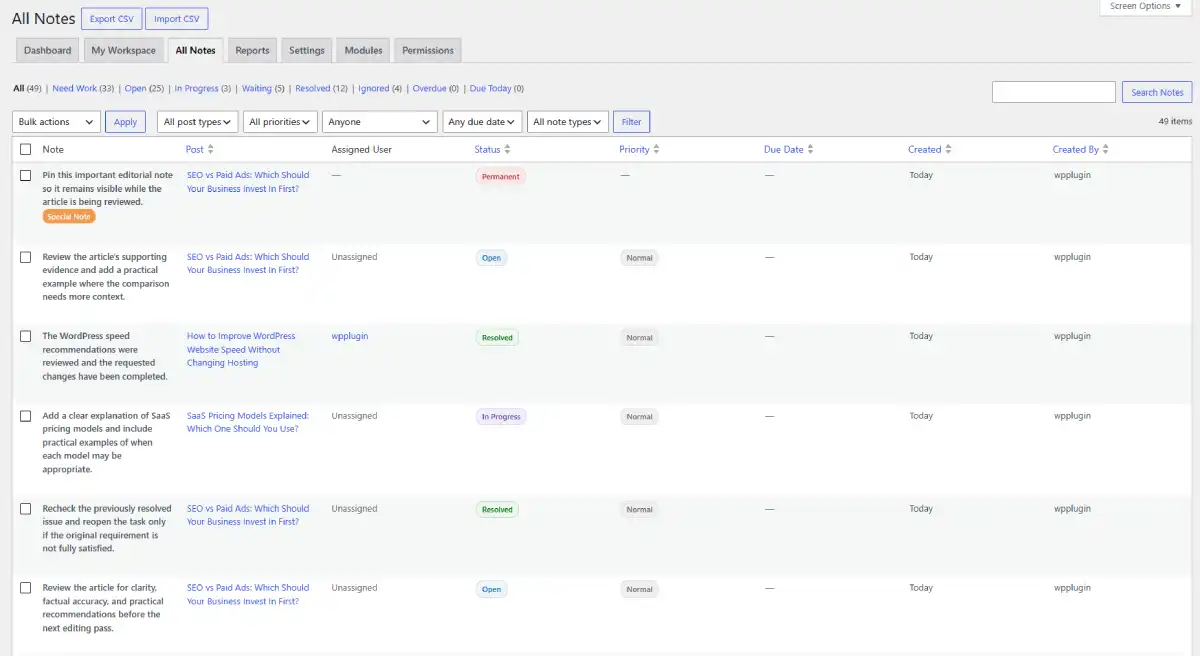
Every note on your site lives on one screen. No more digging through individual posts.
Filter by status, post type, priority, or who it’s assigned to. Search finds the rest.
Pinned notes stand out with a Special Note badge, so the important ones never get lost in the list.
Select a batch and resolve, reassign, or delete them together. Export the view to CSV whenever you need it elsewhere.
Quick Add
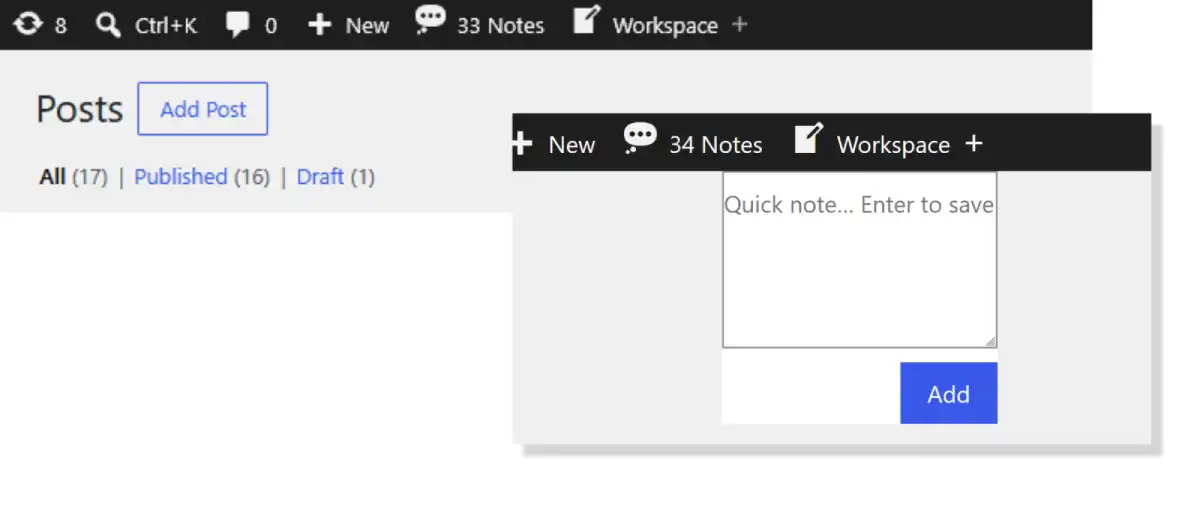
A thought doesn’t wait for the right screen. Neither should you.
Click Workspace in the admin bar, on any page in wp-admin. A small box opens right there.
Type your note. Hit Enter to save it.
That’s it. No new tab, no page reload, no losing your place.
Modules
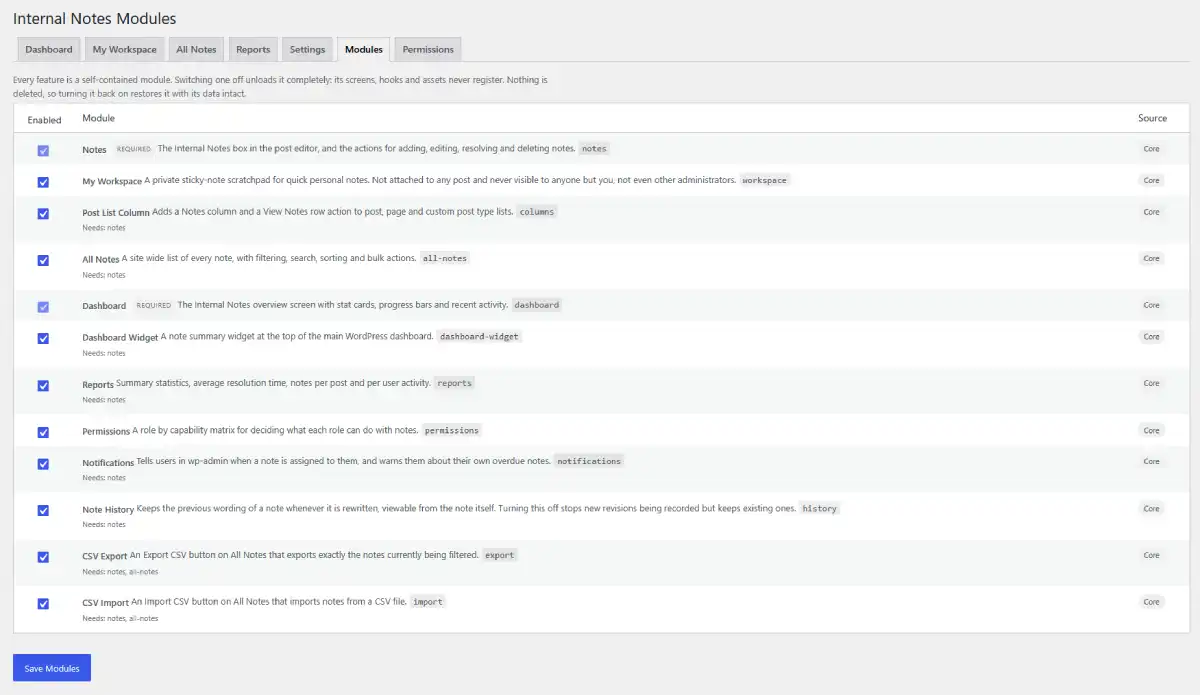
Every feature is its own switch. Turn off what you don’t use.
Flip one off and it’s gone completely. No hidden screens, no leftover code running in the background.
Turn it back on later and everything’s still there. Nothing gets deleted, ever.
Notes and Dashboard stay on, they’re the core. Everything else, from CSV export to notifications, is entirely up to you.
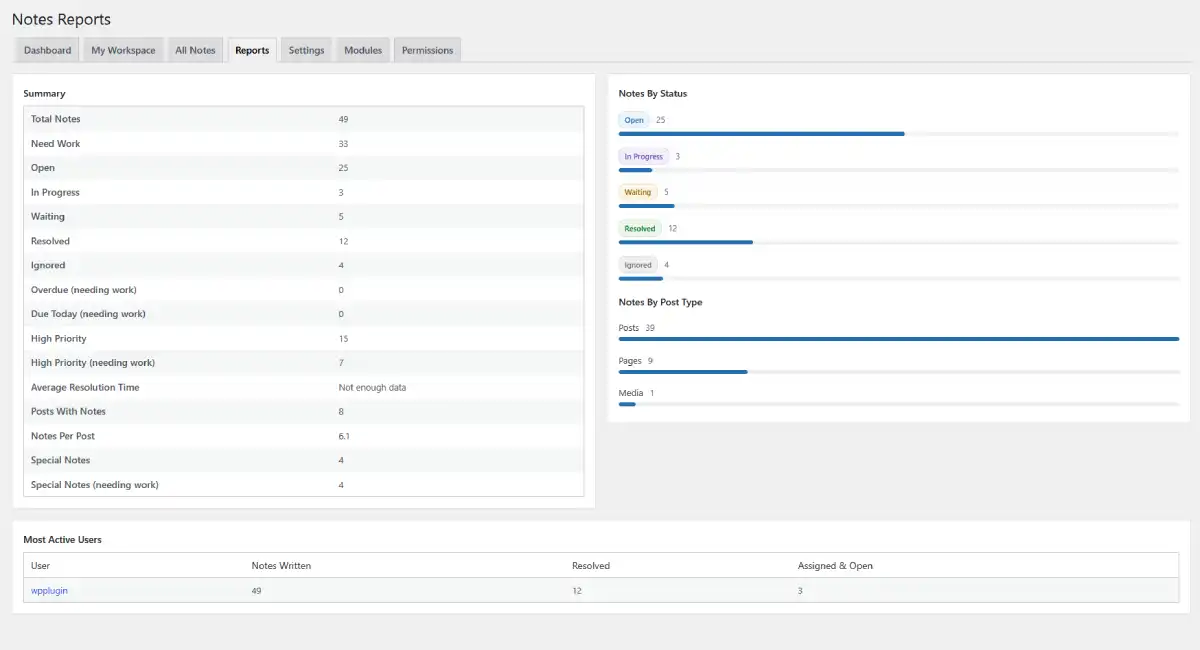
Reports
Numbers, not guesswork. See exactly where your editorial process stands.
Total notes, resolved, ignored, still needing work. It’s all broken down by status at a glance.
See which post types generate the most notes, and which teammates are writing and resolving the most.
Everything on this page updates live. No exporting to a spreadsheet just to see how the week went.
Give Your Team a Place for Editorial Feedback
That Actually Sticks
Stop losing notes in Slack threads and email chains. Keep every piece of feedback exactly where the work happens.
Common Questions
Does this plugin affect my site’s speed for public visitors?
No, not at all. Skyboot Internal Note registers no hooks, runs no database queries, and enqueues no assets for public visitors. Even when the frontend admin bar integration is enabled, every piece of code is gated behind a logged-in user check with the correct permissions.
Who can see and add notes?
By default, users with the manage_internal_notes capability can create and manage notes. This is granted automatically to Administrators and Editors. You can fully customize permissions per role at any time under Internal Notes → Permissions, including custom and store roles.
Can I restrict certain roles from deleting notes?
Yes. The Permissions screen gives you a capability matrix where you can independently control who can view, create, edit, assign, resolve, and delete notes for each user role.
Does assigning a note send an email notification?
No. To avoid notification fatigue, teammates are alerted using a clean, dismissible admin notice the next time they log in or visit any Internal Notes screen. No emails are sent, and no external services are contacted.
Are My Workspace notes private?
Yes, completely. Every workspace note is locked to your user ID at the database level. Other users, including Administrators, cannot view, search, or export your workspace notes.
Does this plugin work with custom post types?
Yes. You can enable Internal Notes for any registered public or private post type from Internal Notes → Settings.
What happens to notes when a post is deleted?
All notes and their full revision histories attached to that post are automatically deleted from the database when the post is removed. No orphaned data is left behind.
What happens to my data if I cancel my subscription?
Your notes, settings, and history stay intact. You’ll stop receiving plugin updates and support once your license lapses, but nothing already stored in your database is touched.
Can I permanently delete all plugin data?
Yes. Enable the “Delete all notes and settings when the plugin is deleted” option in Internal Notes → Settings, then delete the plugin from the Plugins screen. All custom tables, options, capabilities, and user meta are removed cleanly.
Is this plugin compatible with the Block Editor (Gutenberg)?
Yes. The note meta box appears in the post editor sidebar for both the Classic Editor and the Block Editor.